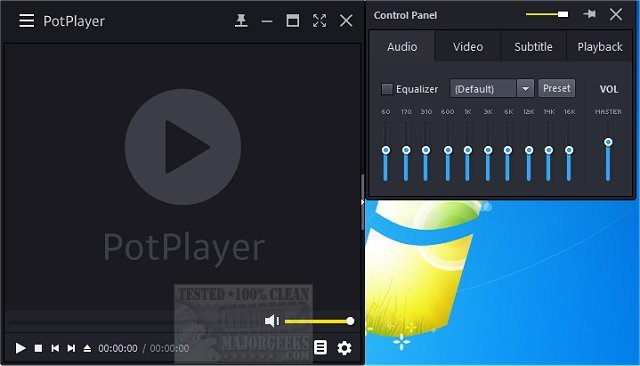
PotPlayer 1.7.22859 has been released, showcasing itself as a versatile media player that supports a wide array of video and audio formats, as well as TV channels, subtitles, and customizable skins. A portable version of the software is also available for users who prefer a more flexible option.
If you're in search of a media player that can handle all types of media files seamlessly, PotPlayer is a standout choice. This lightweight yet powerful application ensures smooth playback for movies, music, and high-resolution videos without straining your system's resources. It is particularly appealing for users who prioritize performance and customization.
PotPlayer is designed for users who seek high performance without compromising on ease of use. Here are some of its key features:
- Extensive Format Support: PotPlayer natively supports a myriad of formats, including MP4, MKV, AVI, FLV, MP3, FLAC, and many others, eliminating the need for additional codec installations.
- Optimized Performance with Hardware Acceleration: Utilizing technologies like DXVA, CUDA, and QuickSync, PotPlayer offers seamless video playback, even on older systems, ensuring low CPU usage and preventing choppy video experiences.
- Comprehensive Subtitle Support: With compatibility for various subtitle formats such as SRT, ASS, SSA, and Blu-ray subtitles, PotPlayer allows users to customize subtitle size, position, and timing for an enhanced viewing experience.
- Customizable Playback Controls: Users can easily adjust playback speed, fine-tune audio settings with equalizers, apply video filters, and manage multiple sound cards, all without navigating complex menus.
- Efficient Playlist Management: PotPlayer remembers the last 200 files played, allowing users to resume watching right where they left off, which is perfect for binge-watching sessions.
- Support for 3D and 360-Degree Videos: PotPlayer goes beyond standard formats by offering support for 3D playback and interactive 360-degree videos, creating an immersive viewing experience.
- Screen Capture and Bookmarking Features: Users can take screenshots or record video segments, as well as bookmark favorite scenes for easy access later.
- Minimal System Impact: PotPlayer is designed to be lightweight and efficient, making it suitable for everyday use across various hardware configurations.
PotPlayer has earned a reputation as one of the best media players available, rivaling options like VLC and MPC-HC. With its outstanding format support, remarkable performance, and extensive customization features, it is highly recommended for anyone seeking a free, feature-rich, and user-friendly media player. Download PotPlayer today to enjoy a seamless and enhanced media playback experience.
For those interested in optimizing their media experience further, consider exploring:
- How to Enable Windows Sonic Surround Sound on Windows 10 & 11
- How to Rename Your Sound Input or Output Devices
- How to Change Sound Audio Balance in Windows 10 & 11
- How to Change Default Sound Output Device in Windows 10 & 11
These resources can help you enhance your audio and video settings to complement your PotPlayer experience
PotPlayer: The Ultimate Media Player
If you're in search of a media player that can handle all types of media files seamlessly, PotPlayer is a standout choice. This lightweight yet powerful application ensures smooth playback for movies, music, and high-resolution videos without straining your system's resources. It is particularly appealing for users who prioritize performance and customization.
Why PotPlayer Stands Out
PotPlayer is designed for users who seek high performance without compromising on ease of use. Here are some of its key features:
- Extensive Format Support: PotPlayer natively supports a myriad of formats, including MP4, MKV, AVI, FLV, MP3, FLAC, and many others, eliminating the need for additional codec installations.
- Optimized Performance with Hardware Acceleration: Utilizing technologies like DXVA, CUDA, and QuickSync, PotPlayer offers seamless video playback, even on older systems, ensuring low CPU usage and preventing choppy video experiences.
- Comprehensive Subtitle Support: With compatibility for various subtitle formats such as SRT, ASS, SSA, and Blu-ray subtitles, PotPlayer allows users to customize subtitle size, position, and timing for an enhanced viewing experience.
- Customizable Playback Controls: Users can easily adjust playback speed, fine-tune audio settings with equalizers, apply video filters, and manage multiple sound cards, all without navigating complex menus.
- Efficient Playlist Management: PotPlayer remembers the last 200 files played, allowing users to resume watching right where they left off, which is perfect for binge-watching sessions.
- Support for 3D and 360-Degree Videos: PotPlayer goes beyond standard formats by offering support for 3D playback and interactive 360-degree videos, creating an immersive viewing experience.
- Screen Capture and Bookmarking Features: Users can take screenshots or record video segments, as well as bookmark favorite scenes for easy access later.
- Minimal System Impact: PotPlayer is designed to be lightweight and efficient, making it suitable for everyday use across various hardware configurations.
Conclusion
PotPlayer has earned a reputation as one of the best media players available, rivaling options like VLC and MPC-HC. With its outstanding format support, remarkable performance, and extensive customization features, it is highly recommended for anyone seeking a free, feature-rich, and user-friendly media player. Download PotPlayer today to enjoy a seamless and enhanced media playback experience.
Additional Resources
For those interested in optimizing their media experience further, consider exploring:
- How to Enable Windows Sonic Surround Sound on Windows 10 & 11
- How to Rename Your Sound Input or Output Devices
- How to Change Sound Audio Balance in Windows 10 & 11
- How to Change Default Sound Output Device in Windows 10 & 11
These resources can help you enhance your audio and video settings to complement your PotPlayer experience
PotPlayer 1.7.22859 released
PotPlayer is a comprehensive video and audio player that also supports TV channels, subtitles, and skins. Portable version also available.