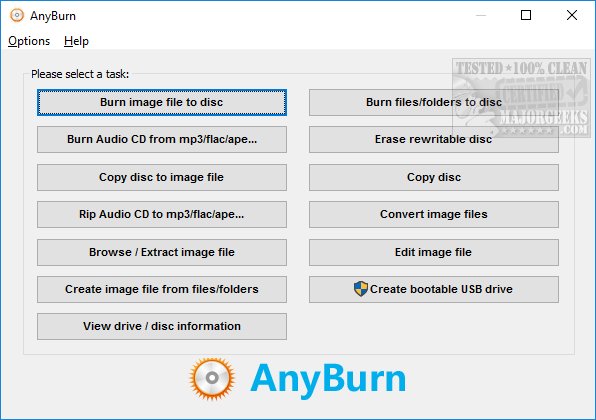
AnyBurn 6.8 has been released, continuing to provide users with a comprehensive and free solution for CD, DVD, and Blu-ray burning. This application allows users to create and burn disc images, rip and burn audio files, copy discs, and even create bootable Windows USB drives.
The user-friendly interface is designed with two side-by-side buttons, simplifying access to common tasks. For those who frequently work with image files, AnyBurn offers a wealth of features, enabling users to burn to disc, copy discs, browse or extract files, as well as create, convert, and edit various image formats. Audio enthusiasts can rip CDs into formats such as MP3, FLAC, APE, and WMA, and can also burn audio CDs that are compatible with standard CD and DVD players.
One notable aspect of AnyBurn is its robust error management options, which are crucial for ensuring successful burning processes. Users can access a variety of additional settings tailored to their specific tasks—such as verifying data, finalizing discs, and adjusting burning speeds. When dealing with image files, options like file system selection, ISO9660 names, Joliet names, and file optimization are available.
Furthermore, AnyBurn supports multiple languages (13 or more), allowing for a customizable user experience. Configuration options extend to preferences such as buffer size, disc ejection upon completion, and drag-and-drop actions.
Overall, AnyBurn stands out as a lightweight, easy-to-use application that is packed with features, making it an excellent choice for users seeking reliable and versatile burning software.
In future updates, users can look forward to potential enhancements, such as improved compatibility with newer disc formats, additional audio and video format support, and possibly cloud integration for easier access to stored files. Additionally, a more streamlined user interface could further simplify the burning process, catering to both novice and experienced users alike
The user-friendly interface is designed with two side-by-side buttons, simplifying access to common tasks. For those who frequently work with image files, AnyBurn offers a wealth of features, enabling users to burn to disc, copy discs, browse or extract files, as well as create, convert, and edit various image formats. Audio enthusiasts can rip CDs into formats such as MP3, FLAC, APE, and WMA, and can also burn audio CDs that are compatible with standard CD and DVD players.
One notable aspect of AnyBurn is its robust error management options, which are crucial for ensuring successful burning processes. Users can access a variety of additional settings tailored to their specific tasks—such as verifying data, finalizing discs, and adjusting burning speeds. When dealing with image files, options like file system selection, ISO9660 names, Joliet names, and file optimization are available.
Furthermore, AnyBurn supports multiple languages (13 or more), allowing for a customizable user experience. Configuration options extend to preferences such as buffer size, disc ejection upon completion, and drag-and-drop actions.
Overall, AnyBurn stands out as a lightweight, easy-to-use application that is packed with features, making it an excellent choice for users seeking reliable and versatile burning software.
In future updates, users can look forward to potential enhancements, such as improved compatibility with newer disc formats, additional audio and video format support, and possibly cloud integration for easier access to stored files. Additionally, a more streamlined user interface could further simplify the burning process, catering to both novice and experienced users alike
AnyBurn 6.8 released
AnyBurn is a free CD, DVD, and Blu-ray burning app that can create and burn images, rip and burn audio, copy discs, create a bootable Windows USB, and more.