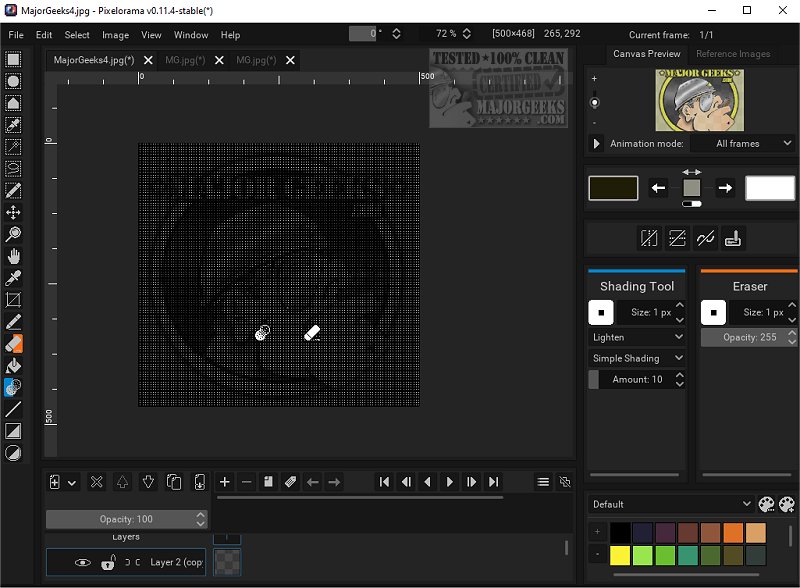
Pixelorama is an Open Source art tool dedicated to the creation of pixel art, catering to both novice and experienced artists alike. Its latest version, 1.2.2, enhances its accessibility and versatility, making it an excellent choice for graphic design and artistry. Users can opt for a portable version, making it easy to work on projects from different locations.
Comprehensive Tools for All Artists
Pixelorama is equipped with a robust suite of tools designed for an efficient user experience. Artists can customize their workflows by mapping tools to the left and right mouse buttons with just a click. The software's animation capabilities include a timeline with layers and frames, along with onion skinning and frame tags. A unique feature allows users to draw while their animations play back, streamlining the animation process and fostering creativity.
Perfecting Pixel Art with Precision
One of the standout features is the pixel-perfect mode, which ensures that artists can create precise pixel lines. Pixelorama offers a variety of pre-made color palettes and the ability to import additional ones, providing a wide color spectrum. Additionally, it includes multiple image manipulation effects to enhance artwork quality. Specific algorithms tailored for pixel art creation, such as cleanEdge, OmniScale, and rotxel, improve the quality of the visuals. The inclusion of 3D layers allows artists to integrate three-dimensional shapes into their 2D designs, expanding their creative horizons.
Customizable User Interface
The interface of Pixelorama is highly customizable, enabling users to tailor their experience according to personal preferences and workflow needs. Export options are versatile, allowing creations to be saved in various formats like PNG, GIFs, and animated PNGs. Moreover, users can import sprite sheets and multiple images as separate frames, facilitating easier integration of external assets into projects.
Guides and Autosave Features
Pixelorama offers a flexible drawing canvas equipped with guides, including a rectangular grid, an isometric grid, and tile mode to enhance the design process. An autosave feature ensures that users’ work is continuously saved, providing data recovery options in case of unexpected software crashes.
Conclusion: Unleash Your Creativity
With its extensive range of tools and features, Pixelorama empowers artists to create stunning sprites, intricate tiles, and captivating animations. The only limit is one’s imagination, enabling users to bring their creative visions to life effortlessly. For those who prefer portable software, the portable version is readily available for download, making Pixelorama a versatile choice for pixel art enthusiasts everywhere.
As Pixelorama continues to evolve, future updates may introduce even more features and enhancements, solidifying its position as a leading tool for pixel art creation
Comprehensive Tools for All Artists
Pixelorama is equipped with a robust suite of tools designed for an efficient user experience. Artists can customize their workflows by mapping tools to the left and right mouse buttons with just a click. The software's animation capabilities include a timeline with layers and frames, along with onion skinning and frame tags. A unique feature allows users to draw while their animations play back, streamlining the animation process and fostering creativity.
Perfecting Pixel Art with Precision
One of the standout features is the pixel-perfect mode, which ensures that artists can create precise pixel lines. Pixelorama offers a variety of pre-made color palettes and the ability to import additional ones, providing a wide color spectrum. Additionally, it includes multiple image manipulation effects to enhance artwork quality. Specific algorithms tailored for pixel art creation, such as cleanEdge, OmniScale, and rotxel, improve the quality of the visuals. The inclusion of 3D layers allows artists to integrate three-dimensional shapes into their 2D designs, expanding their creative horizons.
Customizable User Interface
The interface of Pixelorama is highly customizable, enabling users to tailor their experience according to personal preferences and workflow needs. Export options are versatile, allowing creations to be saved in various formats like PNG, GIFs, and animated PNGs. Moreover, users can import sprite sheets and multiple images as separate frames, facilitating easier integration of external assets into projects.
Guides and Autosave Features
Pixelorama offers a flexible drawing canvas equipped with guides, including a rectangular grid, an isometric grid, and tile mode to enhance the design process. An autosave feature ensures that users’ work is continuously saved, providing data recovery options in case of unexpected software crashes.
Conclusion: Unleash Your Creativity
With its extensive range of tools and features, Pixelorama empowers artists to create stunning sprites, intricate tiles, and captivating animations. The only limit is one’s imagination, enabling users to bring their creative visions to life effortlessly. For those who prefer portable software, the portable version is readily available for download, making Pixelorama a versatile choice for pixel art enthusiasts everywhere.
As Pixelorama continues to evolve, future updates may introduce even more features and enhancements, solidifying its position as a leading tool for pixel art creation
Pixelorama 1.2.2 released
Pixelorama is an Open Source art tool designed specifically for creating pixel art. It provides a comprehensive set of features perfect for both beginners and experienced artists, making it an accessible and versatile option for graphic design and artistry. We also have the portable version.