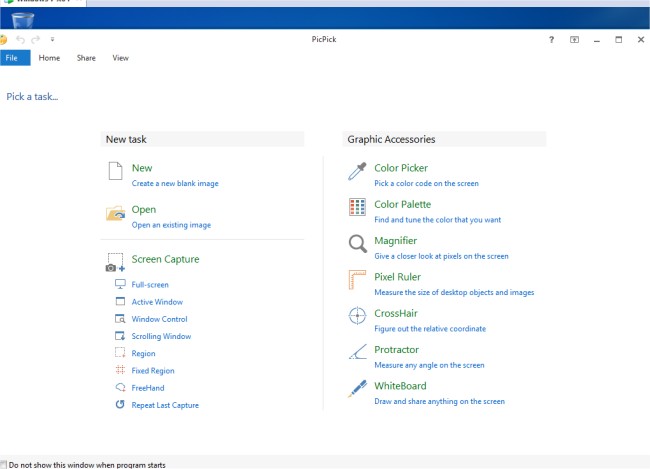
PicPick 7.6.0 has been released, enhancing its reputation as a comprehensive screen capture tool. This versatile software boasts a suite of features that includes not only robust screenshot capabilities—allowing users to capture the entire screen, active windows, scrolling windows, or specific desktop regions—but also a user-friendly image editor. The editor comes with annotation tools such as text, arrows, and shapes, and features a modern Ribbon-style menu for easier navigation.
In addition to basic editing tools, PicPick offers advanced effects like drop shadows, frames, watermarks, mosaic effects, motion blur, and brightness adjustments. Users can save and share their edited images effortlessly through various platforms, including email, FTP, Dropbox, Google Drive, and social media channels like Facebook and Twitter. The application also provides customizable settings for hotkeys, file naming conventions, and image quality, making it adaptable to individual user preferences.
To extend the capabilities of PicPick, future updates could include enhanced collaboration features, allowing multiple users to work on the same image simultaneously. Additionally, integrating AI-driven tools for automatic image enhancement and a broader range of export options could further elevate the user experience. Moreover, offering mobile versions could expand accessibility, enabling users to capture and edit images on the go. Overall, PicPick continues to evolve as a powerful tool for both casual users and professionals alike
In addition to basic editing tools, PicPick offers advanced effects like drop shadows, frames, watermarks, mosaic effects, motion blur, and brightness adjustments. Users can save and share their edited images effortlessly through various platforms, including email, FTP, Dropbox, Google Drive, and social media channels like Facebook and Twitter. The application also provides customizable settings for hotkeys, file naming conventions, and image quality, making it adaptable to individual user preferences.
To extend the capabilities of PicPick, future updates could include enhanced collaboration features, allowing multiple users to work on the same image simultaneously. Additionally, integrating AI-driven tools for automatic image enhancement and a broader range of export options could further elevate the user experience. Moreover, offering mobile versions could expand accessibility, enabling users to capture and edit images on the go. Overall, PicPick continues to evolve as a powerful tool for both casual users and professionals alike
PicPick 7.6.0 released
PicPick is an all-in-one screen capture tool that includes an intuitive image editor, color picker, color palette, pixel ruler, protractor, crosshair, whiteboard and more.