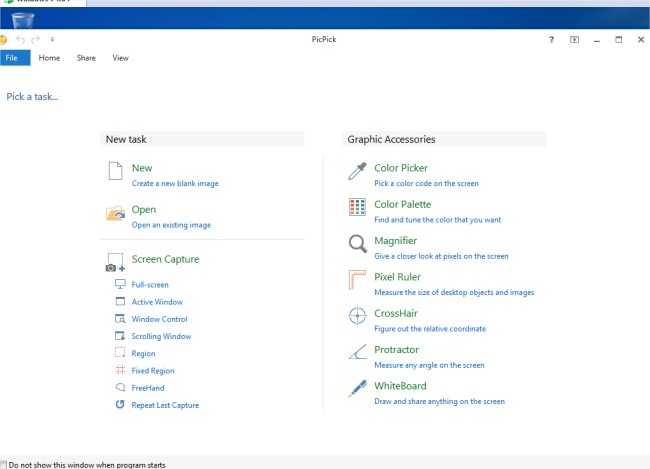
PicPick 7.5.0 has been released, enhancing its reputation as a comprehensive screen capture tool. This software boasts a user-friendly image editor alongside various utilities, including a color picker, color palette, pixel ruler, protractor, crosshair, and whiteboard. With PicPick, users can capture screenshots from their entire screen, individual windows, scrolling windows, or specific desktop regions.
The built-in image editor allows for extensive image annotation and highlighting using text, arrows, and shapes, all facilitated by a modern Ribbon-style menu. Users can also apply a range of effects to their images, such as drop shadows, frames, watermarks, mosaic effects, motion blur, and brightness adjustments.
PicPick supports easy saving, sharing, and sending of images through various platforms, including email, FTP, Dropbox, Google Drive, SkyDrive, Box, Evernote, Facebook, and Twitter. Its advanced settings enable users to customize hotkeys, file naming conventions, image quality, and more, catering to individual preferences and needs.
In addition to these features, PicPick 7.5.0 may include improvements in performance and user interface, enhancing overall usability. This update continues to position PicPick as a valuable resource for those involved in graphic design, digital content creation, and everyday screen capturing tasks.
Looking ahead, users can anticipate future updates that may include additional features, integrations with other software, and improved compatibility with various operating systems, ensuring that PicPick remains a leading choice for both casual users and professionals alike
The built-in image editor allows for extensive image annotation and highlighting using text, arrows, and shapes, all facilitated by a modern Ribbon-style menu. Users can also apply a range of effects to their images, such as drop shadows, frames, watermarks, mosaic effects, motion blur, and brightness adjustments.
PicPick supports easy saving, sharing, and sending of images through various platforms, including email, FTP, Dropbox, Google Drive, SkyDrive, Box, Evernote, Facebook, and Twitter. Its advanced settings enable users to customize hotkeys, file naming conventions, image quality, and more, catering to individual preferences and needs.
In addition to these features, PicPick 7.5.0 may include improvements in performance and user interface, enhancing overall usability. This update continues to position PicPick as a valuable resource for those involved in graphic design, digital content creation, and everyday screen capturing tasks.
Looking ahead, users can anticipate future updates that may include additional features, integrations with other software, and improved compatibility with various operating systems, ensuring that PicPick remains a leading choice for both casual users and professionals alike
PicPick 7.5.0 released
PicPick is an all-in-one screen capture tool that includes an intuitive image editor, color picker, color palette, pixel ruler, protractor, crosshair, whiteboard and more.