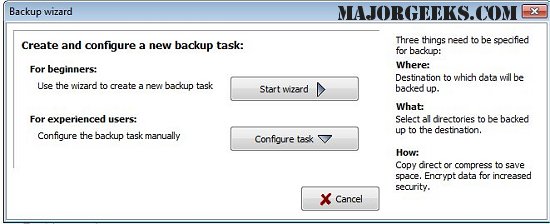
The latest release of Personal Backup, version 6.4.15.0, introduces robust features for saving personal data to various destinations, including local drives, removable drives, Windows network servers, and FTP servers. Users can create and manage an unlimited number of backup tasks, selecting files on a folder-by-folder basis while automatically including all subfolders. There is flexibility to exclude or include specific subdirectories and to filter files based on type, age, or name.
The software maintains the original directory structure, allowing users to easily navigate their backed-up files. Backup options include compressing files using gzip or zipping them by subfolders or directories, with support for large zip files exceeding 4GB. Additionally, data can be encrypted using the AES algorithm for enhanced security.
Key features of Personal Backup include:
- A user-friendly wizard for creating backup tasks.
- Unlimited configuration for backup tasks.
- Full directory structure backups.
- The ability to initiate backups on demand or schedule them to run automatically.
- FTP backup capabilities, including support for proxies and FTPS.
Overall, Personal Backup 6.4.15.0 provides a comprehensive solution for secure and flexible data backup, catering to diverse user needs.
In addition to these features, users might find value in exploring related topics such as resetting or reinstalling Windows 10 using the cloud, reinstalling Windows 10 without losing files, managing system restore options, and adjusting system protection storage sizes in Windows 10 and 11. This holistic approach ensures users can maintain their data integrity while effectively managing their system environments
The software maintains the original directory structure, allowing users to easily navigate their backed-up files. Backup options include compressing files using gzip or zipping them by subfolders or directories, with support for large zip files exceeding 4GB. Additionally, data can be encrypted using the AES algorithm for enhanced security.
Key features of Personal Backup include:
- A user-friendly wizard for creating backup tasks.
- Unlimited configuration for backup tasks.
- Full directory structure backups.
- The ability to initiate backups on demand or schedule them to run automatically.
- FTP backup capabilities, including support for proxies and FTPS.
Overall, Personal Backup 6.4.15.0 provides a comprehensive solution for secure and flexible data backup, catering to diverse user needs.
In addition to these features, users might find value in exploring related topics such as resetting or reinstalling Windows 10 using the cloud, reinstalling Windows 10 without losing files, managing system restore options, and adjusting system protection storage sizes in Windows 10 and 11. This holistic approach ensures users can maintain their data integrity while effectively managing their system environments
Personal Backup 6.4.15.0 released
Personal Backup saves personal data to any destination folder located on a local fixed or removable drive, Windows network server, or an FTP server.