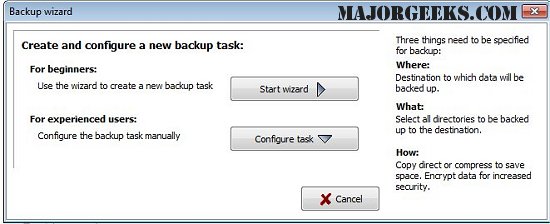
The latest version of Personal Backup, 6.4.12.0, has been launched, offering a versatile solution for saving personal data. This software allows users to back up their files to various destinations, including local fixed or removable drives, Windows network servers, or FTP servers.
With Personal Backup, users can easily configure and store multiple backup tasks based on their preferences. The backup process operates on a by-folder selection method, automatically including all subfolders while allowing users to filter which subdirectories to include or exclude from the backup. Additionally, users can set criteria for file selection based on type, age, and naming conventions.
The software maintains the original drive structure, represented as subdirectories (e.g., LwC, LwD). Users have options for file compression using gzip or can opt to save files as zip archives, with the flexibility to encrypt data using the AES algorithm for enhanced security.
Key Features of Personal Backup:
- An intuitive wizard for creating new backup tasks.
- Support for an unlimited number of customizable backup tasks.
- Capability to back up complete directory structures.
- Options for manual or automated backup initiation.
- FTP backup functionality, with support for proxy settings and FTPS (FTP over SSL).
- Versatile backup options, including:
- Direct copying of files with or without compression (gzip) while preserving the directory structure and drive identifiers.
- Backup without drive identifiers.
- Separated backups by root directory.
- Consolidated backups into a single directory without root identifiers.
- Zip file options, including one zip file per subdirectory or root directory, with support for large files over 4GB.
This update enhances usability and flexibility for users managing their data backups, making it easier to secure personal information against loss.
Further Resources:
- For users looking to manage their system more effectively, additional guides are available on topics such as reinstalling Windows 10 without losing files, managing system restore settings, and optimizing storage sizes for system protection in Windows 10 and 11
With Personal Backup, users can easily configure and store multiple backup tasks based on their preferences. The backup process operates on a by-folder selection method, automatically including all subfolders while allowing users to filter which subdirectories to include or exclude from the backup. Additionally, users can set criteria for file selection based on type, age, and naming conventions.
The software maintains the original drive structure, represented as subdirectories (e.g., LwC, LwD). Users have options for file compression using gzip or can opt to save files as zip archives, with the flexibility to encrypt data using the AES algorithm for enhanced security.
Key Features of Personal Backup:
- An intuitive wizard for creating new backup tasks.
- Support for an unlimited number of customizable backup tasks.
- Capability to back up complete directory structures.
- Options for manual or automated backup initiation.
- FTP backup functionality, with support for proxy settings and FTPS (FTP over SSL).
- Versatile backup options, including:
- Direct copying of files with or without compression (gzip) while preserving the directory structure and drive identifiers.
- Backup without drive identifiers.
- Separated backups by root directory.
- Consolidated backups into a single directory without root identifiers.
- Zip file options, including one zip file per subdirectory or root directory, with support for large files over 4GB.
This update enhances usability and flexibility for users managing their data backups, making it easier to secure personal information against loss.
Further Resources:
- For users looking to manage their system more effectively, additional guides are available on topics such as reinstalling Windows 10 without losing files, managing system restore settings, and optimizing storage sizes for system protection in Windows 10 and 11
Personal Backup 6.4.12.0 released
Personal Backup saves personal data to any destination folder located on a local fixed or removable drive, Windows network server, or an FTP server.