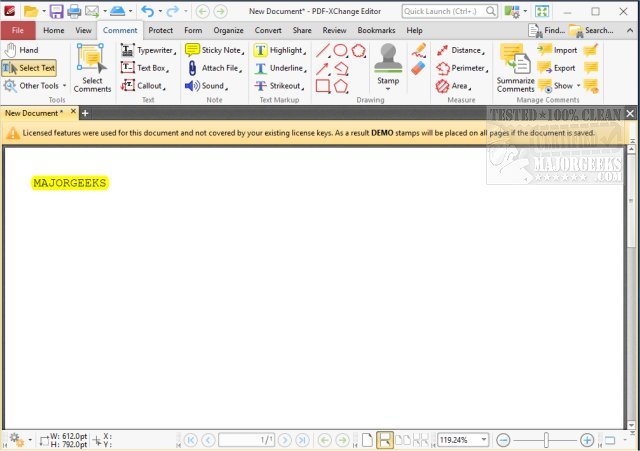
PDF-XChange Editor is a comprehensive PDF editing and viewing tool that allows users to annotate, create, edit, view, perform OCR, and digitally sign PDF files. This recent version emphasizes its powerful features that aim to enhance user experience while maintaining affordability.
Why Choose PDF-XChange Editor?
For individuals frustrated with cumbersome and costly PDF software, PDF-XChange Editor presents an efficient solution. It boasts a user-friendly interface, rapid performance, and a versatile set of editing tools, making it an ideal choice for creating, modifying, annotating, and securing PDF documents.
Key Features of PDF-XChange Editor:
- Comprehensive PDF Editing: Modify text, images, and layouts directly within PDFs without needing the original files.
- Optical Character Recognition (OCR): Convert scanned documents into searchable and editable text, facilitating easier document management.
- Form Creation and Editing: Easily design interactive and fillable forms without the need for advanced technical skills.
- File Conversion: Seamlessly convert PDFs into other formats such as Word, Excel, or PowerPoint.
- Enhanced Security: Implement digital signatures, password protection, and encryption to safeguard sensitive documents.
Ideal for Various Users
PDF-XChange Editor caters to a wide range of users including professionals managing contracts, students handling research papers, and anyone needing to adjust PDF files. Its functionality allows office workers to efficiently fill out forms and annotate documents, educators and students to organize notes without printing, and businesses to expedite document processing with digital signatures and conversions. The OCR feature also provides a means to digitize and organize physical paperwork into a searchable format.
Conclusion
In a market filled with expensive and bloated PDF editors, PDF-XChange Editor stands out by offering a robust set of features at an accessible price. Whether users need to make minor adjustments or conduct extensive document revisions, this software provides the tools necessary for effective PDF management. For anyone who regularly interacts with PDF files, PDF-XChange Editor is undoubtedly a worthwhile addition to their software toolkit.
Similar Articles:
- Tips for Preventing Microsoft Edge from Opening PDF Files
- How to Open and Utilize CAB Files in Windows
- Techniques for Extracting, Expanding, or Creating CAB Files via Command-Line
- Understanding RAR Files and How to Access Them
- An Overview of LZMA Compression and Its Application
Why Choose PDF-XChange Editor?
For individuals frustrated with cumbersome and costly PDF software, PDF-XChange Editor presents an efficient solution. It boasts a user-friendly interface, rapid performance, and a versatile set of editing tools, making it an ideal choice for creating, modifying, annotating, and securing PDF documents.
Key Features of PDF-XChange Editor:
- Comprehensive PDF Editing: Modify text, images, and layouts directly within PDFs without needing the original files.
- Optical Character Recognition (OCR): Convert scanned documents into searchable and editable text, facilitating easier document management.
- Form Creation and Editing: Easily design interactive and fillable forms without the need for advanced technical skills.
- File Conversion: Seamlessly convert PDFs into other formats such as Word, Excel, or PowerPoint.
- Enhanced Security: Implement digital signatures, password protection, and encryption to safeguard sensitive documents.
Ideal for Various Users
PDF-XChange Editor caters to a wide range of users including professionals managing contracts, students handling research papers, and anyone needing to adjust PDF files. Its functionality allows office workers to efficiently fill out forms and annotate documents, educators and students to organize notes without printing, and businesses to expedite document processing with digital signatures and conversions. The OCR feature also provides a means to digitize and organize physical paperwork into a searchable format.
Conclusion
In a market filled with expensive and bloated PDF editors, PDF-XChange Editor stands out by offering a robust set of features at an accessible price. Whether users need to make minor adjustments or conduct extensive document revisions, this software provides the tools necessary for effective PDF management. For anyone who regularly interacts with PDF files, PDF-XChange Editor is undoubtedly a worthwhile addition to their software toolkit.
Similar Articles:
- Tips for Preventing Microsoft Edge from Opening PDF Files
- How to Open and Utilize CAB Files in Windows
- Techniques for Extracting, Expanding, or Creating CAB Files via Command-Line
- Understanding RAR Files and How to Access Them
- An Overview of LZMA Compression and Its Application
PDF-XChange Editor 11.1.0.0 released
PDF-XChange Editor is a full-featured PDF editor/viewer that permits you to annotate, create, edit, view, and OCR as well as digitally sign PDF files.