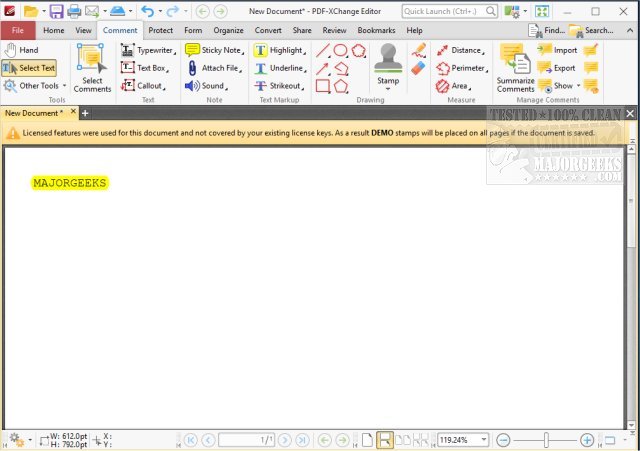
PDF-XChange Editor 11.0.1.0 has been released, enhancing its status as a comprehensive PDF editor and viewer. This software allows users to annotate, create, edit, view, perform OCR (Optical Character Recognition), and digitally sign PDF files, making it a versatile tool for both personal and professional use.
Why Choose PDF-XChange Editor?
If you're frustrated with expensive and cumbersome PDF software, PDF-XChange Editor offers a streamlined alternative. Its powerful editing capabilities, quick performance, and user-friendly interface make it an ideal choice for anyone needing to work with PDFs.
Key Features Include:
- Full PDF Editing: Modify text, images, and layouts directly within PDFs, eliminating the need for original documents.
- Optical Character Recognition (OCR): Convert scanned documents into searchable and editable text, aiding in digitization.
- Form Creation and Editing: Easily create interactive and fillable forms without requiring advanced technical skills.
- PDF Conversion: Transform PDFs into formats like Word, Excel, or PowerPoint effortlessly.
- Built-in Security Features: Protect your documents with digital signatures, password protection, and encryption.
Ideal For Various Users:
PDF-XChange Editor is suitable for a wide range of users, from professionals managing contracts to students handling research papers. Office workers can efficiently fill out forms and annotate documents, educators can manage lecture notes digitally, and businesses can enhance document processing through swift conversions and secure signatures. Additionally, the OCR feature helps maintain organized, searchable archives of scanned materials.
Conclusion:
PDF-XChange Editor stands out among PDF editing software by offering robust functionalities without the high costs associated with competitors. Whether you need to make minor adjustments or undertake extensive document revisions, this powerful tool provides the necessary features to simplify your PDF-related tasks. If you frequently work with PDFs, investing in PDF-XChange Editor could significantly enhance your productivity.
Additional Resources:
For users looking to expand their knowledge on related topics, guides on managing PDF files in different environments (such as stopping Microsoft Edge from opening PDFs or understanding file formats like CAB and RAR) can be beneficial
Why Choose PDF-XChange Editor?
If you're frustrated with expensive and cumbersome PDF software, PDF-XChange Editor offers a streamlined alternative. Its powerful editing capabilities, quick performance, and user-friendly interface make it an ideal choice for anyone needing to work with PDFs.
Key Features Include:
- Full PDF Editing: Modify text, images, and layouts directly within PDFs, eliminating the need for original documents.
- Optical Character Recognition (OCR): Convert scanned documents into searchable and editable text, aiding in digitization.
- Form Creation and Editing: Easily create interactive and fillable forms without requiring advanced technical skills.
- PDF Conversion: Transform PDFs into formats like Word, Excel, or PowerPoint effortlessly.
- Built-in Security Features: Protect your documents with digital signatures, password protection, and encryption.
Ideal For Various Users:
PDF-XChange Editor is suitable for a wide range of users, from professionals managing contracts to students handling research papers. Office workers can efficiently fill out forms and annotate documents, educators can manage lecture notes digitally, and businesses can enhance document processing through swift conversions and secure signatures. Additionally, the OCR feature helps maintain organized, searchable archives of scanned materials.
Conclusion:
PDF-XChange Editor stands out among PDF editing software by offering robust functionalities without the high costs associated with competitors. Whether you need to make minor adjustments or undertake extensive document revisions, this powerful tool provides the necessary features to simplify your PDF-related tasks. If you frequently work with PDFs, investing in PDF-XChange Editor could significantly enhance your productivity.
Additional Resources:
For users looking to expand their knowledge on related topics, guides on managing PDF files in different environments (such as stopping Microsoft Edge from opening PDFs or understanding file formats like CAB and RAR) can be beneficial
PDF-XChange Editor 11.0.1.0 released
PDF-XChange Editor is a full-featured PDF editor/viewer that permits you to annotate, create, edit, view, and OCR as well as digitally sign PDF files.