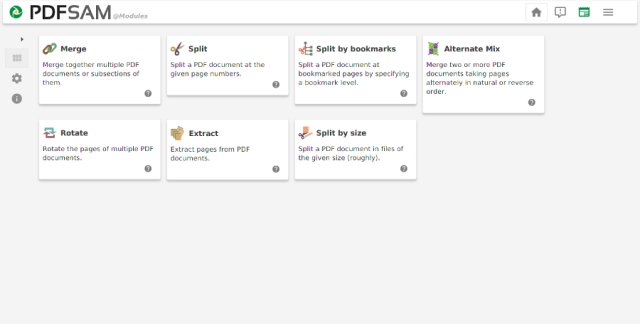
PDFsam 6.0.5 has been released, enhancing the capabilities of this open-source application designed for managing PDF files. Users can split, merge, extract pages, rotate, and mix PDF documents with ease. A standout feature of PDFsam is its ability to merge PDFs by selecting specific pages, which greatly enhances document organization. Additionally, the software supports the combination of bookmarks and interactive forms, making it a versatile tool for both personal and professional use.
Key Features of PDFsam:
- Alternate Mix: Join two PDF files seamlessly.
- Rotate: Rotate all or specific parts of a PDF file.
- Split: Divide a PDF at specified page numbers, bookmarks, or file sizes.
- Extract: Remove pages from any PDF file easily.
PDFsam is a reliable and efficient solution for anyone looking to manage their PDF documents effectively.
Additional Resources:
For users looking to further enhance their PDF experience, here are some helpful articles:
- How to Create a PDF in Windows
- How to Enable Two-Page View for PDF Documents in Google Chrome
- How to Stop Microsoft Edge From Opening PDF and HTML Files
- What is Adobe Acrobat Update Service or Adobe_Updater.exe
In summary, PDFsam 6.0.5 continues to be a valuable tool for PDF management, offering a user-friendly interface and a comprehensive set of features that cater to various document handling needs. Whether for personal organization or professional documentation, PDFsam stands out as a dependable choice
Key Features of PDFsam:
- Alternate Mix: Join two PDF files seamlessly.
- Rotate: Rotate all or specific parts of a PDF file.
- Split: Divide a PDF at specified page numbers, bookmarks, or file sizes.
- Extract: Remove pages from any PDF file easily.
PDFsam is a reliable and efficient solution for anyone looking to manage their PDF documents effectively.
Additional Resources:
For users looking to further enhance their PDF experience, here are some helpful articles:
- How to Create a PDF in Windows
- How to Enable Two-Page View for PDF Documents in Google Chrome
- How to Stop Microsoft Edge From Opening PDF and HTML Files
- What is Adobe Acrobat Update Service or Adobe_Updater.exe
In summary, PDFsam 6.0.5 continues to be a valuable tool for PDF management, offering a user-friendly interface and a comprehensive set of features that cater to various document handling needs. Whether for personal organization or professional documentation, PDFsam stands out as a dependable choice
PDFsam 6.0.5 released
PDFsam (PDF Split and Merge) is an Open Source app that allows you to split, merge, extract pages, rotate, and mix PDF files.