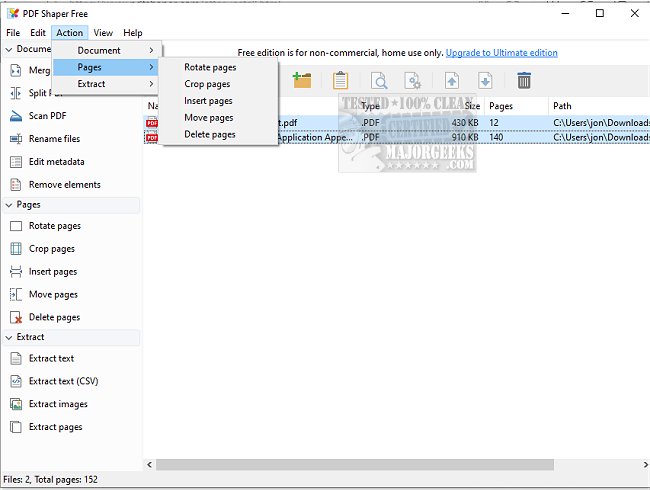
PDF Shaper 15.7 has been released, enhancing its reputation as a user-friendly PDF converter and extractor with a variety of beneficial features. The software is designed with an intuitive interface and customizable themes, making it accessible for users of all skill levels. Its rapid and reliable PDF processing algorithm stands out in the market, allowing users to efficiently handle multiple files simultaneously.
Among its diverse functionalities, PDF Shaper enables users to split large PDF files into smaller segments, merge various documents into one, and apply watermarks to safeguard intellectual property. The inclusion of electronic signature capabilities is particularly advantageous for users dealing with legal documents.
Furthermore, PDF Shaper optimizes PDF files for quicker loading times and supports conversion to various formats, including Word, Excel, and HTML. Security features such as encryption and decryption with password protection ensure that sensitive documents remain secure. Users can also manipulate PDF content by inserting, rearranging, or extracting text and images.
The software is optimized for minimal CPU usage, allowing for seamless operation without taxing system resources. Its batch processing capability facilitates the simultaneous handling of multiple PDF documents, greatly enhancing productivity.
In summary, PDF Shaper is a robust and versatile tool for managing PDF documents, offering a comprehensive suite of features designed to enhance efficiency and effectiveness. Some of its key features include:
- Splitting and merging PDF documents and pages
- Extracting text, graphics, and pages from PDFs
- Converting images to PDF and vice versa
- Rotating, cropping, or deleting PDF pages
- Encrypting or decrypting PDF files, signing, and setting user permissions
- Converting PDFs to RTF and TXT formats
For users seeking additional resources, there are related guides on creating PDFs, enabling two-page views in Google Chrome, and managing PDF settings in Microsoft Edge and Windows 10 & 11.
With its extensive capabilities, PDF Shaper 15.7 is an essential tool for anyone looking to efficiently manage and manipulate PDF documents
Among its diverse functionalities, PDF Shaper enables users to split large PDF files into smaller segments, merge various documents into one, and apply watermarks to safeguard intellectual property. The inclusion of electronic signature capabilities is particularly advantageous for users dealing with legal documents.
Furthermore, PDF Shaper optimizes PDF files for quicker loading times and supports conversion to various formats, including Word, Excel, and HTML. Security features such as encryption and decryption with password protection ensure that sensitive documents remain secure. Users can also manipulate PDF content by inserting, rearranging, or extracting text and images.
The software is optimized for minimal CPU usage, allowing for seamless operation without taxing system resources. Its batch processing capability facilitates the simultaneous handling of multiple PDF documents, greatly enhancing productivity.
In summary, PDF Shaper is a robust and versatile tool for managing PDF documents, offering a comprehensive suite of features designed to enhance efficiency and effectiveness. Some of its key features include:
- Splitting and merging PDF documents and pages
- Extracting text, graphics, and pages from PDFs
- Converting images to PDF and vice versa
- Rotating, cropping, or deleting PDF pages
- Encrypting or decrypting PDF files, signing, and setting user permissions
- Converting PDFs to RTF and TXT formats
For users seeking additional resources, there are related guides on creating PDFs, enabling two-page views in Google Chrome, and managing PDF settings in Microsoft Edge and Windows 10 & 11.
With its extensive capabilities, PDF Shaper 15.7 is an essential tool for anyone looking to efficiently manage and manipulate PDF documents
PDF Shaper 15.7 released
PDF Shaper is an easy-to-use PDF converter and extractor with a user-friendly interface and many useful features.