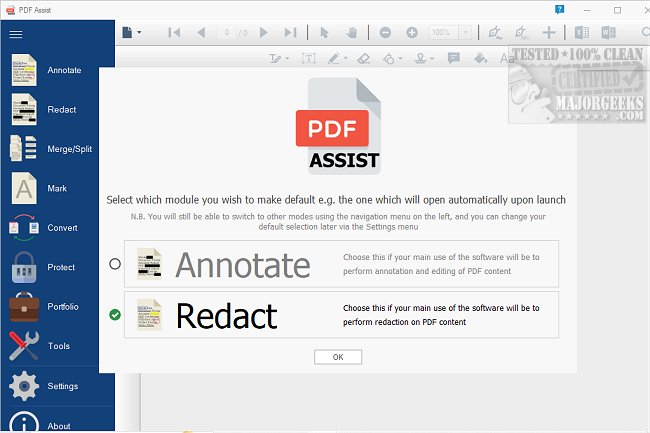
PDF Assist 3.1.5 is a versatile PDF management tool that offers a range of functionalities for handling PDF files efficiently. Key features include:
- Secure Redaction: Automatically identifies and removes sensitive information such as National Insurance numbers, tax references, phone numbers, and dates, ensuring complete deletion rather than mere masking.
- User-Friendly Interface: The software boasts a work-driven interface that organizes features in an easily navigable left-side menu, enhancing user experience.
- Annotation Tools: Users can highlight, underline, and add various forms of markup, including shapes and signatures, allowing for comprehensive document editing.
- Merge and Split Functions: Simplifies the process of managing PDF files by allowing users to effortlessly split lengthy documents or merge multiple PDFs into a single file.
- Form Filling and Update Management: Provides options for automatic updates without administrative privileges and allows for disabling updates per machine, aligning with organizational policies.
- PDF Protection: Offers encryption and password protection to secure files, along with the ability to remove protection from already secured documents.
- Watermarking: Users can add personalized or pre-existing watermarks to enhance professionalism and security.
Although PDF Assist is not free, its perpetual license is considered valuable for users who frequently manage a large volume of PDF documents.
Extension of the Features
In addition to the existing features, future updates could include:
- Collaboration Tools: Integration of real-time collaboration features enabling multiple users to annotate and edit a document simultaneously, enhancing team productivity.
- OCR Capabilities: Implementing Optical Character Recognition (OCR) to convert scanned documents into editable and searchable text, expanding functionality for users working with physical documents.
- Cloud Integration: Seamless connectivity with popular cloud storage services (like Google Drive, Dropbox, etc.) for easier access and sharing of PDF files.
- Template Creation: The ability to create and save templates for frequently used document formats, streamlining the document creation process.
- Advanced Search and Indexing: Enhanced search capabilities that allow users to find specific text or phrases within multiple PDF files quickly, improving document management efficiency.
These enhancements would position PDF Assist as a comprehensive solution for both individual and business users, making it an indispensable tool for PDF management
- Secure Redaction: Automatically identifies and removes sensitive information such as National Insurance numbers, tax references, phone numbers, and dates, ensuring complete deletion rather than mere masking.
- User-Friendly Interface: The software boasts a work-driven interface that organizes features in an easily navigable left-side menu, enhancing user experience.
- Annotation Tools: Users can highlight, underline, and add various forms of markup, including shapes and signatures, allowing for comprehensive document editing.
- Merge and Split Functions: Simplifies the process of managing PDF files by allowing users to effortlessly split lengthy documents or merge multiple PDFs into a single file.
- Form Filling and Update Management: Provides options for automatic updates without administrative privileges and allows for disabling updates per machine, aligning with organizational policies.
- PDF Protection: Offers encryption and password protection to secure files, along with the ability to remove protection from already secured documents.
- Watermarking: Users can add personalized or pre-existing watermarks to enhance professionalism and security.
Although PDF Assist is not free, its perpetual license is considered valuable for users who frequently manage a large volume of PDF documents.
Extension of the Features
In addition to the existing features, future updates could include:
- Collaboration Tools: Integration of real-time collaboration features enabling multiple users to annotate and edit a document simultaneously, enhancing team productivity.
- OCR Capabilities: Implementing Optical Character Recognition (OCR) to convert scanned documents into editable and searchable text, expanding functionality for users working with physical documents.
- Cloud Integration: Seamless connectivity with popular cloud storage services (like Google Drive, Dropbox, etc.) for easier access and sharing of PDF files.
- Template Creation: The ability to create and save templates for frequently used document formats, streamlining the document creation process.
- Advanced Search and Indexing: Enhanced search capabilities that allow users to find specific text or phrases within multiple PDF files quickly, improving document management efficiency.
These enhancements would position PDF Assist as a comprehensive solution for both individual and business users, making it an indispensable tool for PDF management
PDF Assist 3.1.5 released
PDF Assist is a comprehensive PDF tool that enables you to perform various tasks on your PDF files.