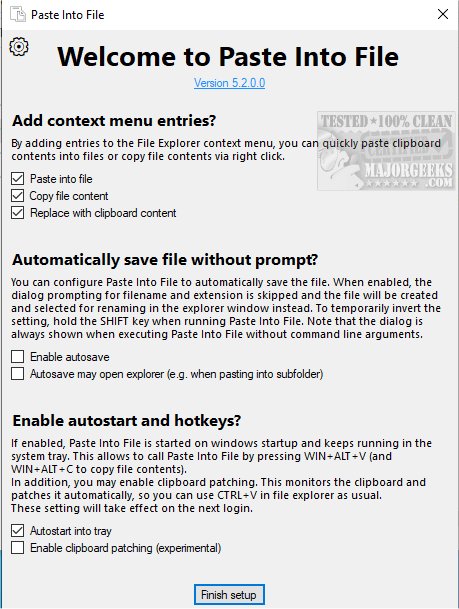
PasteIntoFile is an innovative tool designed to enhance the clipboard management experience by allowing users to effortlessly copy and paste clipboard contents directly into files. This utility streamlines the process of transferring text and images from the clipboard into files, eliminating the need for manual opening and editing. Additionally, users can quickly copy file contents to the clipboard using the context menu, facilitating seamless information transfer between applications.
This tool is particularly beneficial for individuals who frequently handle text and image data, providing a convenient method for moving content efficiently. While the interface may not boast the latest design trends, it is user-friendly and straightforward. At the top of the interface, users will find the filename, along with an output directory and a preview box for content sourced from various origins. Notably, the software allows for filename customization, including various date and time formats for easy identification.
One standout feature of PasteIntoFile is its Batch Mode for Monitoring Clipboard Changes, which tracks all copied items—be they text or images—and automatically saves them into designated files upon new clipboard entries. Another valuable addition is Clipboard Patching, enabling users to paste items using familiar methods such as CTRL+V or right-click options.
PasteIntoFile supports a wide array of content types and file formats, including but not limited to Markdown, HTML, Java, PS1, JSON, CSS, PHP, and Python. This versatility ensures that users can efficiently manage and save their clipboard data in formats that best suit their needs.
Key Features of PasteIntoFile:
- Explorer context menu options for pasting into files, replacing clipboard content, and copying file contents.
- Hotkeys for quick actions: Win+Alt+V for pasting and Win+Alt+C for copying file contents.
- Autosave mode that allows renaming within the file explorer without prompts.
- Batch mode that monitors clipboard activity and saves changes automatically.
- Clipboard patching for traditional paste functionality using CTRL+V (experimental).
- Compatibility with multiple file formats including PNG, JPG, GIF, SVG, TXT, HTML, CSV, URL, PDF, RTF, and more.
In conclusion, PasteIntoFile 5.6.2 offers a robust solution for clipboard management, catering to users who require quick and efficient methods for handling data across different applications. Its combination of features makes it an essential tool for professionals and anyone who frequently interacts with digital content. Whether for personal or professional use, PasteIntoFile simplifies the process of clipboard management, enhancing productivity and workflow efficiency
PasteIntoFile 5.6.2 released
PasteIntoFile is a useful tool that provides you with the ability to copy and paste clipboard contents into files.