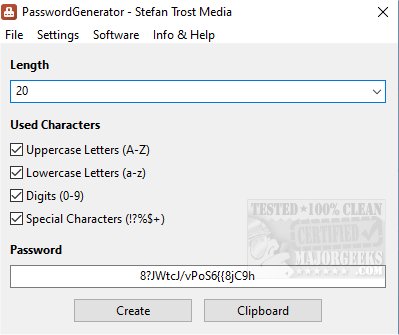
The latest release of PasswordGenerator, version 26.9.6, enhances your ability to create secure and unique passwords tailored to your specific needs. Users can customize the length and character composition of their passwords, choosing from uppercase letters, lowercase letters, digits, and special characters. The tool also provides flexibility in its settings, allowing users to add or remove characters from each category and even use any Unicode character, thus broadening the range of possible passwords.
A noteworthy feature is the option to ensure that generated passwords contain at least one character from each selected category, enhancing password strength. Users benefit from a convenient clipboard copying feature, enabling quick pasting of passwords into other applications. Moreover, a history feature allows users to store multiple generated passwords and export them as a password list, which is particularly useful for managing numerous credentials.
For advanced users, PasswordGenerator offers command line functionality in batch mode, making it easy to integrate the password generation capabilities into scripts for various automation tasks. The interface is designed to be user-friendly, ensuring that both novice and experienced users can easily navigate the tool.
In addition to its robust password generation features, the author accepts donations through their site, supporting further development and maintenance of the software.
For those seeking additional information on password management, similar topics include methods for revealing hidden passwords, finding Wi-Fi passwords, and managing saved passwords in web browsers like Google Chrome.
As the importance of cybersecurity continues to grow, tools like PasswordGenerator play a crucial role in helping users create strong passwords, thus enhancing their online safety. Future updates could potentially include features like password strength assessments, breach alerts, or integration with password management systems to streamline the overall user experience
A noteworthy feature is the option to ensure that generated passwords contain at least one character from each selected category, enhancing password strength. Users benefit from a convenient clipboard copying feature, enabling quick pasting of passwords into other applications. Moreover, a history feature allows users to store multiple generated passwords and export them as a password list, which is particularly useful for managing numerous credentials.
For advanced users, PasswordGenerator offers command line functionality in batch mode, making it easy to integrate the password generation capabilities into scripts for various automation tasks. The interface is designed to be user-friendly, ensuring that both novice and experienced users can easily navigate the tool.
In addition to its robust password generation features, the author accepts donations through their site, supporting further development and maintenance of the software.
For those seeking additional information on password management, similar topics include methods for revealing hidden passwords, finding Wi-Fi passwords, and managing saved passwords in web browsers like Google Chrome.
As the importance of cybersecurity continues to grow, tools like PasswordGenerator play a crucial role in helping users create strong passwords, thus enhancing their online safety. Future updates could potentially include features like password strength assessments, breach alerts, or integration with password management systems to streamline the overall user experience
PasswordGenerator 26.9.6 released
With PasswordGenerator, you have the ability to generate unique passwords with customizable lengths and character selection.