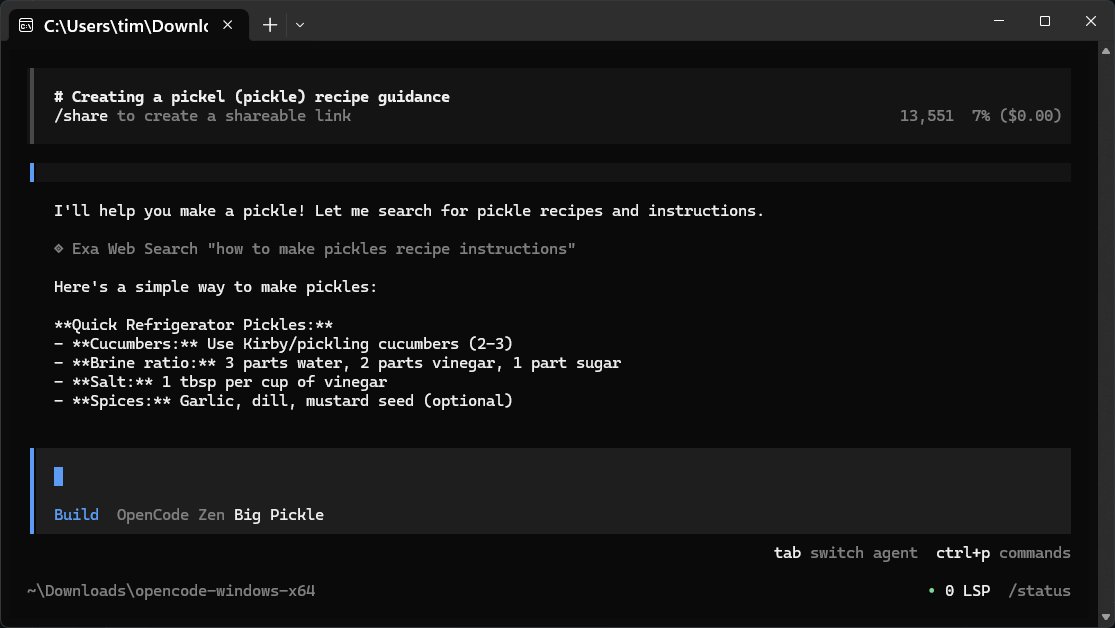
OpenCode is an open-source AI assistant designed for coding, debugging, and understanding code files right on your computer. Unlike many traditional AI tools, it operates without requiring accounts or cloud connections, making it a straightforward option for developers. By allowing users to interact with their projects in natural language, OpenCode acts as a command-line companion that understands various programming languages and can execute commands on behalf of the user.
- Compatibility: It works with a wide array of coding languages and IDEs, enhancing its versatility for developers.
- Lightweight Design: The lack of a graphical user interface (GUI) contributes to its speed, catering to users who prefer terminal-based work environments.
- General Assistance: Apart from coding help, OpenCode can answer general queries, explain concepts, and even provide recipes, though its primary functionality revolves around coding.
2. Session Management: OpenCode does not save sessions automatically; users should export sessions if needed.
3. Copy-Paste Functionality: The built-in export function is recommended for quicker content transfer.
Key Features of OpenCode:
- User-Friendly: OpenCode is efficient, easy to use, and runs locally, ensuring privacy as it does not share data with external servers.- Compatibility: It works with a wide array of coding languages and IDEs, enhancing its versatility for developers.
- Lightweight Design: The lack of a graphical user interface (GUI) contributes to its speed, catering to users who prefer terminal-based work environments.
- General Assistance: Apart from coding help, OpenCode can answer general queries, explain concepts, and even provide recipes, though its primary functionality revolves around coding.
How OpenCode Operates:
OpenCode does not possess its own large language model (LLM); instead, it connects to external repositories to fetch answers. This design allows it to remain lightweight while still being able to provide relevant responses via a stable internet connection. Users can choose and configure over 75 different LLMs, including popular ones like OpenAI and Anthropic, making it adaptable for varied requirements.Using OpenCode:
To integrate different LLMs, users can follow a straightforward authentication process via command line. The ability to switch between multiple LLMs is beneficial for tasks that vary in complexity, allowing for efficiency in responses.Tips for Optimal Use:
1. Security: Keep your API keys secure and never share them.2. Session Management: OpenCode does not save sessions automatically; users should export sessions if needed.
3. Copy-Paste Functionality: The built-in export function is recommended for quicker content transfer.
Local Model Compatibility:
OpenCode is also compatible with local models, enabling users to run everything on their systems without relying on cloud services. For those who prefer self-hosted solutions, this feature maximizes control and privacy.Conclusion:
OpenCode stands out as a clean, efficient, and flexible coding assistant tailored for those comfortable with command-line interfaces. While it may not offer a sophisticated user interface and requires internet access for certain functionalities, its simplicity, privacy, and ease of use make it a powerful tool for developers. For any issues or inquiries, users are encouraged to seek assistance on forums like MajorGeeks.Future Prospects:
As OpenCode continues to evolve, future updates could potentially introduce enhanced user interface options, improved local model integration, and expanded functionalities to cater to a broader audience, including those who might prefer a more visual coding environment. Keeping an eye on user feedback will be crucial for the development of upcoming versionsOpenCode 1.18.2 released
OpenCode is a free, Open Source AI assistant that runs on your computer and helps you write code, fix bugs, and understand what your files are doing.