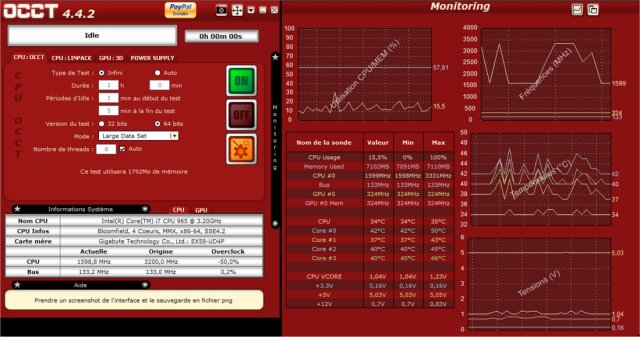
The latest version of OCCT (OverClock Checking Tool), 17.0.10, has been released, providing enthusiasts, overclockers, and system builders with an essential utility to benchmark, overclock, and monitor their PC components effectively. OCCT is a powerful tool designed to stress-test critical hardware components such as the CPU, GPU, RAM, and power supply, ensuring they perform reliably under heavy loads.
- Real-Time Monitoring: Track important metrics like temperature, voltage, clock speeds, and power consumption to preemptively identify hardware issues.
- Power Supply Testing: Simulate extreme power loads to evaluate the robustness of your PSU.
- Benchmarking: Assess your system's performance before and after upgrades to determine the effectiveness of your investments.
- Error Detection: Run targeted tests to discover faulty components and system instability.
- Troubleshooting: Identify the cause of random crashes or freezes by testing key components.
- Verification for New Builds: Stress-test newly built systems to ensure stability before everyday use.
- Overheating Diagnosis: Pinpoint components that may be causing excessive heat.
- Power Supply Verification: Ensure your PSU can handle peak power demands.
- Post-BIOS Update Stability Testing: Confirm system stability after BIOS changes that affect voltage and memory settings.
- Laptop Thermal Management: Assess whether a laptop's cooling system is adequate.
- Performance Benchmarking: Compare pre- and post-upgrade performance metrics.
- Stress Testing for Professionals: Ideal for users involved in resource-intensive tasks like video editing and 3D rendering.
- Preventative Maintenance: Regular stress tests can help detect aging hardware before it fails.
- Stability Testing After Undervolting: Ensure stability after reducing power consumption and heat generation.
- Extensive stress testing capabilities for all critical hardware components.
- Real-time monitoring with visual data representation.
- Useful for both overclocking and stability troubleshooting.
- Free version available with essential features.
Cons:
- Some advanced functionalities require a paid version.
- May push hardware to extreme limits, requiring cautious use.
- Less user-friendly for beginners compared to other monitoring tools.
- Instructions for updating and finding your Windows Experience Index score.
- Tips for identifying hardware in your computer.
In summary, OCCT 17.0.10 serves as an essential resource for both casual users and hardcore enthusiasts, enabling them to ensure their systems are stable, efficient, and ready for any task
Key Features of OCCT
- Stress Testing: Push your CPU, GPU, RAM, and PSU to their limits to confirm they can handle maximum loads without crashing.- Real-Time Monitoring: Track important metrics like temperature, voltage, clock speeds, and power consumption to preemptively identify hardware issues.
- Power Supply Testing: Simulate extreme power loads to evaluate the robustness of your PSU.
- Benchmarking: Assess your system's performance before and after upgrades to determine the effectiveness of your investments.
- Error Detection: Run targeted tests to discover faulty components and system instability.
Practical Applications
OCCT's utility extends beyond overclocking; it's a valuable tool for anyone seeking optimal system performance:- Troubleshooting: Identify the cause of random crashes or freezes by testing key components.
- Verification for New Builds: Stress-test newly built systems to ensure stability before everyday use.
- Overheating Diagnosis: Pinpoint components that may be causing excessive heat.
- Power Supply Verification: Ensure your PSU can handle peak power demands.
- Post-BIOS Update Stability Testing: Confirm system stability after BIOS changes that affect voltage and memory settings.
- Laptop Thermal Management: Assess whether a laptop's cooling system is adequate.
- Performance Benchmarking: Compare pre- and post-upgrade performance metrics.
- Stress Testing for Professionals: Ideal for users involved in resource-intensive tasks like video editing and 3D rendering.
- Preventative Maintenance: Regular stress tests can help detect aging hardware before it fails.
- Stability Testing After Undervolting: Ensure stability after reducing power consumption and heat generation.
Pros and Cons
Pros:- Extensive stress testing capabilities for all critical hardware components.
- Real-time monitoring with visual data representation.
- Useful for both overclocking and stability troubleshooting.
- Free version available with essential features.
Cons:
- Some advanced functionalities require a paid version.
- May push hardware to extreme limits, requiring cautious use.
- Less user-friendly for beginners compared to other monitoring tools.
Conclusion
For those serious about maintaining system stability or exploring overclocking, OCCT is an indispensable tool. It acts as a rigorous personal trainer for your PC, highlighting areas for improvement and ensuring your hardware is performing optimally. Whether you're a seasoned overclocker or just aim to keep your system reliable, OCCT is worth downloading and putting your system through its paces.Related Resources
- Guides on benchmarking your computer.- Instructions for updating and finding your Windows Experience Index score.
- Tips for identifying hardware in your computer.
In summary, OCCT 17.0.10 serves as an essential resource for both casual users and hardcore enthusiasts, enabling them to ensure their systems are stable, efficient, and ready for any task
OCCT 17.0.10 released
OCCT (OverClock Checking Tool) will let you benchmark, overclock, and monitor your system components.