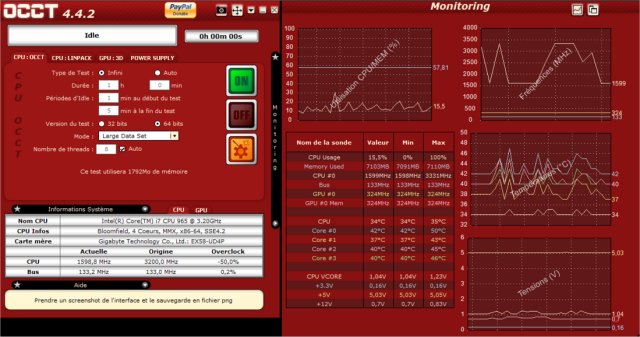
The latest version of OCCT (OverClock Checking Tool) has been released, offering users a robust solution for benchmarking, overclocking, and monitoring their computer components. This utility is particularly beneficial for overclockers, system builders, and hardware enthusiasts looking to optimize their systems or ensure stability under high loads.
What is OCCT?
OCCT is a specialized tool designed to stress-test various components of your system, including the CPU, GPU, RAM, and power supply (PSU). It provides real-time monitoring capabilities, allowing users to track critical metrics and diagnose potential hardware failures before they disrupt usage.
Key Features:
- Stress Testing: OCCT rigorously tests your system components to guarantee they can withstand maximum loads without crashing.
- Hardware Monitoring: Users can observe real-time data on temperatures, voltages, clock speeds, and power consumption, helping to identify any overheating or power issues.
- Power Supply Testing: The tool simulates extreme power loads to evaluate whether your PSU is capable of handling the demands of your system.
- Benchmarking: Users can assess performance differences before and after hardware upgrades, providing insights into the value of their investments.
- Error Detection: Targeted stress tests reveal faulty components and system instability, enabling proactive maintenance.
Real-World Applications:
OCCT is not solely for overclocking; it is a versatile tool for anyone seeking optimal system performance. Here are some practical uses:
- Troubleshooting Crashes: Identify if components like the CPU, GPU, RAM, or PSU are causing random system failures.
- New Builds Verification: Stress-test newly assembled systems to ensure reliability before regular use.
- Overheating Diagnosis: Pinpoint the component responsible for excessive heat generation.
- Power Supply Reliability: Assess if the PSU can handle peak loads or if it needs replacement.
- Post-BIOS Update Stability Checks: Confirm that system stability is maintained after BIOS adjustments.
- Laptop Cooling Efficiency: Determine if a laptop’s cooling system is effective or if additional cooling solutions are needed.
- Performance Benchmarking: Compare performance metrics before and after hardware upgrades.
- Workstation Stability Testing: Ideal for professionals in video editing, 3D rendering, and game development to verify system stability.
- Preventative Maintenance: Regular stress tests can uncover aging hardware before it leads to more significant issues.
- Undervolting Stability Testing: Validate that your system remains stable after reducing voltage to decrease heat and power consumption.
Pros and Cons:
Pros:
- Comprehensive stress tests for all major components.
- Real-time hardware monitoring with graphical representations.
- Effective for overclocking and diagnosing stability problems.
- Free version available with essential features.
Cons:
- Some advanced features require a paid version.
- Can push hardware to extreme limits; caution is advised.
- Less user-friendly compared to some other monitoring tools.
Conclusion:
For those serious about maintaining system stability or exploring overclocking, OCCT is an indispensable tool. It functions almost like a personal trainer for your PC, pushing it to its limits and highlighting areas for improvement. Whether you're an experienced overclocker or simply want a dependable machine, OCCT is worth downloading to test your system thoroughly.
Extended Features:
In addition to its primary functions, OCCT could expand its offerings by integrating AI-driven performance recommendations based on user data. This could help users optimize settings dynamically, ensuring maximum efficiency and performance based on individual usage patterns. Furthermore, an enhanced user interface could make the tool more accessible for beginners, breaking down complex functionalities into simpler, guided processes. Regular updates could also introduce new stress tests tailored for emerging hardware technologies, keeping OCCT relevant as hardware evolves
What is OCCT?
OCCT is a specialized tool designed to stress-test various components of your system, including the CPU, GPU, RAM, and power supply (PSU). It provides real-time monitoring capabilities, allowing users to track critical metrics and diagnose potential hardware failures before they disrupt usage.
Key Features:
- Stress Testing: OCCT rigorously tests your system components to guarantee they can withstand maximum loads without crashing.
- Hardware Monitoring: Users can observe real-time data on temperatures, voltages, clock speeds, and power consumption, helping to identify any overheating or power issues.
- Power Supply Testing: The tool simulates extreme power loads to evaluate whether your PSU is capable of handling the demands of your system.
- Benchmarking: Users can assess performance differences before and after hardware upgrades, providing insights into the value of their investments.
- Error Detection: Targeted stress tests reveal faulty components and system instability, enabling proactive maintenance.
Real-World Applications:
OCCT is not solely for overclocking; it is a versatile tool for anyone seeking optimal system performance. Here are some practical uses:
- Troubleshooting Crashes: Identify if components like the CPU, GPU, RAM, or PSU are causing random system failures.
- New Builds Verification: Stress-test newly assembled systems to ensure reliability before regular use.
- Overheating Diagnosis: Pinpoint the component responsible for excessive heat generation.
- Power Supply Reliability: Assess if the PSU can handle peak loads or if it needs replacement.
- Post-BIOS Update Stability Checks: Confirm that system stability is maintained after BIOS adjustments.
- Laptop Cooling Efficiency: Determine if a laptop’s cooling system is effective or if additional cooling solutions are needed.
- Performance Benchmarking: Compare performance metrics before and after hardware upgrades.
- Workstation Stability Testing: Ideal for professionals in video editing, 3D rendering, and game development to verify system stability.
- Preventative Maintenance: Regular stress tests can uncover aging hardware before it leads to more significant issues.
- Undervolting Stability Testing: Validate that your system remains stable after reducing voltage to decrease heat and power consumption.
Pros and Cons:
Pros:
- Comprehensive stress tests for all major components.
- Real-time hardware monitoring with graphical representations.
- Effective for overclocking and diagnosing stability problems.
- Free version available with essential features.
Cons:
- Some advanced features require a paid version.
- Can push hardware to extreme limits; caution is advised.
- Less user-friendly compared to some other monitoring tools.
Conclusion:
For those serious about maintaining system stability or exploring overclocking, OCCT is an indispensable tool. It functions almost like a personal trainer for your PC, pushing it to its limits and highlighting areas for improvement. Whether you're an experienced overclocker or simply want a dependable machine, OCCT is worth downloading to test your system thoroughly.
Extended Features:
In addition to its primary functions, OCCT could expand its offerings by integrating AI-driven performance recommendations based on user data. This could help users optimize settings dynamically, ensuring maximum efficiency and performance based on individual usage patterns. Furthermore, an enhanced user interface could make the tool more accessible for beginners, breaking down complex functionalities into simpler, guided processes. Regular updates could also introduce new stress tests tailored for emerging hardware technologies, keeping OCCT relevant as hardware evolves
OCCT 17.0.1 released
OCCT (OverClock Checking Tool) will let you benchmark, overclock, and monitor your system components.