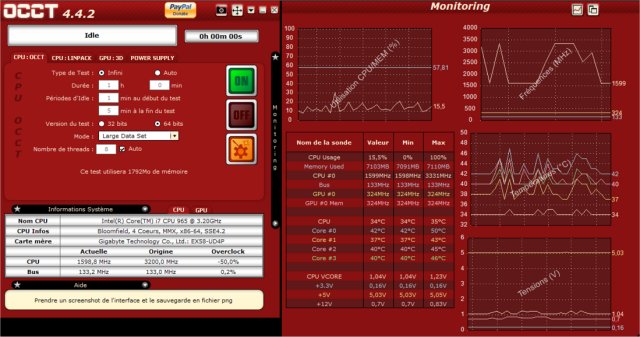
The OverClock Checking Tool (OCCT) has unveiled its latest version, 16.1.10, designed to assist overclockers, system builders, and hardware enthusiasts in effectively benchmarking, overclocking, and monitoring their computer components. This powerful utility is essential for anyone pushing their PC to its limits or wanting to ensure system reliability under stress.
What is OCCT?
OCCT is a robust application that stress-tests critical components of your PC, including the CPU, GPU, RAM, and power supply unit (PSU). It also offers real-time monitoring capabilities, allowing users to track temperature, voltage, clock speeds, and power consumption, which can help diagnose potential hardware failures before they lead to crashes or system instability.
Key Features:
- Stress Testing: OCCT rigorously tests your CPU, GPU, RAM, and PSU to confirm they can handle maximum loads without failure.
- Hardware Monitoring: Real-time tracking of system parameters helps identify overheating or power issues.
- Power Supply Testing: Simulates extreme loads to evaluate the PSU's reliability under stress.
- Benchmarking: Compare performance pre- and post-hardware upgrades.
- Error Detection: Targeted stress tests help pinpoint faulty components.
Practical Applications:
OCCT is not limited to just overclocking; it's a valuable tool for anyone aiming for optimal system performance. Here are some scenarios where OCCT proves helpful:
- Troubleshooting Crashes: Identify the cause of random freezes or crashes.
- New Build Validation: Ensure a newly built PC is stable before regular use.
- Overheating Diagnosis: Determine which component is causing excessive heat.
- Power Supply Evaluation: Test if the PSU can handle peak demands.
- Post-BIOS Update Stability Checks: Verify system stability after BIOS adjustments.
- Laptop Thermal Management: Assess if a laptop’s cooling system is functioning effectively.
- Performance Benchmarking: Measure performance changes after hardware upgrades.
- Workstation Stress Testing: Ideal for professionals requiring stability during high workloads.
- Preventative Maintenance: Conduct regular stress tests to uncover aging hardware issues before they escalate.
- Stability After Undervolting: Confirm that a system remains stable after reducing power consumption.
Pros and Cons:
Pros:
- Comprehensive stress tests for multiple components.
- Real-time monitoring with visual data representation.
- Effective for both overclocking and troubleshooting.
- Free version with fundamental features available.
Cons:
- Some advanced features are only accessible in the paid version.
- Can stress hardware to extreme levels; caution is advised.
- May not be as beginner-friendly as other monitoring tools.
Geek Verdict:
For those serious about maintaining system stability or engaging in overclocking, OCCT is an invaluable tool akin to a personal trainer for your PC. It rigorously tests and provides insights into areas for improvement, making it suitable for both hardcore enthusiasts and casual users seeking reliability. Download OCCT now to put your system through the ultimate test!
Related Resources:
- Guides on benchmarking your computer.
- Instructions for updating and finding your Windows Experience Index score.
- Tips on identifying hardware components in your PC.
Extensions:
Future updates to OCCT could focus on enhanced user interface design to improve accessibility for beginners, integration with cloud services for remote monitoring, and advanced analytics features that provide predictive insights into hardware performance trends. Additionally, expanding community support forums could foster knowledge-sharing among users
What is OCCT?
OCCT is a robust application that stress-tests critical components of your PC, including the CPU, GPU, RAM, and power supply unit (PSU). It also offers real-time monitoring capabilities, allowing users to track temperature, voltage, clock speeds, and power consumption, which can help diagnose potential hardware failures before they lead to crashes or system instability.
Key Features:
- Stress Testing: OCCT rigorously tests your CPU, GPU, RAM, and PSU to confirm they can handle maximum loads without failure.
- Hardware Monitoring: Real-time tracking of system parameters helps identify overheating or power issues.
- Power Supply Testing: Simulates extreme loads to evaluate the PSU's reliability under stress.
- Benchmarking: Compare performance pre- and post-hardware upgrades.
- Error Detection: Targeted stress tests help pinpoint faulty components.
Practical Applications:
OCCT is not limited to just overclocking; it's a valuable tool for anyone aiming for optimal system performance. Here are some scenarios where OCCT proves helpful:
- Troubleshooting Crashes: Identify the cause of random freezes or crashes.
- New Build Validation: Ensure a newly built PC is stable before regular use.
- Overheating Diagnosis: Determine which component is causing excessive heat.
- Power Supply Evaluation: Test if the PSU can handle peak demands.
- Post-BIOS Update Stability Checks: Verify system stability after BIOS adjustments.
- Laptop Thermal Management: Assess if a laptop’s cooling system is functioning effectively.
- Performance Benchmarking: Measure performance changes after hardware upgrades.
- Workstation Stress Testing: Ideal for professionals requiring stability during high workloads.
- Preventative Maintenance: Conduct regular stress tests to uncover aging hardware issues before they escalate.
- Stability After Undervolting: Confirm that a system remains stable after reducing power consumption.
Pros and Cons:
Pros:
- Comprehensive stress tests for multiple components.
- Real-time monitoring with visual data representation.
- Effective for both overclocking and troubleshooting.
- Free version with fundamental features available.
Cons:
- Some advanced features are only accessible in the paid version.
- Can stress hardware to extreme levels; caution is advised.
- May not be as beginner-friendly as other monitoring tools.
Geek Verdict:
For those serious about maintaining system stability or engaging in overclocking, OCCT is an invaluable tool akin to a personal trainer for your PC. It rigorously tests and provides insights into areas for improvement, making it suitable for both hardcore enthusiasts and casual users seeking reliability. Download OCCT now to put your system through the ultimate test!
Related Resources:
- Guides on benchmarking your computer.
- Instructions for updating and finding your Windows Experience Index score.
- Tips on identifying hardware components in your PC.
Extensions:
Future updates to OCCT could focus on enhanced user interface design to improve accessibility for beginners, integration with cloud services for remote monitoring, and advanced analytics features that provide predictive insights into hardware performance trends. Additionally, expanding community support forums could foster knowledge-sharing among users
OCCT 16.1.10 released
OCCT (OverClock Checking Tool) will let you benchmark, overclock, and monitor your system components.