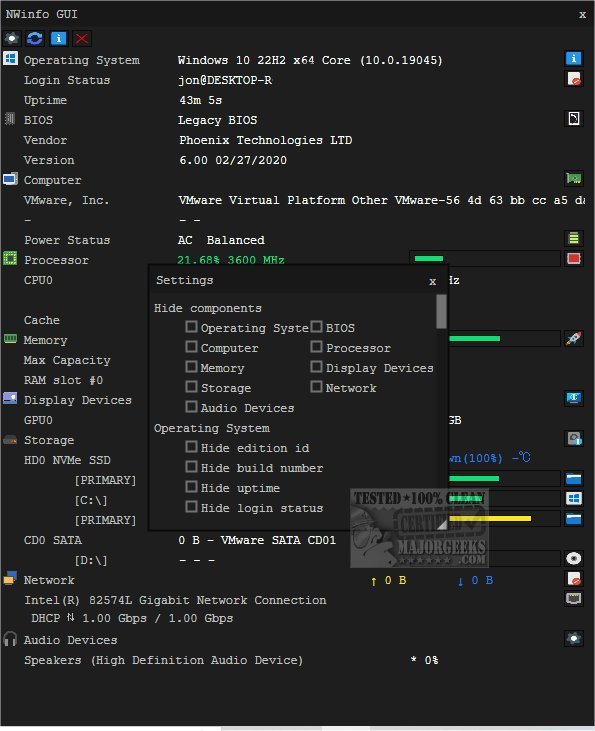
NWinfo version 1.6.7 has been released, enhancing its functionality as a versatile tool for retrieving vital system and hardware information. This comprehensive application is designed to optimize system performance by providing insights into hardware and software configurations, simplifying the troubleshooting process, and ensuring hardware compatibility for seamless operation.
With NWinfo, users can easily access detailed data about their computer’s components, including:
- SMBIOS: Access detailed firmware and hardware component information.
- CPUID: Retrieve processor-specific details, such as model number and capabilities.
- S.M.A.R.T.: Monitor the health and reliability of storage devices, aiding in the prediction of potential failures.
- PCI Data: Gather information about installed PCI devices, including graphics cards and network interfaces.
- EDID: Obtain details about connected display devices for better configuration.
Additionally, NWinfo supports flexible data export options, allowing findings to be exported in formats like JSON, YAML, and LUA tables for easy integration or sharing. It also features a Command Line interface for advanced users, with all options available on the developer's website.
To further assist users, NWinfo provides helpful guides on identifying various hardware components, including how to find the serial number of a Windows PC, check graphics card details, and assess RAM specifications.
Overall, NWinfo 1.6.7 stands out as a powerful tool for anyone looking to understand and optimize their system's performance while ensuring compatibility among hardware components. This release not only enhances user experience but also positions NWinfo as an essential asset for both IT professionals and everyday users alike
With NWinfo, users can easily access detailed data about their computer’s components, including:
- SMBIOS: Access detailed firmware and hardware component information.
- CPUID: Retrieve processor-specific details, such as model number and capabilities.
- S.M.A.R.T.: Monitor the health and reliability of storage devices, aiding in the prediction of potential failures.
- PCI Data: Gather information about installed PCI devices, including graphics cards and network interfaces.
- EDID: Obtain details about connected display devices for better configuration.
Additionally, NWinfo supports flexible data export options, allowing findings to be exported in formats like JSON, YAML, and LUA tables for easy integration or sharing. It also features a Command Line interface for advanced users, with all options available on the developer's website.
To further assist users, NWinfo provides helpful guides on identifying various hardware components, including how to find the serial number of a Windows PC, check graphics card details, and assess RAM specifications.
Overall, NWinfo 1.6.7 stands out as a powerful tool for anyone looking to understand and optimize their system's performance while ensuring compatibility among hardware components. This release not only enhances user experience but also positions NWinfo as an essential asset for both IT professionals and everyday users alike
NWinfo 1.6.7 released
NWinfo is a comprehensive tool designed to help you retrieve essential system/hardware information and more.