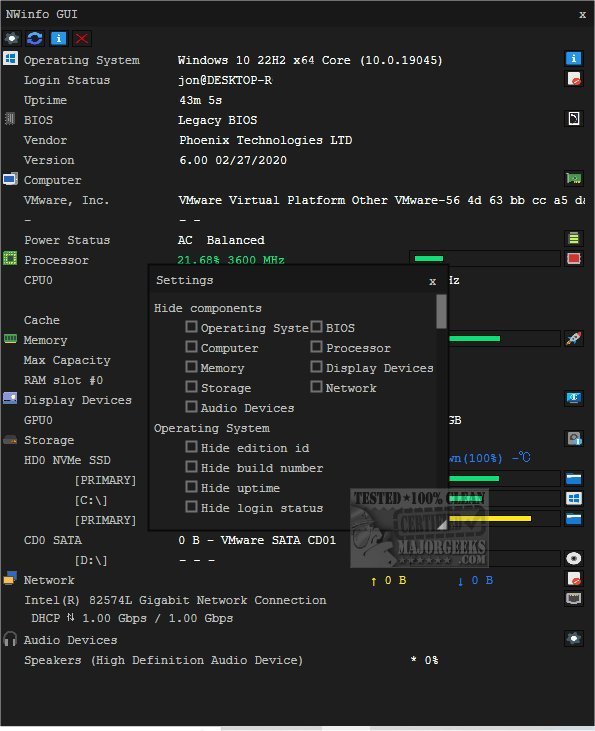
NWinfo is a robust tool that facilitates the retrieval of vital system and hardware information, streamlining performance optimization and troubleshooting. With this latest release, users can easily access and analyze critical insights into both hardware and software configurations, enhancing overall system performance.
One of NWinfo's standout features is its ability to assist in identifying and resolving issues promptly, ensuring users can maintain system integrity and efficiency. The tool also guarantees hardware compatibility, providing confidence that various components will function seamlessly together.
In addition to its analytics capabilities, NWinfo offers flexible data export options, allowing users to export findings in widely used formats such as JSON, YAML, and LUA tables. This versatility ensures easy integration into various applications or collaborative sharing with colleagues for detailed analysis. Furthermore, NWinfo supports command-line usage, with all options readily available on the developer's website, catering to advanced users and automation enthusiasts.
NWinfo delivers in-depth insights into numerous computer components, including:
- SMBIOS: Access critical data regarding the system's firmware and hardware components.
- CPUID: Obtain detailed processor information, including model number, capabilities, and features.
- S.M.A.R.T.: Monitor the health and reliability of storage devices, helping predict potential failures.
- PCI: Gather information on installed PCI devices, such as graphics cards and network interfaces.
- EDID: Retrieve data about connected display devices, enhancing configuration and compatibility.
For users looking to delve deeper into their systems, NWinfo provides helpful guidance on identifying hardware, such as how to find the serial number of a Windows PC, check the graphics card in use, and verify memory specifications.
In summary, NWinfo 1.6.5 is an invaluable tool for anyone looking to optimize their computing experience, offering comprehensive insights and user-friendly features that enhance both performance and troubleshooting capabilities
One of NWinfo's standout features is its ability to assist in identifying and resolving issues promptly, ensuring users can maintain system integrity and efficiency. The tool also guarantees hardware compatibility, providing confidence that various components will function seamlessly together.
In addition to its analytics capabilities, NWinfo offers flexible data export options, allowing users to export findings in widely used formats such as JSON, YAML, and LUA tables. This versatility ensures easy integration into various applications or collaborative sharing with colleagues for detailed analysis. Furthermore, NWinfo supports command-line usage, with all options readily available on the developer's website, catering to advanced users and automation enthusiasts.
NWinfo delivers in-depth insights into numerous computer components, including:
- SMBIOS: Access critical data regarding the system's firmware and hardware components.
- CPUID: Obtain detailed processor information, including model number, capabilities, and features.
- S.M.A.R.T.: Monitor the health and reliability of storage devices, helping predict potential failures.
- PCI: Gather information on installed PCI devices, such as graphics cards and network interfaces.
- EDID: Retrieve data about connected display devices, enhancing configuration and compatibility.
For users looking to delve deeper into their systems, NWinfo provides helpful guidance on identifying hardware, such as how to find the serial number of a Windows PC, check the graphics card in use, and verify memory specifications.
In summary, NWinfo 1.6.5 is an invaluable tool for anyone looking to optimize their computing experience, offering comprehensive insights and user-friendly features that enhance both performance and troubleshooting capabilities
NWinfo 1.6.5 released
NWinfo is a comprehensive tool designed to help you retrieve essential system/hardware information and more.