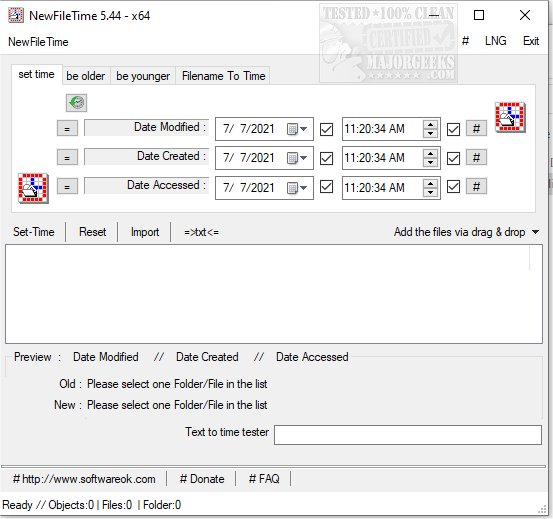
NewFileTime version 8.28 has been released, offering users a versatile tool for managing file and folder timestamps on their systems. This free application enables users to easily adjust timestamps to make files appear younger or older, or to set them to a specific date and time.
One of the standout features of NewFileTime is its ability to process multiple files and folders simultaneously. Users can conveniently add files through a drag-and-drop interface or by importing them from a folder, streamlining the workflow to get tasks done quickly. Being a portable utility, NewFileTime allows users to make timestamp adjustments for creation, last access, and modification dates at any location and time.
In addition to its primary functionality, NewFileTime can be particularly useful in various scenarios, such as correcting erroneous timestamps, organizing files based on dates, or preparing files for archival. It offers a straightforward and efficient solution for users looking to manage their files more effectively.
Moreover, NewFileTime can be a helpful companion for those encountering issues like file access denial or needing to securely delete files in Windows 10 and 11. Users can also benefit from the ability to take full ownership of files and folders, enhancing their control over file management.
Overall, NewFileTime 8.28 is a powerful tool for anyone who needs to manipulate file timestamps, providing flexibility and efficiency in managing their digital assets
One of the standout features of NewFileTime is its ability to process multiple files and folders simultaneously. Users can conveniently add files through a drag-and-drop interface or by importing them from a folder, streamlining the workflow to get tasks done quickly. Being a portable utility, NewFileTime allows users to make timestamp adjustments for creation, last access, and modification dates at any location and time.
In addition to its primary functionality, NewFileTime can be particularly useful in various scenarios, such as correcting erroneous timestamps, organizing files based on dates, or preparing files for archival. It offers a straightforward and efficient solution for users looking to manage their files more effectively.
Moreover, NewFileTime can be a helpful companion for those encountering issues like file access denial or needing to securely delete files in Windows 10 and 11. Users can also benefit from the ability to take full ownership of files and folders, enhancing their control over file management.
Overall, NewFileTime 8.28 is a powerful tool for anyone who needs to manipulate file timestamps, providing flexibility and efficiency in managing their digital assets
NewFileTime 8.28 released
NewFileTime is a free app that allows you to manipulate timestamps on any file or folder on your system, making them younger or older or setting a specific date/time.