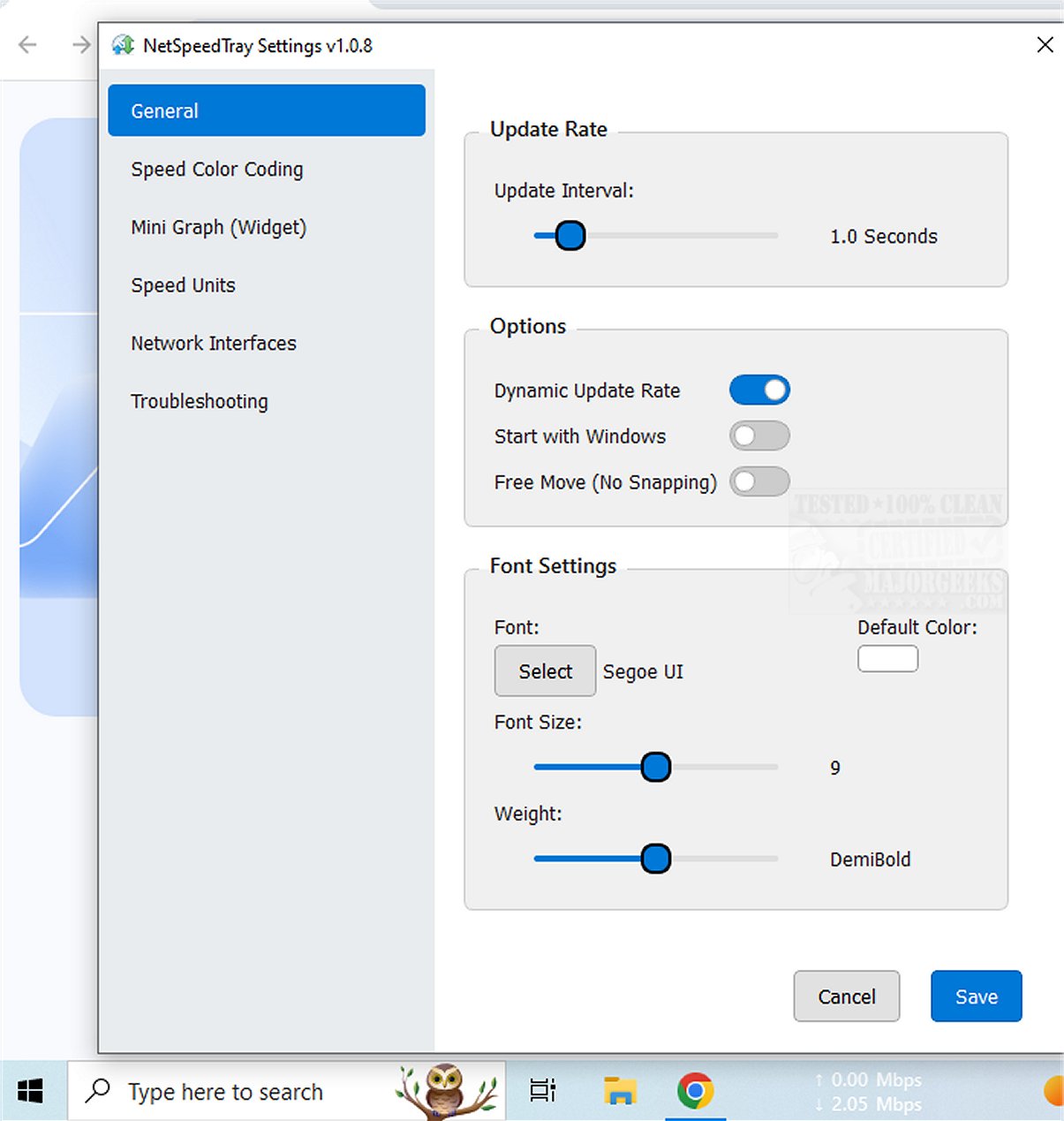
NetSpeedTray is a real-time network speed monitoring tool that offers users critical insights into their internet performance. This utility is particularly helpful for those who want to stay informed about their connection status as they transfer files or experience suspected slow speeds.
Key Features of NetSpeedTray:
- Systray Integration: NetSpeedTray operates as a tray-based application, allowing users to quickly access network speed information without disrupting their workflow. It serves as a convenient alternative to the more detailed, but intrusive, breakdowns offered by Windows Task Manager.
- Network Interface Monitoring: Users can opt to monitor specific network interfaces, which adds a layer of customization to their network assessment. An enhancement that would further improve the tool could be the ability to track network usage on a per-application basis, enabling users to pinpoint which programs might be affecting network performance.
- Customization Options: The software boasts various customization features, including Speed Color Coding, which provides visual indicators of speed performance. Users can modify font settings, color schemes for different speed metrics, and even enable a mini graph widget to visualize speed data alongside numeric values.
User Experience and Verdict:
NetSpeedTray is designed for Windows users, seamlessly integrating into the Taskbar and presenting real-time upload and download speeds in an intuitive manner. Its native appearance and user-friendly interface make it an attractive option for anyone looking to keep a close watch on their network performance. Overall, NetSpeedTray enhances the experience of staying connected while delivering essential network insights in an elegant format.
Future Considerations:
As technology continues to evolve, NetSpeedTray could further enhance its functionality by incorporating features such as advanced analytics, alerts for unusual network activity, and integration with other network management tools. These additions could provide users with even deeper insights and control over their internet performance, ensuring they can optimize their connections effectively.
Related Topics:
- How to Improve Your Wireless Network Performance
- Hide or Block Neighbor's Wi-Fi Networks on Windows
- How to See Your Network Adapter Speed in Windows 10 & 11
- How to Reset Network Settings in Windows 10 & 1
Key Features of NetSpeedTray:
- Systray Integration: NetSpeedTray operates as a tray-based application, allowing users to quickly access network speed information without disrupting their workflow. It serves as a convenient alternative to the more detailed, but intrusive, breakdowns offered by Windows Task Manager.
- Network Interface Monitoring: Users can opt to monitor specific network interfaces, which adds a layer of customization to their network assessment. An enhancement that would further improve the tool could be the ability to track network usage on a per-application basis, enabling users to pinpoint which programs might be affecting network performance.
- Customization Options: The software boasts various customization features, including Speed Color Coding, which provides visual indicators of speed performance. Users can modify font settings, color schemes for different speed metrics, and even enable a mini graph widget to visualize speed data alongside numeric values.
User Experience and Verdict:
NetSpeedTray is designed for Windows users, seamlessly integrating into the Taskbar and presenting real-time upload and download speeds in an intuitive manner. Its native appearance and user-friendly interface make it an attractive option for anyone looking to keep a close watch on their network performance. Overall, NetSpeedTray enhances the experience of staying connected while delivering essential network insights in an elegant format.
Future Considerations:
As technology continues to evolve, NetSpeedTray could further enhance its functionality by incorporating features such as advanced analytics, alerts for unusual network activity, and integration with other network management tools. These additions could provide users with even deeper insights and control over their internet performance, ensuring they can optimize their connections effectively.
Related Topics:
- How to Improve Your Wireless Network Performance
- Hide or Block Neighbor's Wi-Fi Networks on Windows
- How to See Your Network Adapter Speed in Windows 10 & 11
- How to Reset Network Settings in Windows 10 & 1
NetSpeedTray 1.3.2 released
NetSpeedTray allows you to monitor and assess your network speeds in real-time. This tool provides valuable insights into your internet performance, helping you stay informed about your connection status.