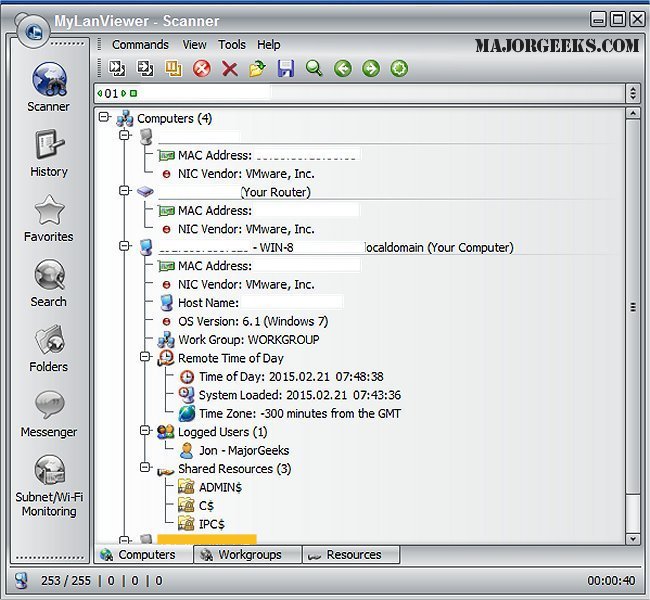
MyLanViewer Network/IP Scanner version 6.8.0 has been released, enhancing its capabilities as a robust tool for scanning Netbios and LAN/Network IP addresses. This software enables users to efficiently locate IP addresses, MAC addresses, and shared folders for computers connected to either wired or wireless networks. It presents information in a visually appealing buddy-list style interface, detailing the computer name, IP address, MAC address, NIC vendor, operating system version, logged-in users, shared folders, and other relevant technical details.
In addition to basic scanning features, MyLanViewer offers advanced functionalities such as remote shutdown, wake-on-LAN, and various power management options including locking workstations, logging off users, and rebooting or powering off devices. It can also monitor IP addresses and provide notifications for any changes in the status of connected computers.
The software is capable of accessing shared folders, terminating user sessions, and disabling shared folders as necessary. It also includes netstat information and can detect unauthorized DHCP servers within the network. Notably, MyLanViewer can monitor all devices on a subnet, including hidden ones, and will alert users when new devices connect, which is particularly useful for those managing wireless networks.
The installation process is straightforward, and the interface is designed to be user-friendly. MyLanViewer Network/IP Scanner is an essential tool for network administrators and home users alike who wish to maintain oversight of their network's activity.
In summary, MyLanViewer Network/IP Scanner 6.8.0 is an invaluable resource for managing and monitoring network activity, providing both essential and advanced features to ensure network efficiency and security. As networks continue to grow and evolve, tools like MyLanViewer will remain critical in helping users maintain control over their digital environments. Future updates may focus on enhancing user experience further, adding features such as increased compatibility with emerging network technologies, and improved security protocols to safeguard user data
MyLanViewer Network/IP Scanner 6.8.0 released
MyLanViewer Network/IP Scanner is a powerful Netbios and LAN/Network IP address scanner that assists in locating IP addresses, MAC addresses, and shared folders of computers on your wired or wireless (Wi-Fi) network.