LibreScroll has recently released version 2.2.2, a software application designed to enhance the scrolling experience on Windows operating systems. By enabling smooth inertial scrolling with any standard mouse, LibreScroll offers users a more fluid and natural navigation experience, similar to touch scrolling on smartphones. This feature is particularly beneficial when navigating through lengthy content, allowing for efficient and intuitive movement.
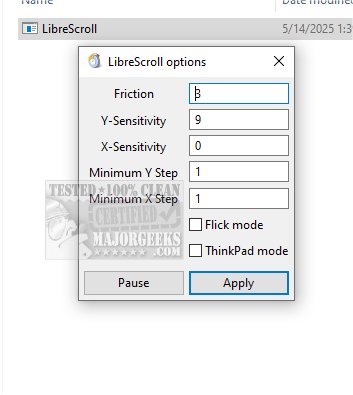
One notable aspect of LibreScroll is its lack of a traditional user interface, opting instead for a compact settings window that can be accessed through the system tray. Users can customize various scrolling parameters such as friction, Y-sensitivity, X-sensitivity, and minimum step sizes for both axes. Additionally, the software includes a flick mode that enhances the scrolling effect, making it feel more seamless and engaging. Users can make real-time adjustments to these settings without needing to restart the application, and they can pause the custom scroll functionality at any time for greater control.
To utilize LibreScroll, users simply need to press and hold the middle mouse button while moving the mouse, creating a scrolling effect that keeps the cursor stationary. When the button is released, scrolling stops, allowing the cursor to move freely again. It's important for users to click the Apply button after making any changes to ensure that their adjustments take effect.
The overall verdict on LibreScroll is positive, as it successfully transforms the scrolling experience to mirror the fluidity of touch devices. This software captures the elegant and effortless scrolling found on smartphones and brings it to traditional mouse usage, enhancing user productivity and satisfaction.
Looking ahead, potential extensions of LibreScroll could include features such as customizable scrolling gestures, support for additional input devices like trackpads, and integration with various applications to optimize scrolling experiences across different platforms. Additionally, user feedback could guide future updates and enhancements, ensuring that LibreScroll continues to meet the evolving needs of its users
LibreScroll 2.2.2 released
LibreScroll enables smooth inertial scrolling on Windows using any standard mouse. This feature enhances the scrolling experience by providing more fluid and natural movement, making it easier to navigate through content efficiently.