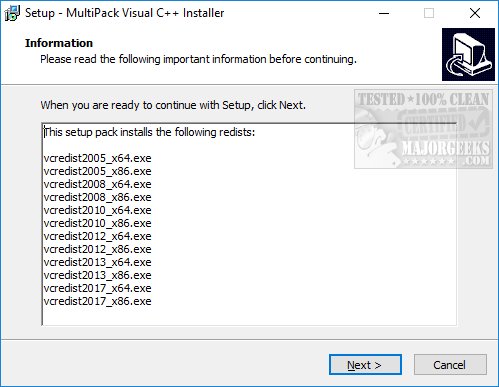
The MultiPack Visual C++ Installer 4.2 has just been released, providing a streamlined solution for installing all Microsoft Visual C++ end-user runtimes. Recognizing the confusion caused by the numerous separate runtime packages available, the creator developed this comprehensive installer to simplify the process for users. If you're encountering issues with applications or games that fail to run due to missing Visual C++ components, this installer offers a quick fix.
Unlike traditional installers, MultiPack Visual C++ Installer does not feature individual installation or uninstallation options, eliminating any uncertainty. Users simply need to execute the program, and it will automatically install all necessary Visual C++ runtimes. It's important to note that the installer has been tested exclusively on Windows 10 and 11.
If you're frustrated with the challenge of finding the correct Visual C++ runtime package, the MultiPack Visual C++ Installer is designed to have you operational in just minutes.
In addition to its straightforward installation process, the MultiPack Visual C++ Installer is also beneficial for developers who need to ensure that their applications run smoothly on end-user systems. By bundling all required runtimes into one package, it reduces the burden on users who may not have the technical expertise to navigate the various Visual C++ redistributable options.
Furthermore, as software continues to evolve, the importance of having the correct libraries and runtimes installed cannot be overstated. This tool not only addresses immediate issues but also promotes a smoother overall experience when running applications that rely on Visual C++.
In summary, the MultiPack Visual C++ Installer 4.2 is an essential utility for both casual users and developers, ensuring that Visual C++ dependencies are easily managed and installed, thereby enhancing application compatibility and performance
Unlike traditional installers, MultiPack Visual C++ Installer does not feature individual installation or uninstallation options, eliminating any uncertainty. Users simply need to execute the program, and it will automatically install all necessary Visual C++ runtimes. It's important to note that the installer has been tested exclusively on Windows 10 and 11.
If you're frustrated with the challenge of finding the correct Visual C++ runtime package, the MultiPack Visual C++ Installer is designed to have you operational in just minutes.
In addition to its straightforward installation process, the MultiPack Visual C++ Installer is also beneficial for developers who need to ensure that their applications run smoothly on end-user systems. By bundling all required runtimes into one package, it reduces the burden on users who may not have the technical expertise to navigate the various Visual C++ redistributable options.
Furthermore, as software continues to evolve, the importance of having the correct libraries and runtimes installed cannot be overstated. This tool not only addresses immediate issues but also promotes a smoother overall experience when running applications that rely on Visual C++.
In summary, the MultiPack Visual C++ Installer 4.2 is an essential utility for both casual users and developers, ensuring that Visual C++ dependencies are easily managed and installed, thereby enhancing application compatibility and performance
MultiPack Visual C++ Installer 4.2 released
MultiPack Visual C++ Installer is designed to install all of the Microsoft Visual C++ end-user runtimes.