MultiMonitorTool has recently been updated to version 2.25, enhancing its functionality for managing multiple monitors on a system. This versatile tool allows users to enable or disable monitors, designate a primary monitor, save and load monitor configurations, and seamlessly move windows between monitors. Users can perform these tasks through an intuitive user interface or via the Command Line, providing flexibility based on individual preferences.
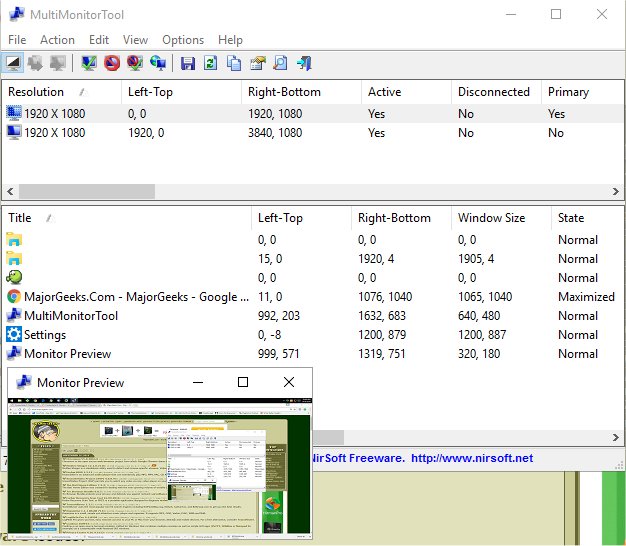
One of the standout features of MultiMonitorTool is its preview window, which displays a live view of each monitor connected to the system, making it easier to manage and visualize monitor setups. The tool is designed for simplicity, requiring no installation or additional DLL files; users can simply run the executable file, MultiMonitorTool.exe, to get started.
The main interface consists of two panes: the upper pane lists all detected monitors, while the lower pane shows details about the visible windows on the selected monitor. Users can easily select multiple monitors and employ keyboard shortcuts such as Ctrl+F6 to disable, Ctrl+F7 to enable, Ctrl+F8 to toggle, and Ctrl+F9 to set a primary monitor. Furthermore, users can manage windows by selecting them in the lower pane and using options to move them to the next monitor or to the primary monitor.
In addition to its core features, MultiMonitorTool also aids in optimizing workflow for users with multiple displays. It is particularly useful for professionals who require efficient window management for tasks such as graphic design, programming, or data analysis.
To further enhance this tool, future versions could consider adding features such as customizable profiles for different work environments, integration with virtual desktops, or improved window snapping capabilities. Additionally, providing support for touchscreen monitors or interactive displays could broaden its usability for various user scenarios
One of the standout features of MultiMonitorTool is its preview window, which displays a live view of each monitor connected to the system, making it easier to manage and visualize monitor setups. The tool is designed for simplicity, requiring no installation or additional DLL files; users can simply run the executable file, MultiMonitorTool.exe, to get started.
The main interface consists of two panes: the upper pane lists all detected monitors, while the lower pane shows details about the visible windows on the selected monitor. Users can easily select multiple monitors and employ keyboard shortcuts such as Ctrl+F6 to disable, Ctrl+F7 to enable, Ctrl+F8 to toggle, and Ctrl+F9 to set a primary monitor. Furthermore, users can manage windows by selecting them in the lower pane and using options to move them to the next monitor or to the primary monitor.
In addition to its core features, MultiMonitorTool also aids in optimizing workflow for users with multiple displays. It is particularly useful for professionals who require efficient window management for tasks such as graphic design, programming, or data analysis.
To further enhance this tool, future versions could consider adding features such as customizable profiles for different work environments, integration with virtual desktops, or improved window snapping capabilities. Additionally, providing support for touchscreen monitors or interactive displays could broaden its usability for various user scenarios
MultiMonitorTool 2.25 released
MultiMonitorTool can disable/enable monitors, set the primary monitor, save and load the configuration of all monitors, and move windows from one monitor to another.