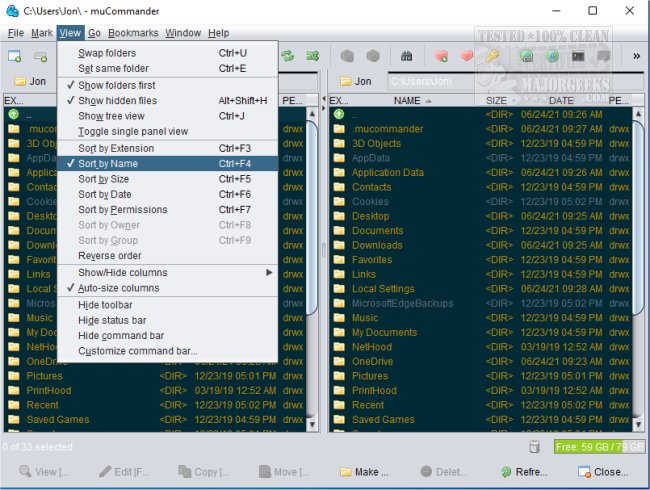
muCommander has recently released version 1.6.2 of its cross-platform file manager, which features a dual-pane interface designed to enhance file management efficiency. The application allows users to effortlessly copy, move, and batch rename files, as well as perform checksum calculations, all from a modern user interface.
Key features of muCommander include support for multiple tabs, universal bookmarks, and a built-in credential manager, allowing for easy management of various accounts. Users can also customize keyboard shortcuts to streamline their workflow. The software provides access to a virtual filesystem that supports a wide range of protocols and services, including local volumes, FTP, SFTP, SMB, NFS, HTTP, Amazon S3, Hadoop HDFS, and Bonjour.
muCommander is particularly beneficial for those seeking a robust file manager that accommodates various filesystems and archive formats, along with features like bookmarks, credential management, and customizable themes. Its compatibility with popular cloud storage services like Dropbox and Google Drive, as well as its ability to handle multiple archive formats such as ZIP, RAR, and 7z, makes it a versatile tool for users.
Additionally, muCommander offers a fully customizable user interface with configurable toolbars and themes, and it is available in multiple languages, catering to an international audience.
For users looking for further improvements in their file management experience, resources such as keyboard shortcuts for Windows File Explorer and tips for optimizing file navigation are also available.
In summary, muCommander 1.6.2 stands out as a powerful and flexible file management tool, perfect for users who require comprehensive support for a variety of systems and workflows
Key features of muCommander include support for multiple tabs, universal bookmarks, and a built-in credential manager, allowing for easy management of various accounts. Users can also customize keyboard shortcuts to streamline their workflow. The software provides access to a virtual filesystem that supports a wide range of protocols and services, including local volumes, FTP, SFTP, SMB, NFS, HTTP, Amazon S3, Hadoop HDFS, and Bonjour.
muCommander is particularly beneficial for those seeking a robust file manager that accommodates various filesystems and archive formats, along with features like bookmarks, credential management, and customizable themes. Its compatibility with popular cloud storage services like Dropbox and Google Drive, as well as its ability to handle multiple archive formats such as ZIP, RAR, and 7z, makes it a versatile tool for users.
Additionally, muCommander offers a fully customizable user interface with configurable toolbars and themes, and it is available in multiple languages, catering to an international audience.
For users looking for further improvements in their file management experience, resources such as keyboard shortcuts for Windows File Explorer and tips for optimizing file navigation are also available.
In summary, muCommander 1.6.2 stands out as a powerful and flexible file management tool, perfect for users who require comprehensive support for a variety of systems and workflows
muCommander 1.6.2 released
muCommander is a cross-platform file manager with a dual-pane interface.