The newly released MSI Viewer 4.0 is a powerful utility designed to help users inspect the contents of MSI (Microsoft Installer) packages without the need to run the installer itself. Built on the lessmsi project, it serves as an efficient solution for accessing individual files contained within MSI files.
Key Features and Functionality
MSI Viewer is particularly beneficial in situations where users require a specific file from an application but wish to avoid installing the entire software. By allowing access to necessary components without full installation, MSI Viewer streamlines the process of file retrieval.
How to Use MSI Viewer
To begin using MSI Viewer, simply launch the application and select the MSI file you wish to examine. Once chosen, the program presents a detailed list of all files included in the package. This functionality is especially advantageous when only a small component is needed from a larger application, as it minimizes the hassle of navigating through extraneous files.
After locating the desired files, users can easily extract them by clicking the "Extract" button. This feature ensures that files can be accessed directly and efficiently, saving users time and effort. Moreover, it eliminates the inconvenience of having to uninstall the program later, which can often be a cumbersome task.
Context Menu Integration
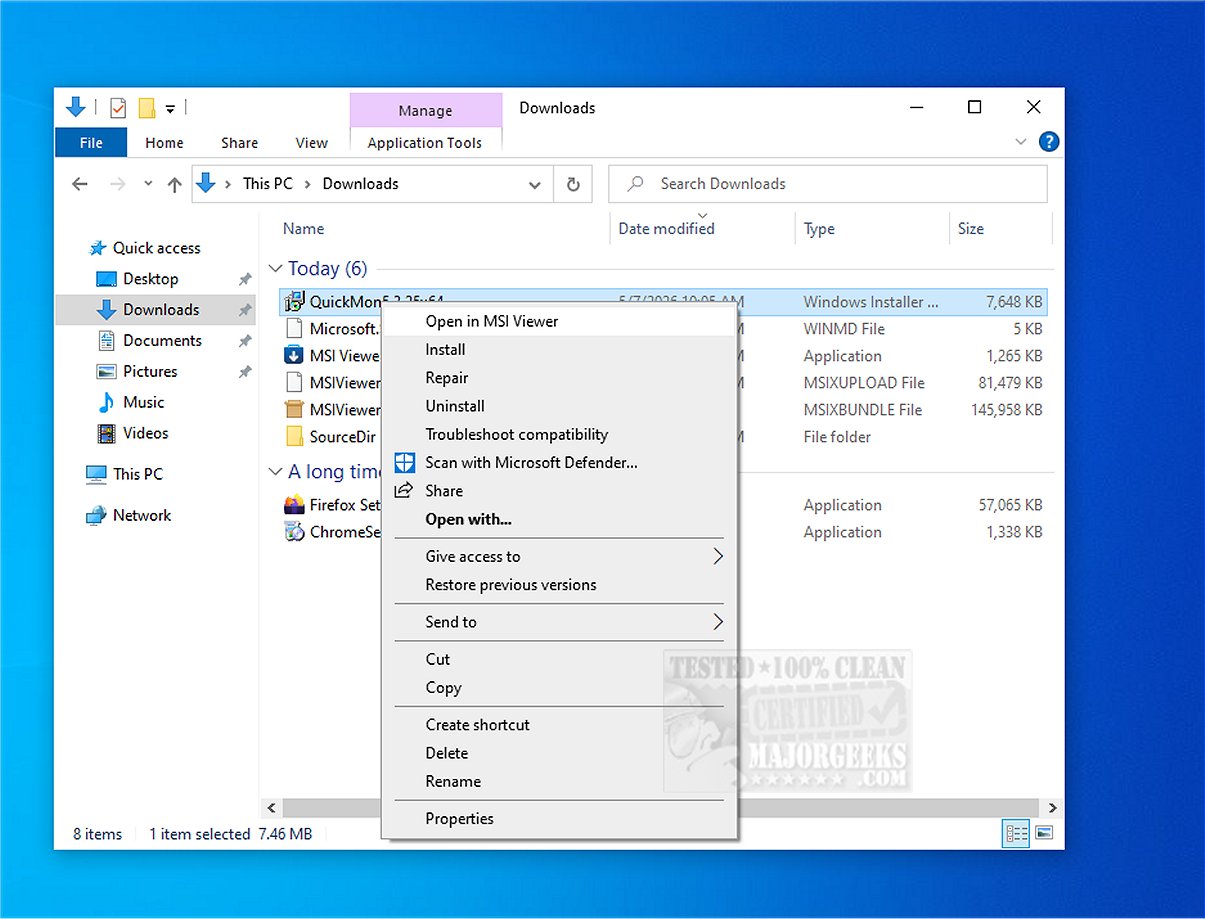
MSI Viewer also offers context menu integration, enhancing user convenience. This feature allows quick access to extraction options directly from the file explorer, further simplifying the workflow.
Geek Verdict
MSI Viewer is an indispensable tool for anyone looking to explore MSI installer packages without executing the installer, making it an excellent choice for inspecting contents for potential security threats or for simply retrieving needed files. Its user-friendly interface and effective functionality make file analysis straightforward and efficient.
Further Reading
For those interested in similar topics, the following resources may be helpful:
- Extract, Expand, or Create CAB Files with the Command-Line
- How to Create Self-Extracting Archives on Windows 10
- How to Open and Use a CAB File in Windows
- Understanding RAR Files and Their Usage
- An Overview of LZMA Compression and Its Applications
Conclusion
With MSI Viewer 4.0, users now have a robust tool at their disposal for analyzing MSI packages, making it easier than ever to access required files without the overhead of full software installation
Key Features and Functionality
MSI Viewer is particularly beneficial in situations where users require a specific file from an application but wish to avoid installing the entire software. By allowing access to necessary components without full installation, MSI Viewer streamlines the process of file retrieval.
How to Use MSI Viewer
To begin using MSI Viewer, simply launch the application and select the MSI file you wish to examine. Once chosen, the program presents a detailed list of all files included in the package. This functionality is especially advantageous when only a small component is needed from a larger application, as it minimizes the hassle of navigating through extraneous files.
After locating the desired files, users can easily extract them by clicking the "Extract" button. This feature ensures that files can be accessed directly and efficiently, saving users time and effort. Moreover, it eliminates the inconvenience of having to uninstall the program later, which can often be a cumbersome task.
Context Menu Integration
MSI Viewer also offers context menu integration, enhancing user convenience. This feature allows quick access to extraction options directly from the file explorer, further simplifying the workflow.
Geek Verdict
MSI Viewer is an indispensable tool for anyone looking to explore MSI installer packages without executing the installer, making it an excellent choice for inspecting contents for potential security threats or for simply retrieving needed files. Its user-friendly interface and effective functionality make file analysis straightforward and efficient.
Further Reading
For those interested in similar topics, the following resources may be helpful:
- Extract, Expand, or Create CAB Files with the Command-Line
- How to Create Self-Extracting Archives on Windows 10
- How to Open and Use a CAB File in Windows
- Understanding RAR Files and Their Usage
- An Overview of LZMA Compression and Its Applications
Conclusion
With MSI Viewer 4.0, users now have a robust tool at their disposal for analyzing MSI packages, making it easier than ever to access required files without the overhead of full software installation
MSI Viewer 4.0 released
MSI Viewer is designed to help you examine the contents of MSI installer packages without running the installer. It is based on the lessmsi project and provides a practical solution for efficiently accessing individual files from MSI files.