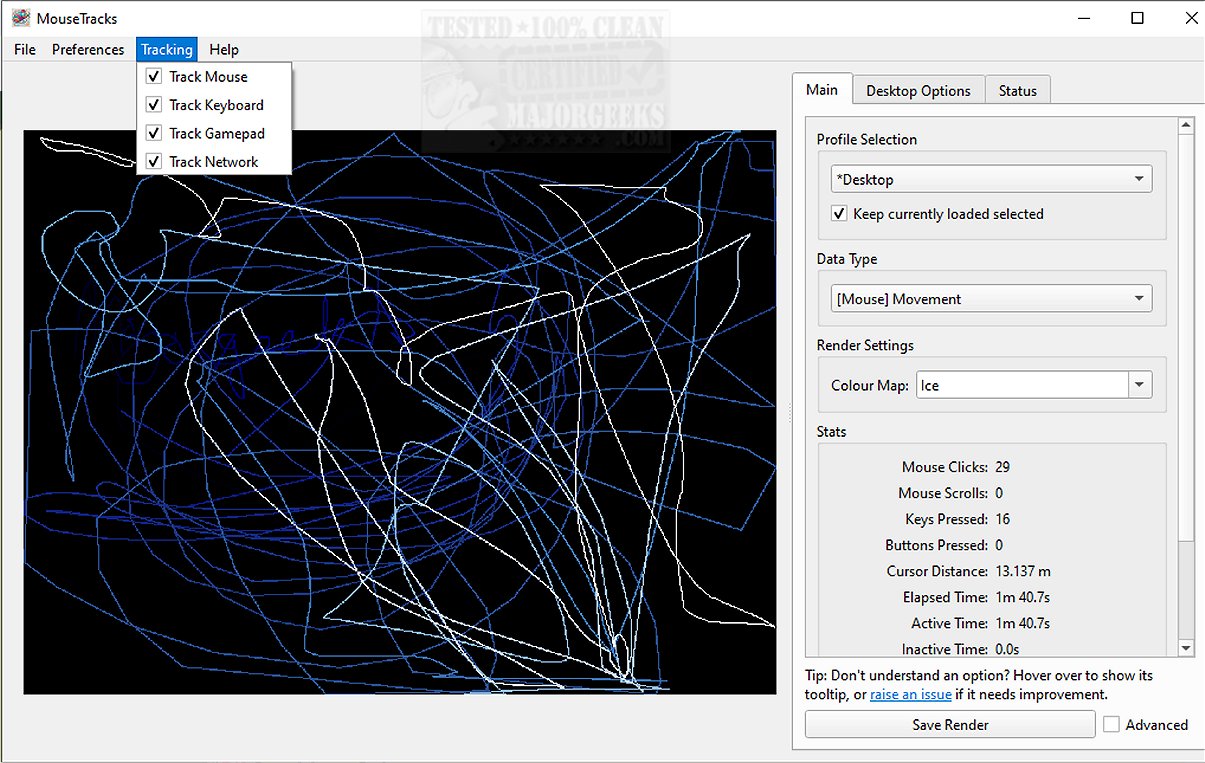
MouseTracks has released version 2.7.0, a powerful application designed to meticulously track and visualize various forms of user input over time, including mouse movements, clicks, keyboard activity, and gamepad input. The application is engineered for unobtrusiveness, enabling continuous operation for extended periods, possibly even years, allowing users to later explore vivid and informative visualizations of their interaction data.
At its core, MouseTracks excels in monitoring mouse movements and clicks with precision. It features a dynamic interface where older movements gradually fade from view, making it easier for users to focus on recent interactions. The application also generates detailed keyboard heatmaps and captures gamepad input, providing a comprehensive understanding of user interaction patterns.
One of the standout features of MouseTracks is the Live Preview functionality, which allows for real-time rendering of tracking data within the graphical user interface (GUI). Regardless of changes in screen resolution, the application consistently delivers high-quality renders, with independent tracking for each resolution that merges seamlessly during the rendering process for clarity.
MouseTracks is particularly adept at handling multi-monitor setups, offering seamless tracking across multiple displays. When linked to a specific application, the rendering bounds intuitively adjust to match the window geometry of that application, enhancing the relevance and usability of the data presented.
Designed for user convenience, MouseTracks operates silently in the background and can be configured to launch automatically upon system startup, minimizing to the systray for a hassle-free experience that does not interrupt regular tasks. Its architecture comprises multiple components that communicate efficiently while running independently, ensuring stable and reliable live tracking, even during resource-intensive operations like rendering visualizations or handling GUI tasks.
Overall, MouseTracks transcends basic tracking functionality, offering a sophisticated solution for users interested in gaining deep insights into their input behavior over time. With its clarity, efficiency, and seamless integration into daily workflows, it empowers users to analyze their interactions with ease and minimal disruption.
For those interested, the developer's repository offers additional information, including guides on running or building from source, a mini-FAQ, and other resources.
In future updates, MouseTracks could consider adding more customization options for visualizations, enhanced analytical tools for deeper insights, and integration with productivity software to further leverage the data collected for optimizing user workflows. These enhancements could make it an even more invaluable tool for users looking to refine their input habits and improve overall efficiency
At its core, MouseTracks excels in monitoring mouse movements and clicks with precision. It features a dynamic interface where older movements gradually fade from view, making it easier for users to focus on recent interactions. The application also generates detailed keyboard heatmaps and captures gamepad input, providing a comprehensive understanding of user interaction patterns.
One of the standout features of MouseTracks is the Live Preview functionality, which allows for real-time rendering of tracking data within the graphical user interface (GUI). Regardless of changes in screen resolution, the application consistently delivers high-quality renders, with independent tracking for each resolution that merges seamlessly during the rendering process for clarity.
MouseTracks is particularly adept at handling multi-monitor setups, offering seamless tracking across multiple displays. When linked to a specific application, the rendering bounds intuitively adjust to match the window geometry of that application, enhancing the relevance and usability of the data presented.
Designed for user convenience, MouseTracks operates silently in the background and can be configured to launch automatically upon system startup, minimizing to the systray for a hassle-free experience that does not interrupt regular tasks. Its architecture comprises multiple components that communicate efficiently while running independently, ensuring stable and reliable live tracking, even during resource-intensive operations like rendering visualizations or handling GUI tasks.
Overall, MouseTracks transcends basic tracking functionality, offering a sophisticated solution for users interested in gaining deep insights into their input behavior over time. With its clarity, efficiency, and seamless integration into daily workflows, it empowers users to analyze their interactions with ease and minimal disruption.
For those interested, the developer's repository offers additional information, including guides on running or building from source, a mini-FAQ, and other resources.
In future updates, MouseTracks could consider adding more customization options for visualizations, enhanced analytical tools for deeper insights, and integration with productivity software to further leverage the data collected for optimizing user workflows. These enhancements could make it an even more invaluable tool for users looking to refine their input habits and improve overall efficiency
MouseTracks 2.7.0 released
MouseTracks is a sophisticated application crafted to meticulously track and visualize various forms of user input over time, including mouse movements, clicks, keyboard activity, and gamepad input.