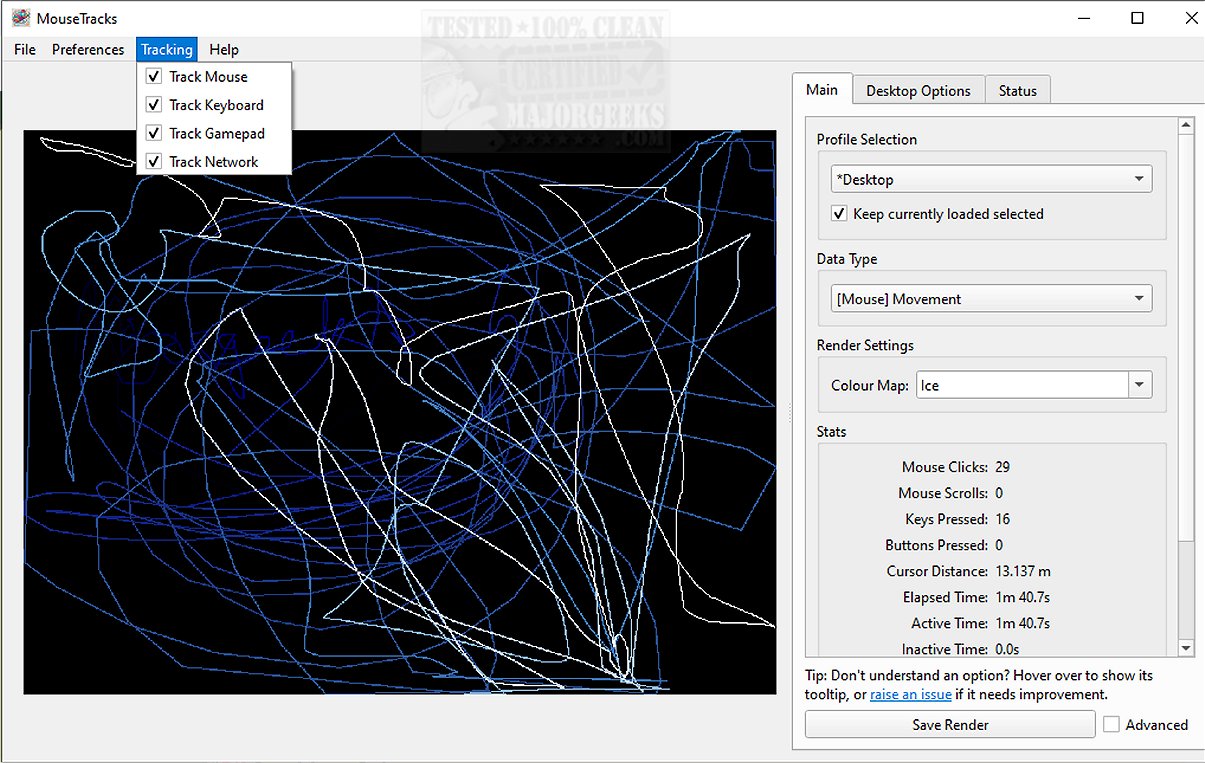
MouseTracks 2.5.0.3 has been released as an advanced application designed to meticulously monitor and visualize various user inputs, encompassing mouse movements, clicks, keyboard activity, and gamepad interactions. The application is engineered for unobtrusive operation, allowing users to run it continuously for extended periods—potentially years—before accessing detailed visualizations of their activity data.
At its core, MouseTracks provides precise monitoring of mouse movements and clicks while employing a dynamic interface that fades older interactions to maintain focus on recent data. It also generates intricate keyboard heatmaps and records gamepad input, thus offering users a comprehensive overview of their interaction habits.
A notable feature of MouseTracks is its Live Preview capability, which allows for real-time rendering of tracking data within the graphical user interface (GUI). Regardless of user modifications to screen resolution, the application maintains high-quality rendering by independently tracking each resolution and merging visual representations for clarity.
MouseTracks is adept at supporting multi-monitor setups, effectively tracking user activity across various displays. It intelligently adjusts rendering bounds to align with specific application windows, ensuring the data presented is relevant and user-friendly.
Designed for convenience, MouseTracks operates silently in the background. Users can set it to launch at system startup and minimize to the system tray, facilitating a seamless experience without interfering with daily tasks. Its modular architecture enhances stability, allowing live tracking to remain reliable even during resource-heavy operations such as rendering visualizations.
The application is more than just a tracking tool; it's a powerful resource for users seeking to understand their input behavior deeply. With its clarity, efficiency, and smooth integration into everyday workflows, MouseTracks empowers users to analyze their interactions effortlessly and with minimal disruption.
For those interested in delving deeper, the developer's repository provides additional resources, including instructions for running or building from source and a mini-FAQ for any queries.
Extensions:
In addition to its current features, future versions of MouseTracks could explore the integration of machine learning algorithms to provide predictive analysis of user behavior patterns. Enhanced customization options such as user-defined thresholds for tracking and visualization could further personalize the experience. Additionally, the application could benefit from enhanced collaboration features, allowing users to share their visualizations with peers or utilize them for productivity assessments in team environments. Overall, the potential for growth in functionality remains vast, promising even more utility for users in various fields
At its core, MouseTracks provides precise monitoring of mouse movements and clicks while employing a dynamic interface that fades older interactions to maintain focus on recent data. It also generates intricate keyboard heatmaps and records gamepad input, thus offering users a comprehensive overview of their interaction habits.
A notable feature of MouseTracks is its Live Preview capability, which allows for real-time rendering of tracking data within the graphical user interface (GUI). Regardless of user modifications to screen resolution, the application maintains high-quality rendering by independently tracking each resolution and merging visual representations for clarity.
MouseTracks is adept at supporting multi-monitor setups, effectively tracking user activity across various displays. It intelligently adjusts rendering bounds to align with specific application windows, ensuring the data presented is relevant and user-friendly.
Designed for convenience, MouseTracks operates silently in the background. Users can set it to launch at system startup and minimize to the system tray, facilitating a seamless experience without interfering with daily tasks. Its modular architecture enhances stability, allowing live tracking to remain reliable even during resource-heavy operations such as rendering visualizations.
The application is more than just a tracking tool; it's a powerful resource for users seeking to understand their input behavior deeply. With its clarity, efficiency, and smooth integration into everyday workflows, MouseTracks empowers users to analyze their interactions effortlessly and with minimal disruption.
For those interested in delving deeper, the developer's repository provides additional resources, including instructions for running or building from source and a mini-FAQ for any queries.
Extensions:
In addition to its current features, future versions of MouseTracks could explore the integration of machine learning algorithms to provide predictive analysis of user behavior patterns. Enhanced customization options such as user-defined thresholds for tracking and visualization could further personalize the experience. Additionally, the application could benefit from enhanced collaboration features, allowing users to share their visualizations with peers or utilize them for productivity assessments in team environments. Overall, the potential for growth in functionality remains vast, promising even more utility for users in various fields
MouseTracks 2.5.0.3 released
MouseTracks is a sophisticated application crafted to meticulously track and visualize various forms of user input over time, including mouse movements, clicks, keyboard activity, and gamepad input.