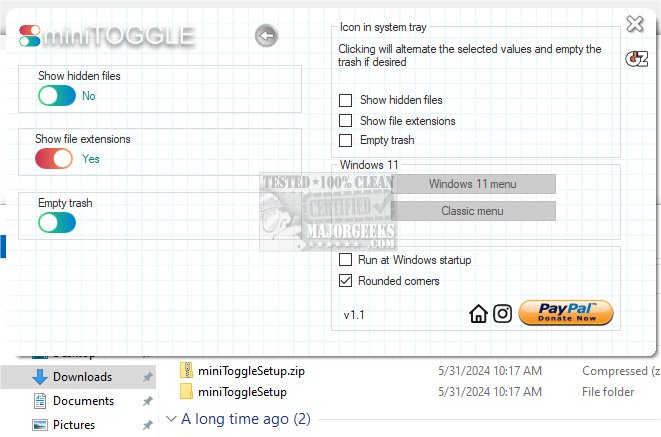
The latest version of miniToggle, 2.0.1, has been released, enhancing users' ability to customize their Explorer settings easily. This user-friendly application is designed to simplify modifying various settings, offering a portable option for on-the-go use.
Key Features of miniToggle 2.0.1:
- Show/Hide Hidden Files: Easily toggle the visibility of hidden files within Explorer.
- Show/Hide File Extensions: Users can choose to display or conceal file extensions for better file management.
- Empty Recycle Bin: Quickly clear out the recycle bin to free up disk space.
- Clean Explorer Tracks: Remove certain traces from Explorer for privacy and performance.
- Change Windows Menu Position: Customize the position of the Windows menu to suit your preferences.
- Show/Hide Clock with Seconds: Toggle the visibility of the clock, including seconds, for a more precise time display.
- Toggle Dark Mode: Switch between light and dark themes to suit your visual comfort.
- Toggle Windows Context Menu: Choose between the new design and the classic version of the Windows 11 context menu exclusively for Windows 11 users.
- Toggle Audio Mute: Quickly mute audio with a simple toggle.
In addition to these functionalities, miniToggle offers an extended screen feature that allows users to select and execute any of the settings mentioned with just a double-click on the tray icon. This quick access feature aims to enhance user convenience and productivity significantly.
As miniToggle continues to evolve, users can expect further improvements and additional features that cater to their needs for a more personalized and efficient Windows experience
Key Features of miniToggle 2.0.1:
- Show/Hide Hidden Files: Easily toggle the visibility of hidden files within Explorer.
- Show/Hide File Extensions: Users can choose to display or conceal file extensions for better file management.
- Empty Recycle Bin: Quickly clear out the recycle bin to free up disk space.
- Clean Explorer Tracks: Remove certain traces from Explorer for privacy and performance.
- Change Windows Menu Position: Customize the position of the Windows menu to suit your preferences.
- Show/Hide Clock with Seconds: Toggle the visibility of the clock, including seconds, for a more precise time display.
- Toggle Dark Mode: Switch between light and dark themes to suit your visual comfort.
- Toggle Windows Context Menu: Choose between the new design and the classic version of the Windows 11 context menu exclusively for Windows 11 users.
- Toggle Audio Mute: Quickly mute audio with a simple toggle.
In addition to these functionalities, miniToggle offers an extended screen feature that allows users to select and execute any of the settings mentioned with just a double-click on the tray icon. This quick access feature aims to enhance user convenience and productivity significantly.
As miniToggle continues to evolve, users can expect further improvements and additional features that cater to their needs for a more personalized and efficient Windows experience
miniToggle 2.0.1 released
miniToggle allows you to change several Explorer settings and more. Portable option is also available.