Minimal Image Viewer, a C++-based image viewing application tailored for Windows, has released its latest version, 1.9.0. This application emphasizes performance and minimalism, making it an ideal choice for users who prefer a straightforward and efficient way to view images. By leveraging native Windows APIs and the Windows Imaging Component (WIC), Minimal Image Viewer ensures reliable functionality for a variety of image formats.
Overview of Minimal Image Viewer
Minimal Image Viewer stands out due to its uncomplicated interface and commitment to user privacy. Upon launching, users are greeted with a sleek, borderless black window that allows for easy image import through drag-and-drop functionality or by accessing the traditional “Open” dialog via the right-click context menu. This user-friendly design helps streamline the process of selecting and viewing images.
Context Menu and Navigation Features
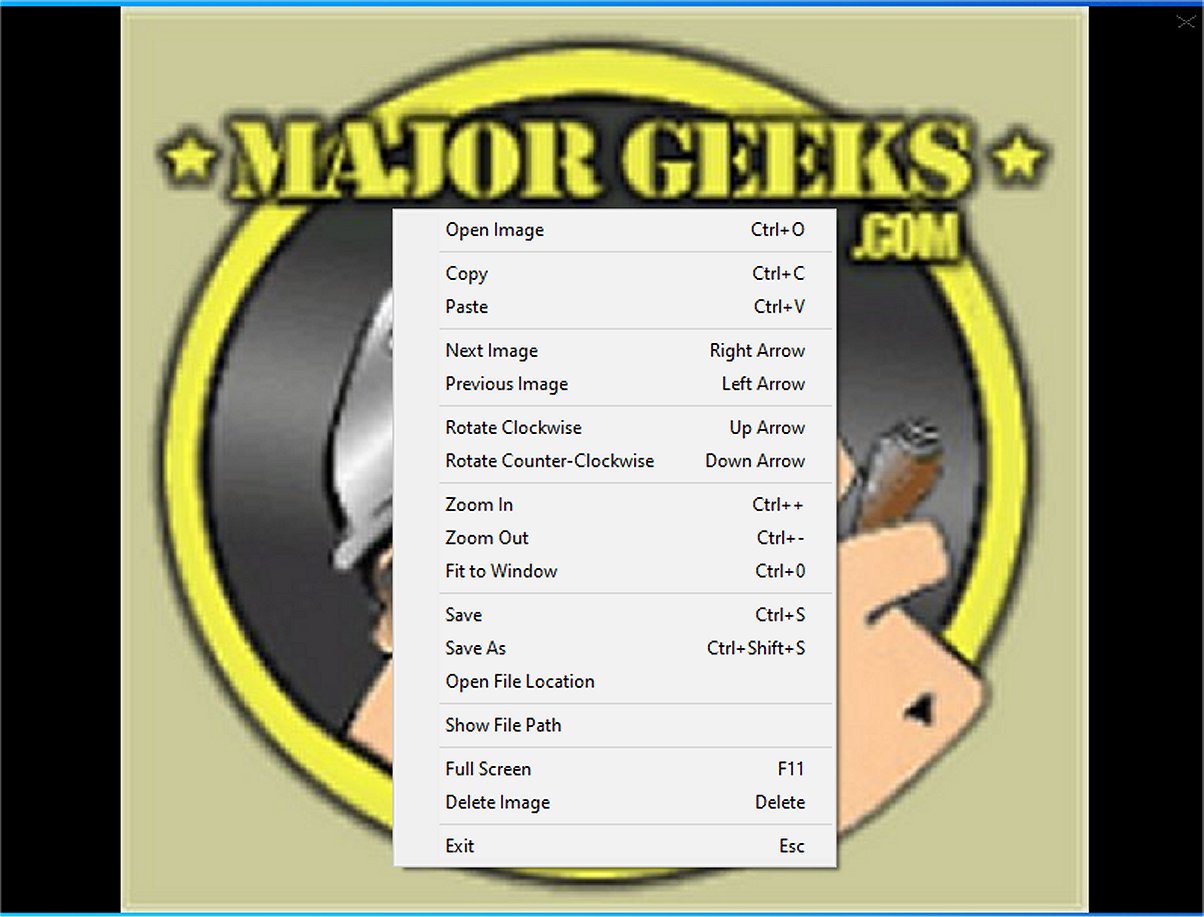
The context menu offers a limited selection of options, including the ability to copy the current image to the clipboard or paste images from the clipboard into the viewer. Navigation through images within a selected folder is seamless, enabling users to view all compatible images effortlessly. The application supports a broad range of file formats thanks to the Windows Imaging Component.
Viewing and Control Features
While the viewing features remain minimal, they are practical. Users can easily rotate images, adjust zoom levels, fit images to the window, or switch to full-screen mode. Additionally, the option to save images to a different location or delete them with just a click or keystroke enhances the organization of photo collections.
Control Shortcuts:
- Open Image: Ctrl+O or right-click → "Open Image"
- Navigate Images: Left/Right arrows or right-click → "Next/Previous Image"
- Zoom In/Out: Ctrl++/-, mouse wheel, or right-click → "Zoom In/Out"; Ctrl+0 or double-click to fit
- Rotate Image: Up/Down arrows or right-click → "Rotate Clockwise/Counterclockwise"
- Save Image: Ctrl+S or right-click → "Save Image" (maintains original format)
- Delete Image: Delete key or right-click → "Delete Image" (sends to Recycle Bin)
- Full-Screen Mode: F11 or right-click → "Full Screen"
- Move/Resize Window: Drag window or edges (non-full-screen)
- Exit Application: Esc or right-click → "Exit"
- Copy/Paste: Ctrl+C / Ctrl+V
Conclusion and Verdict
Overall, Minimal Image Viewer is a minimalist tool that provides a distraction-free experience for image viewing. Its user-centric design and offline operation prioritize data privacy, making it a favorable option for users looking to enjoy their images without unnecessary distractions.
Future Enhancements
As the application continues to evolve, future updates could include more advanced features such as image editing capabilities, enhanced support for additional file formats, or integration with cloud services for easier access to images stored online. Such enhancements would further solidify Minimal Image Viewer as a versatile tool for both casual users and photography enthusiasts
Overview of Minimal Image Viewer
Minimal Image Viewer stands out due to its uncomplicated interface and commitment to user privacy. Upon launching, users are greeted with a sleek, borderless black window that allows for easy image import through drag-and-drop functionality or by accessing the traditional “Open” dialog via the right-click context menu. This user-friendly design helps streamline the process of selecting and viewing images.
Context Menu and Navigation Features
The context menu offers a limited selection of options, including the ability to copy the current image to the clipboard or paste images from the clipboard into the viewer. Navigation through images within a selected folder is seamless, enabling users to view all compatible images effortlessly. The application supports a broad range of file formats thanks to the Windows Imaging Component.
Viewing and Control Features
While the viewing features remain minimal, they are practical. Users can easily rotate images, adjust zoom levels, fit images to the window, or switch to full-screen mode. Additionally, the option to save images to a different location or delete them with just a click or keystroke enhances the organization of photo collections.
Control Shortcuts:
- Open Image: Ctrl+O or right-click → "Open Image"
- Navigate Images: Left/Right arrows or right-click → "Next/Previous Image"
- Zoom In/Out: Ctrl++/-, mouse wheel, or right-click → "Zoom In/Out"; Ctrl+0 or double-click to fit
- Rotate Image: Up/Down arrows or right-click → "Rotate Clockwise/Counterclockwise"
- Save Image: Ctrl+S or right-click → "Save Image" (maintains original format)
- Delete Image: Delete key or right-click → "Delete Image" (sends to Recycle Bin)
- Full-Screen Mode: F11 or right-click → "Full Screen"
- Move/Resize Window: Drag window or edges (non-full-screen)
- Exit Application: Esc or right-click → "Exit"
- Copy/Paste: Ctrl+C / Ctrl+V
Conclusion and Verdict
Overall, Minimal Image Viewer is a minimalist tool that provides a distraction-free experience for image viewing. Its user-centric design and offline operation prioritize data privacy, making it a favorable option for users looking to enjoy their images without unnecessary distractions.
Future Enhancements
As the application continues to evolve, future updates could include more advanced features such as image editing capabilities, enhanced support for additional file formats, or integration with cloud services for easier access to images stored online. Such enhancements would further solidify Minimal Image Viewer as a versatile tool for both casual users and photography enthusiasts
Minimal Image Viewer 1.9.0 released
Minimal Image Viewer is an image viewing application developed in C++ that is specifically designed for Windows. It is designed with a focus on both performance and minimalism. By utilizing native Windows APIs, along with the Windows Imaging Component (WIC), the application provides reliable functionality for users seeking an efficient way to view images.