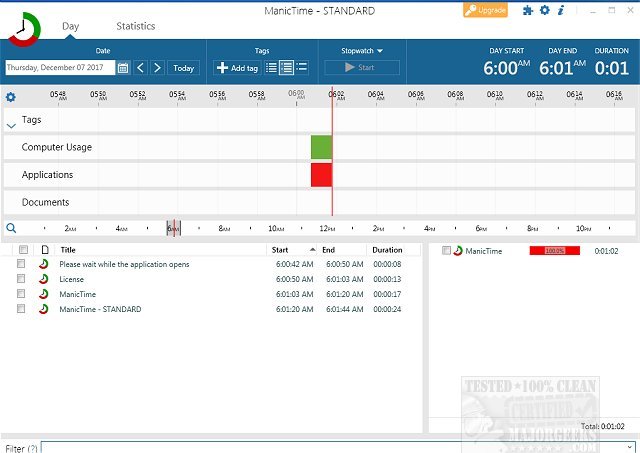
ManicTime version 2026.2.2 has been released, enhancing its functionality as a time management tool that operates discreetly in the background to monitor daily activities. This software eliminates the need for manual time tracking, allowing users to focus on their work without the hassle of starting or stopping a timer. At the end of the workday, users can analyze the collected data for precise time tracking.
The application is designed with a user-friendly interface, capable of tracking over 1,000 application switches throughout the day, which results in a wealth of data. ManicTime utilizes advanced timeline technology to present this information in a clear and accessible manner, allowing users to easily navigate their productivity patterns by dragging timelines or hovering for hints on data specifics.
One of the key advantages of ManicTime is that all recorded data is stored locally on the user's computer, ensuring privacy and enabling offline usage. Users have complete control over their data, with the ability to delete it whenever desired. The tool also assists in identifying the most frequently used applications and websites, helping users accurately determine the time spent on various projects for client billing or personal work tracking.
In summary, ManicTime is an efficient and reliable time management solution that streamlines productivity tracking while maintaining user privacy through local data storage. Its intuitive interface and comprehensive data presentation make it a valuable tool for anyone looking to enhance their time management skills.
As the software continues to evolve, future updates may introduce even more features to improve user experience, such as enhanced reporting capabilities, integrations with project management tools, or additional customization options to cater to diverse user needs
The application is designed with a user-friendly interface, capable of tracking over 1,000 application switches throughout the day, which results in a wealth of data. ManicTime utilizes advanced timeline technology to present this information in a clear and accessible manner, allowing users to easily navigate their productivity patterns by dragging timelines or hovering for hints on data specifics.
One of the key advantages of ManicTime is that all recorded data is stored locally on the user's computer, ensuring privacy and enabling offline usage. Users have complete control over their data, with the ability to delete it whenever desired. The tool also assists in identifying the most frequently used applications and websites, helping users accurately determine the time spent on various projects for client billing or personal work tracking.
In summary, ManicTime is an efficient and reliable time management solution that streamlines productivity tracking while maintaining user privacy through local data storage. Its intuitive interface and comprehensive data presentation make it a valuable tool for anyone looking to enhance their time management skills.
As the software continues to evolve, future updates may introduce even more features to improve user experience, such as enhanced reporting capabilities, integrations with project management tools, or additional customization options to cater to diverse user needs
ManicTime 2026.2.2 released
ManicTime is a system tool for time management that quietly sits in the background and records your daily activities.