MajorPrivacy is a sophisticated privacy and system protection tool for Windows, crafted by Xanasoft, the creators of renowned applications like Sandboxie and DiskCryptor. This software is tailored for power users and security aficionados seeking extensive control and visibility over their system, applications, and sensitive data, surpassing the capabilities of standard Windows security features.
Core Features and Functionality
Designed as the successor to PrivateWin10, MajorPrivacy integrates multiple functionalities including application control, network monitoring, privacy management, file protection, and system hardening into an intuitive interface. It stands out due to its kernel-level protection components, which enable active monitoring of processes and network activity, thereby restricting unauthorized access to files and preventing unwanted applications from executing.
MajorPrivacy's ability to expose hidden activities within applications allows users to identify unexpected behavior, such as unauthorized network connections or excessive access to sensitive folders. This makes it a valuable tool for IT professionals and advanced home users, providing both monitoring capabilities and enforcement tools.
User-Friendly Features
Key features include a flexible installation process, which allows for traditional or portable installations, facilitating testing or deployment across multiple systems. The software also supports rule import/export, enabling users to transfer their configurations easily. Additionally, its robust activity logging feature provides insights into background application activities, simplifying troubleshooting.
Another notable inclusion is the ability to create and mount encrypted disk images, offering a secure method to store sensitive information. Once unmounted, the contents of these images remain inaccessible, adding an extra layer of security.
Interface and Usability
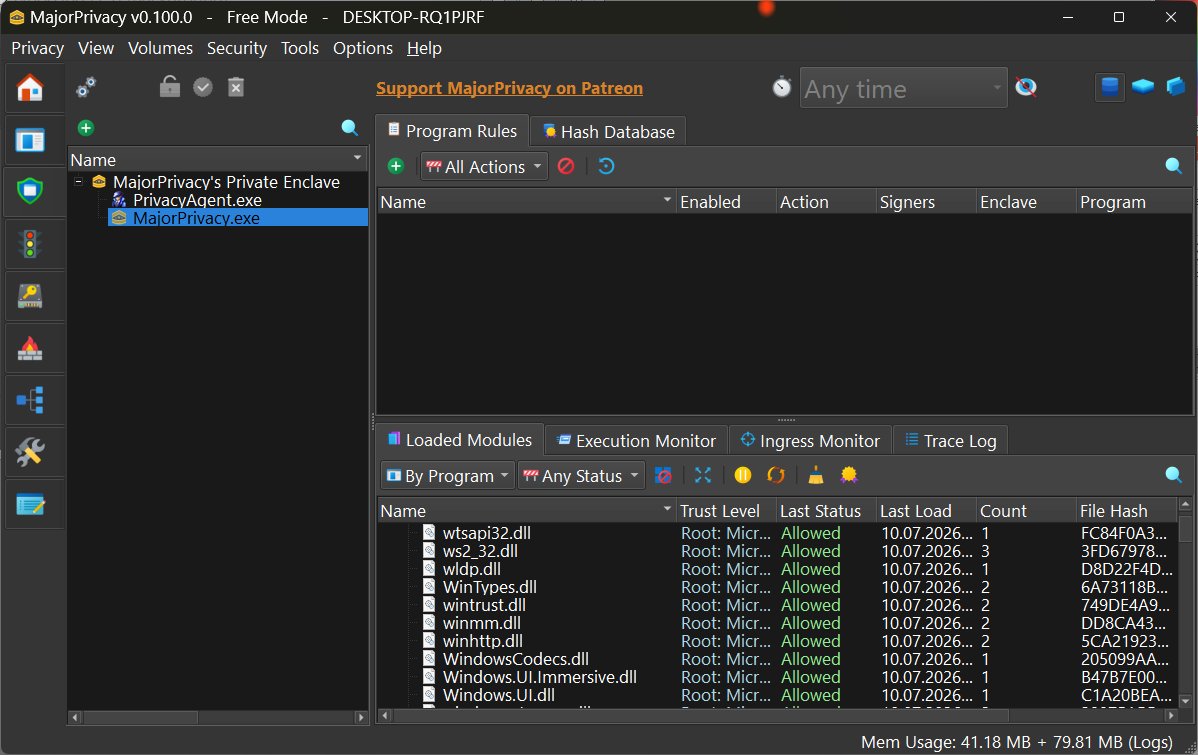
Upon installation, MajorPrivacy presents a well-organized interface that covers various modules related to application control, network management, and privacy settings. While the design is user-friendly, some advanced settings may lack detailed explanations, which could confuse new users. However, the built-in setup wizard aids in navigating initial configurations, making it easier to start using the software.
Users are advised to create a System Restore point and back up their registry before making significant changes, as MajorPrivacy operates deeply within the system.
Challenges and Licensing
The primary challenge of MajorPrivacy lies in its complexity, which comes with a learning curve due to its deep control features. While open-source, some advanced functionalities require a registration key, which is free for the first 90 days and can be renewed or obtained through supporting the project via Patreon or PayPal. This licensing model may raise questions for users who frequently switch between systems, particularly regarding the portability of the registration key.
Final Thoughts
Overall, MajorPrivacy is not just another basic privacy tweak tool; it offers comprehensive visibility and control over application behavior. Its combination of portability, detailed monitoring, and a clean interface makes it a top contender among privacy and system control utilities available today. However, users should be prepared to invest time in understanding its features fully, and they can seek assistance from the MajorGeeks Forums if needed.
In summary, for those seeking significant oversight of their Windows environment and who have outgrown basic privacy tools, MajorPrivacy emerges as a powerful option that continues to evolve, promising ongoing improvements as it develops
Core Features and Functionality
Designed as the successor to PrivateWin10, MajorPrivacy integrates multiple functionalities including application control, network monitoring, privacy management, file protection, and system hardening into an intuitive interface. It stands out due to its kernel-level protection components, which enable active monitoring of processes and network activity, thereby restricting unauthorized access to files and preventing unwanted applications from executing.
MajorPrivacy's ability to expose hidden activities within applications allows users to identify unexpected behavior, such as unauthorized network connections or excessive access to sensitive folders. This makes it a valuable tool for IT professionals and advanced home users, providing both monitoring capabilities and enforcement tools.
User-Friendly Features
Key features include a flexible installation process, which allows for traditional or portable installations, facilitating testing or deployment across multiple systems. The software also supports rule import/export, enabling users to transfer their configurations easily. Additionally, its robust activity logging feature provides insights into background application activities, simplifying troubleshooting.
Another notable inclusion is the ability to create and mount encrypted disk images, offering a secure method to store sensitive information. Once unmounted, the contents of these images remain inaccessible, adding an extra layer of security.
Interface and Usability
Upon installation, MajorPrivacy presents a well-organized interface that covers various modules related to application control, network management, and privacy settings. While the design is user-friendly, some advanced settings may lack detailed explanations, which could confuse new users. However, the built-in setup wizard aids in navigating initial configurations, making it easier to start using the software.
Users are advised to create a System Restore point and back up their registry before making significant changes, as MajorPrivacy operates deeply within the system.
Challenges and Licensing
The primary challenge of MajorPrivacy lies in its complexity, which comes with a learning curve due to its deep control features. While open-source, some advanced functionalities require a registration key, which is free for the first 90 days and can be renewed or obtained through supporting the project via Patreon or PayPal. This licensing model may raise questions for users who frequently switch between systems, particularly regarding the portability of the registration key.
Final Thoughts
Overall, MajorPrivacy is not just another basic privacy tweak tool; it offers comprehensive visibility and control over application behavior. Its combination of portability, detailed monitoring, and a clean interface makes it a top contender among privacy and system control utilities available today. However, users should be prepared to invest time in understanding its features fully, and they can seek assistance from the MajorGeeks Forums if needed.
In summary, for those seeking significant oversight of their Windows environment and who have outgrown basic privacy tools, MajorPrivacy emerges as a powerful option that continues to evolve, promising ongoing improvements as it develops
MajorPrivacy 0.100.0 released
Major Privacy is an advanced Windows privacy and system protection tool designed to give you granular control over applications, files, network activity, and sensitive data.