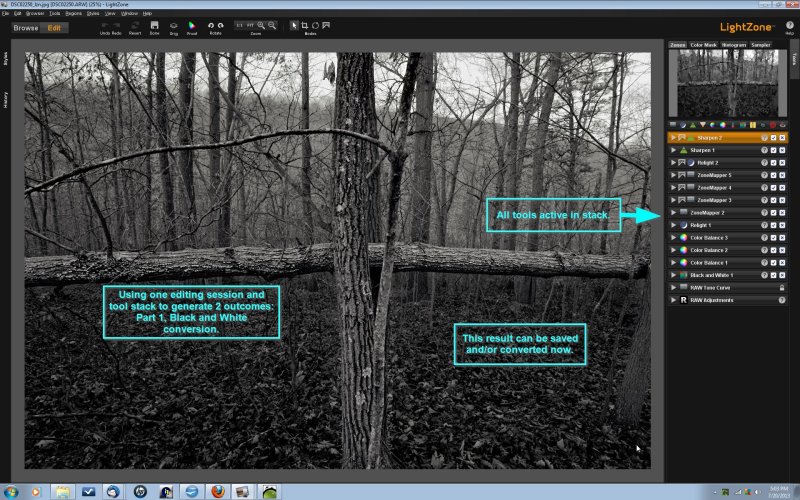
LightZone 5.0.0 has been released, marking a significant update to this free, open-source digital photo editing software. Designed to handle both JPEG and RAW file formats, LightZone serves as an alternative to Adobe Photoshop Lightroom, providing advanced editing capabilities for photographers.
One of the standout features of LightZone is its ability to create and apply "styles"—pre-determined image transformations—that can be utilized on entire batches of photos in one go. This allows photographers to save their preferred adjustments tailored to specific camera characteristics, streamlining the editing process. Once a style is developed, it can be easily applied to multiple images, ensuring consistency across a photographer's work.
LightZone operates as a non-destructive RAW editor, meaning that when edits are made, a new image file is created without altering the original. This non-destructiveness preserves the original "digital negative," which contains all the data captured by the camera. As a result, photographers can create various edited versions of an image, each utilizing different styles or transformations, without compromising the integrity of the original file.
The software outputs JPEG files that include metadata referencing the original image and a detailed record of all transformations applied during the editing process. This feature ensures that edits can be undone or modified in future sessions, providing flexibility for further improvements. Additionally, since edits are made directly on the RAW files rather than on a compressed JPEG version, LightZone eliminates issues related to JPEG compression artifacts, leading to higher-quality results.
In conclusion, LightZone 5.0.0 enhances the digital editing experience for photographers by offering powerful batch processing capabilities, non-destructive editing, and meticulous tracking of editing history, all while maintaining the original image quality. This makes it an excellent tool not only for professional photographers but also for enthusiasts looking to refine their images without the risk of losing their original files
One of the standout features of LightZone is its ability to create and apply "styles"—pre-determined image transformations—that can be utilized on entire batches of photos in one go. This allows photographers to save their preferred adjustments tailored to specific camera characteristics, streamlining the editing process. Once a style is developed, it can be easily applied to multiple images, ensuring consistency across a photographer's work.
LightZone operates as a non-destructive RAW editor, meaning that when edits are made, a new image file is created without altering the original. This non-destructiveness preserves the original "digital negative," which contains all the data captured by the camera. As a result, photographers can create various edited versions of an image, each utilizing different styles or transformations, without compromising the integrity of the original file.
The software outputs JPEG files that include metadata referencing the original image and a detailed record of all transformations applied during the editing process. This feature ensures that edits can be undone or modified in future sessions, providing flexibility for further improvements. Additionally, since edits are made directly on the RAW files rather than on a compressed JPEG version, LightZone eliminates issues related to JPEG compression artifacts, leading to higher-quality results.
In conclusion, LightZone 5.0.0 enhances the digital editing experience for photographers by offering powerful batch processing capabilities, non-destructive editing, and meticulous tracking of editing history, all while maintaining the original image quality. This makes it an excellent tool not only for professional photographers but also for enthusiasts looking to refine their images without the risk of losing their original files
LightZone 5.0.0 released
LightZone is a free, open-source digital photo editor software application capable of editing JPEG and RAW files similar to Adobe Photoshop Lightroom.