LibreScroll has released version 2.2.0.1, an application designed to enhance scrolling on Windows using any standard mouse. It offers a smooth inertial scrolling feature that mimics the fluid and natural movement typically experienced on smartphones, making it easier for users to navigate long content efficiently.
One of the key highlights of LibreScroll is its flick mode, which enhances scrolling dynamics, providing a more fluid experience. Users can make real-time adjustments to settings without restarting the application, and they have the ability to pause the custom scrolling at any time for better control.
- Time-saving keyboard shortcuts.
- Managing Sticky Keys in Windows 10 & 11.
- Changing double-click settings for file and folder access.
- Utilizing the Scroll Lock key effectively.
Overall, LibreScroll is a valuable tool for anyone looking to improve their scrolling efficiency and comfort on Windows
What is LibreScroll?
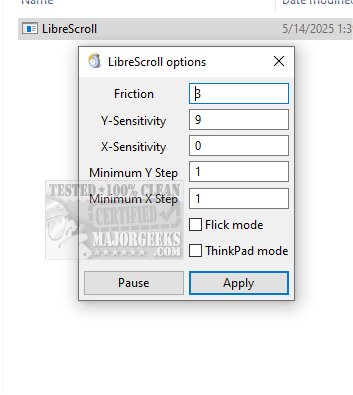
LibreScroll improves the overall scrolling experience by introducing continuous, smooth scrolling, which feels more intuitive. The application operates without a traditional user interface; instead, it features a compact settings window accessible from the system tray. Users can customize various scrolling parameters such as friction, Y-sensitivity, X-sensitivity, and minimum step sizes for both axes.One of the key highlights of LibreScroll is its flick mode, which enhances scrolling dynamics, providing a more fluid experience. Users can make real-time adjustments to settings without restarting the application, and they have the ability to pause the custom scrolling at any time for better control.
Using LibreScroll
To utilize the scrolling feature, users need to press and hold the middle mouse button while moving the mouse, which allows for a stationary cursor as the content scrolls. Upon releasing the button, scrolling stops, and the cursor becomes freely movable again. It’s important to click the "Apply" button after making changes to ensure the new settings take effect.Geek Verdict: Smooth Scrolling Experience
LibreScroll redefines the scrolling experience on traditional mice, closely resembling the responsive touch scrolling seen on modern tablets. Once scrolling is initiated, content continues to glide smoothly before gradually decelerating, creating an intuitive navigation experience. With LibreScroll, users can enjoy the effortless elegance of smartphone-like scrolling on their desktop devices.Additional Resources
To maximize productivity and enhance user experience, consider exploring other related tips such as:- Time-saving keyboard shortcuts.
- Managing Sticky Keys in Windows 10 & 11.
- Changing double-click settings for file and folder access.
- Utilizing the Scroll Lock key effectively.
Overall, LibreScroll is a valuable tool for anyone looking to improve their scrolling efficiency and comfort on Windows
LibreScroll 2.2.0.1 released
LibreScroll enables smooth inertial scrolling on Windows using any standard mouse. This feature enhances the scrolling experience by providing more fluid and natural movement, making it easier to navigate through content efficiently.