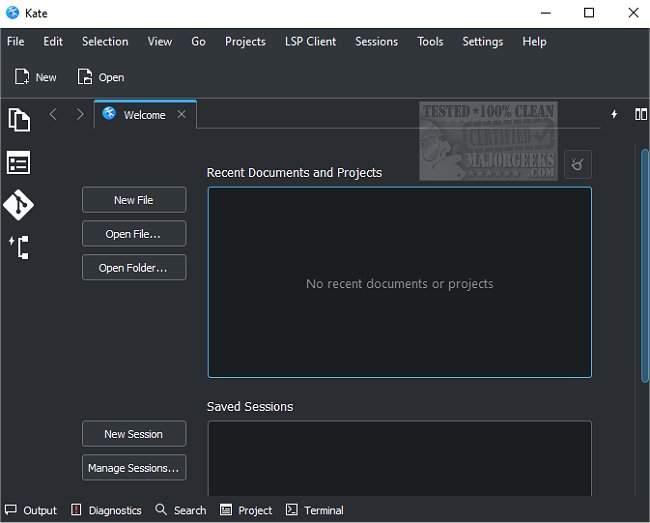
The release of Kate 25.08.1 marks an exciting update for this versatile text editor, which caters to a wide range of users, from beginners to seasoned programmers. Unlike many text editors that either oversimplify or are overly complex, Kate manages to strike a balance by offering a user-friendly interface alongside a plethora of powerful features.
Upon launching Kate, users encounter an intuitive interface that allows for immediate typing. However, the layout reveals various settings and a ribbon-style toolbar that hints at the software's advanced capabilities. One standout feature is the split-mode window, which allows users to view and edit multiple documents simultaneously, either horizontally or vertically. This is complemented by support for multiple sessions and a wide array of plugins, such as an embedded terminal, SQL, and GDB plugins, enhancing functionality.
Kate also provides robust encoding support, including Unicode, and enables users to open files over a network, ensuring seamless operation in diverse environments. Its scriptable nature allows for extensive customization, while bookmarks enhance document navigation. Users can benefit from visible line numbers, highlighting for specific words, and an impressive support for over 300 programming languages, complete with features like auto-indentation and smart comment handling.
Furthermore, Kate ensures data safety with its backup capabilities, allowing users to save their work at any moment, and providing file recovery options in the event of a system crash. A comprehensive undo/redo system further enhances user experience.
Key Features of Kate 25.08.1:
- Multi-document interface (MDI) with horizontal and vertical split views.
- Extensive plugin options, including terminal, SQL, and build integrations.
- Session management for efficient workflow.
- Support for various encodings and network file access.
- Bookmarking system, complete with breakpoints.
- Features for line modification indication, code folding, and bracket matching.
- Advanced spell-checking and highlighting capabilities.
- Rectangular block selection mode and Vi input mode for programming flexibility.
- Customizable through scripting, catering to user-specific needs.
In conclusion, Kate 25.08.1 delivers an impressive suite of features that rivals professional-grade text editors while maintaining an accessible interface. Whether you're writing code, editing documents, or managing multiple files, Kate stands out as a robust tool for all text editing needs. As the development of Kate continues, one can anticipate further enhancements and features that will solidify its position in the realm of text editing software
Upon launching Kate, users encounter an intuitive interface that allows for immediate typing. However, the layout reveals various settings and a ribbon-style toolbar that hints at the software's advanced capabilities. One standout feature is the split-mode window, which allows users to view and edit multiple documents simultaneously, either horizontally or vertically. This is complemented by support for multiple sessions and a wide array of plugins, such as an embedded terminal, SQL, and GDB plugins, enhancing functionality.
Kate also provides robust encoding support, including Unicode, and enables users to open files over a network, ensuring seamless operation in diverse environments. Its scriptable nature allows for extensive customization, while bookmarks enhance document navigation. Users can benefit from visible line numbers, highlighting for specific words, and an impressive support for over 300 programming languages, complete with features like auto-indentation and smart comment handling.
Furthermore, Kate ensures data safety with its backup capabilities, allowing users to save their work at any moment, and providing file recovery options in the event of a system crash. A comprehensive undo/redo system further enhances user experience.
Key Features of Kate 25.08.1:
- Multi-document interface (MDI) with horizontal and vertical split views.
- Extensive plugin options, including terminal, SQL, and build integrations.
- Session management for efficient workflow.
- Support for various encodings and network file access.
- Bookmarking system, complete with breakpoints.
- Features for line modification indication, code folding, and bracket matching.
- Advanced spell-checking and highlighting capabilities.
- Rectangular block selection mode and Vi input mode for programming flexibility.
- Customizable through scripting, catering to user-specific needs.
In conclusion, Kate 25.08.1 delivers an impressive suite of features that rivals professional-grade text editors while maintaining an accessible interface. Whether you're writing code, editing documents, or managing multiple files, Kate stands out as a robust tool for all text editing needs. As the development of Kate continues, one can anticipate further enhancements and features that will solidify its position in the realm of text editing software
Kate 25.08.1 released
Kate is a text editor with an enormous number of features for everyone, from beginners to programmers.