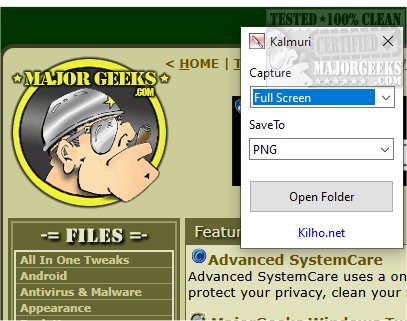
Kalmuri 4.3.1 has been released, enhancing its capabilities as a user-friendly screen capture application. This software allows users to easily capture and record their screens, functioning as both a snapshot tool and a screen recorder. It operates discreetly in the system tray, ensuring it does not disrupt ongoing work.
The application features a straightforward interface with two primary drop-down menus: one for selecting actions and the other for choosing output formats. Although the initial options may appear limited, users can access a more comprehensive menu by right-clicking within the main window. This expanded menu includes additional features such as naming output files, adjusting sound settings, setting default hotkeys for screen captures, and designating the default save folder for images or videos.
Kalmuri supports various output formats, enabling users to select the best option for their needs. Formats include PNG for high-quality images, JPG for compressed photos, GIF for animations, and BMP for uncompressed images. Users can save screenshots locally, copy them to the clipboard, print them, or upload them to Imgbox. The app also includes a built-in browser for capturing website snapshots.
As a screen recording tool, Kalmuri allows users to record videos in MP4 format, capturing either the entire screen or specific regions, with the option to include the cursor, making it ideal for creating video tutorials.
Overall, Kalmuri is an efficient and intuitive screen capture tool, designed for easy navigation and quick access to capturing high-quality screenshots. It is suitable for a variety of applications, from presentations to tutorials.
Extensions:
In addition to its current features, future versions of Kalmuri could benefit from enhancements such as cloud integration for seamless storage and sharing, advanced editing tools for captured images and videos, and support for additional output formats to cater to a wider range of user needs. Incorporating features like scheduled captures and enhanced annotation tools could further elevate the application, making it even more versatile for professionals and casual users alike. Additionally, a mobile version of Kalmuri would expand its accessibility, allowing users to capture screens on-the-go
The application features a straightforward interface with two primary drop-down menus: one for selecting actions and the other for choosing output formats. Although the initial options may appear limited, users can access a more comprehensive menu by right-clicking within the main window. This expanded menu includes additional features such as naming output files, adjusting sound settings, setting default hotkeys for screen captures, and designating the default save folder for images or videos.
Kalmuri supports various output formats, enabling users to select the best option for their needs. Formats include PNG for high-quality images, JPG for compressed photos, GIF for animations, and BMP for uncompressed images. Users can save screenshots locally, copy them to the clipboard, print them, or upload them to Imgbox. The app also includes a built-in browser for capturing website snapshots.
As a screen recording tool, Kalmuri allows users to record videos in MP4 format, capturing either the entire screen or specific regions, with the option to include the cursor, making it ideal for creating video tutorials.
Overall, Kalmuri is an efficient and intuitive screen capture tool, designed for easy navigation and quick access to capturing high-quality screenshots. It is suitable for a variety of applications, from presentations to tutorials.
Extensions:
In addition to its current features, future versions of Kalmuri could benefit from enhancements such as cloud integration for seamless storage and sharing, advanced editing tools for captured images and videos, and support for additional output formats to cater to a wider range of user needs. Incorporating features like scheduled captures and enhanced annotation tools could further elevate the application, making it even more versatile for professionals and casual users alike. Additionally, a mobile version of Kalmuri would expand its accessibility, allowing users to capture screens on-the-go
Kalmuri 4.3.1 released
Capture and record your screen with Kalmuri, the easy-to-use screen capture app.