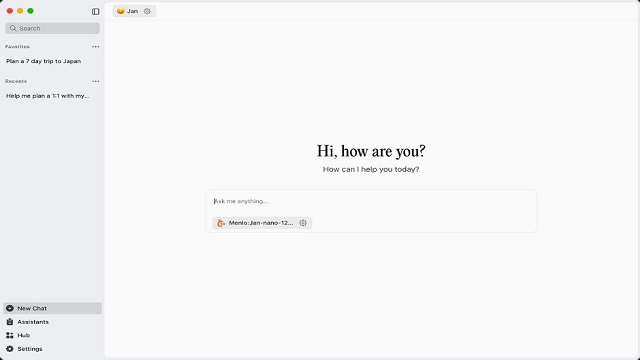
Jan AI is a free and open-source desktop chat application that operates on Windows, Linux, and Mac, allowing users to have ChatGPT-like conversations while keeping their data local. This means your prompts and interactions are not sent to the cloud, enhancing privacy and security. The application is designed for ease of use, making it accessible even for those who have never worked with local AI models before. Users can set up projects and engage in conversations without the complexities often associated with running local AI, such as managing Python environments or dealing with missing dependencies.
Functionality of Jan AI
Jan AI simplifies the process of utilizing various open-source AI models like Llama, Mistral, Qwen, and Gemma through a user-friendly interface. To get started, users simply need to install Jan, select a model from the built-in model hub, and begin chatting—no subscriptions or accounts are required. Additionally, Jan features its own model, which is easy to install (though it requires over 5.7 GB of disk space).
For developers and advanced users, Jan can host a local server that mimics the OpenAI API, making it compatible with various scripts and applications. Users have the flexibility to operate entirely offline or connect to cloud models as desired.
Integration and Project Management
The application includes built-in connectors for popular services like Gmail, Slack, and Figma, allowing users to work seamlessly with their existing content. Projects can be organized to group chats, files, and tasks, preventing clutter and enhancing productivity.
Reasons to Use Jan AI
Jan AI is particularly appealing for users who prioritize privacy, as all interactions remain local unless users opt to share data. It is ideal for writers needing offline drafting, developers testing prompts, researchers handling sensitive information, individuals with unreliable internet connectivity, and anyone seeking a free alternative to subscription-based AI services.
Key Features of Jan AI
- Local execution of models, enabling users to run open-source LLMs on their own hardware.
- Optional cloud model support, allowing API keys to be used only if desired.
- An OpenAI-compatible local API server for various applications.
- Cross-platform compatibility (Windows, macOS, Linux).
- A clean, beginner-friendly interface.
- Fully open-source, with no hidden fees or lock-in.
Considerations and Limitations
While Jan AI offers many advantages, it is not without its downsides. The quality of the models varies, as open-source LLMs are still evolving. Performance also depends on the hardware; larger models require more RAM and a capable GPU, and older machines may struggle. Users may need to tweak settings for optimal performance. Jan AI does not guarantee the same level of responses as higher-tier models like GPT-4, highlighting the inherent trade-offs of local AI solutions.
Conclusion
Jan AI strikes an impressive balance between functionality and user-friendliness, providing a privacy-first, open-source alternative in the local AI landscape. Its clean interface, built-in model hub, and local API server enhance its usability, while the primary limitation lies in hardware requirements. Overall, Jan AI is a solid choice for those looking to explore local AI capabilities without the complications and risks associated with cloud-based services.
Future Prospects
As Jan AI continues to evolve, future updates could include enhancements in model quality, expanded integrations with more services, and improved performance optimization tools. Community contributions to its open-source code may also lead to innovative features, making Jan AI an even more powerful tool for users across various fields
Functionality of Jan AI
Jan AI simplifies the process of utilizing various open-source AI models like Llama, Mistral, Qwen, and Gemma through a user-friendly interface. To get started, users simply need to install Jan, select a model from the built-in model hub, and begin chatting—no subscriptions or accounts are required. Additionally, Jan features its own model, which is easy to install (though it requires over 5.7 GB of disk space).
For developers and advanced users, Jan can host a local server that mimics the OpenAI API, making it compatible with various scripts and applications. Users have the flexibility to operate entirely offline or connect to cloud models as desired.
Integration and Project Management
The application includes built-in connectors for popular services like Gmail, Slack, and Figma, allowing users to work seamlessly with their existing content. Projects can be organized to group chats, files, and tasks, preventing clutter and enhancing productivity.
Reasons to Use Jan AI
Jan AI is particularly appealing for users who prioritize privacy, as all interactions remain local unless users opt to share data. It is ideal for writers needing offline drafting, developers testing prompts, researchers handling sensitive information, individuals with unreliable internet connectivity, and anyone seeking a free alternative to subscription-based AI services.
Key Features of Jan AI
- Local execution of models, enabling users to run open-source LLMs on their own hardware.
- Optional cloud model support, allowing API keys to be used only if desired.
- An OpenAI-compatible local API server for various applications.
- Cross-platform compatibility (Windows, macOS, Linux).
- A clean, beginner-friendly interface.
- Fully open-source, with no hidden fees or lock-in.
Considerations and Limitations
While Jan AI offers many advantages, it is not without its downsides. The quality of the models varies, as open-source LLMs are still evolving. Performance also depends on the hardware; larger models require more RAM and a capable GPU, and older machines may struggle. Users may need to tweak settings for optimal performance. Jan AI does not guarantee the same level of responses as higher-tier models like GPT-4, highlighting the inherent trade-offs of local AI solutions.
Conclusion
Jan AI strikes an impressive balance between functionality and user-friendliness, providing a privacy-first, open-source alternative in the local AI landscape. Its clean interface, built-in model hub, and local API server enhance its usability, while the primary limitation lies in hardware requirements. Overall, Jan AI is a solid choice for those looking to explore local AI capabilities without the complications and risks associated with cloud-based services.
Future Prospects
As Jan AI continues to evolve, future updates could include enhancements in model quality, expanded integrations with more services, and improved performance optimization tools. Community contributions to its open-source code may also lead to innovative features, making Jan AI an even more powerful tool for users across various fields
Jan AI 0.8.3 released
Jan is a free, Open Source AI chat application that runs directly on your computer (Windows, Linux, Mac), giving you ChatGPT-like abilities without sending your data to the cloud.