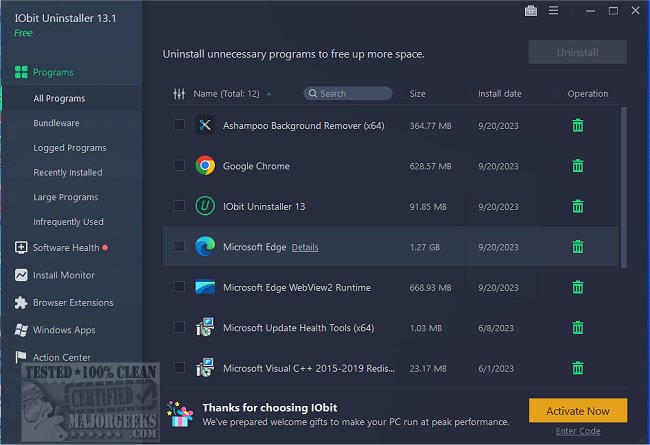
IObit Uninstaller 15.4.0.1 has been released, providing users with a comprehensive solution for removing unwanted programs, Windows apps, and browser extensions. Unlike the default Windows Add or Remove Programs feature, IObit Uninstaller ensures complete removal of applications, including any residual files, registry entries, and hidden junk that may remain after an uninstall.
2. Bundled Software Detection: The uninstaller detects and removes unwanted bundled software upon installation, helping users avoid the installation of undesired toolbars, adware, and bloatware.
3. Real-Time Installation Monitoring: This feature tracks changes made to the system during software installation. When uninstalled, IObit can revert all alterations, ensuring no remnants are left behind. This is especially beneficial for users who frequently test new software.
4. Broad Removal Capabilities: Beyond third-party applications, IObit Uninstaller can remove Windows apps, Universal Windows Platform (UWP) apps, and stubborn browser extensions, giving users full control over their software environment.
5. Software Health Management: The tool includes features for managing software permissions, blocking pop-ups, cleaning unnecessary files, and removing potentially harmful software. It also features a Software Updater that keeps popular applications up to date automatically.
- Completely removes stubborn or broken software.
- Detects and uninstalls bundled software before it becomes problematic.
- Offers real-time installation monitoring for complete rollback.
- Capable of removing Windows apps and browser extensions.
- Automatic updates for popular applications without manual intervention.
- Cleans up leftover files, registry entries, and junk.
Cons:
- The free version has limitations, with advanced features requiring a Pro subscription.
- Some legitimate software may be flagged as bundledware, necessitating user verification.
- The Software Updater does not support every application.
Key Features:
1. Complete Program Removal: IObit Uninstaller excels in eradicating stubborn and broken programs that fail to uninstall properly. It cleans up associated files, folders, and registry entries that can clutter your system.2. Bundled Software Detection: The uninstaller detects and removes unwanted bundled software upon installation, helping users avoid the installation of undesired toolbars, adware, and bloatware.
3. Real-Time Installation Monitoring: This feature tracks changes made to the system during software installation. When uninstalled, IObit can revert all alterations, ensuring no remnants are left behind. This is especially beneficial for users who frequently test new software.
4. Broad Removal Capabilities: Beyond third-party applications, IObit Uninstaller can remove Windows apps, Universal Windows Platform (UWP) apps, and stubborn browser extensions, giving users full control over their software environment.
5. Software Health Management: The tool includes features for managing software permissions, blocking pop-ups, cleaning unnecessary files, and removing potentially harmful software. It also features a Software Updater that keeps popular applications up to date automatically.
Pros and Cons:
Pros:- Completely removes stubborn or broken software.
- Detects and uninstalls bundled software before it becomes problematic.
- Offers real-time installation monitoring for complete rollback.
- Capable of removing Windows apps and browser extensions.
- Automatic updates for popular applications without manual intervention.
- Cleans up leftover files, registry entries, and junk.
Cons:
- The free version has limitations, with advanced features requiring a Pro subscription.
- Some legitimate software may be flagged as bundledware, necessitating user verification.
- The Software Updater does not support every application.
Conclusion:
IObit Uninstaller stands out as an excellent tool for users seeking a clean and efficient PC. It effectively eliminates the shortcomings of the built-in Windows uninstaller by ensuring that all traces of unwanted software are removed. Its features, including the ability to handle stubborn programs and monitor installations in real time, make it a valuable addition to any tech-savvy user's toolkit.Future Enhancements:
To improve user experience further, IObit could consider expanding the capabilities of its Software Updater to include more applications, enhancing the free version with additional features, and refining its detection algorithms to reduce false positives. Additionally, user education on managing flagged software could enhance overall satisfaction and effectivenessIObit Uninstaller 15.4.0.1 released
IObit Uninstaller helps you remove unwanted programs, Windows apps, and browser plug-ins/toolbars entirely, even when Windows Add or Remove Programs fails.