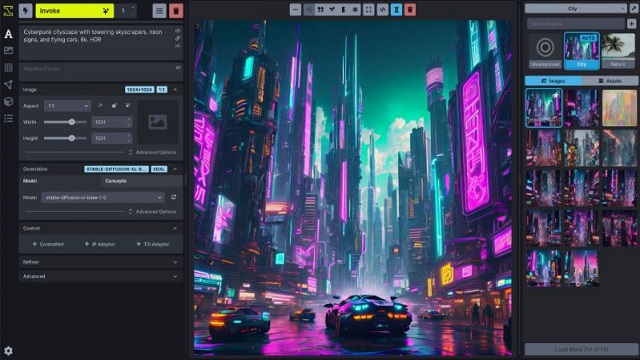
InvokeAI version 6.13.7 has been released, presenting a robust open-source AI image generation toolkit that operates seamlessly on Windows, macOS, and Linux platforms. This local AI image generator allows users to create and edit images using Stable Diffusion without relying on cloud services, ensuring full control, privacy, and the flexibility to utilize various models without incurring subscription costs.
InvokeAI serves as a self-hosted AI art studio with a local web server that features a modern and user-friendly interface for generating images, adjusting parameters, managing models, and editing results directly on a single canvas. The Unified Canvas feature is particularly noteworthy, enabling users to make targeted edits to specific areas of an image rather than regenerating the entire piece, thus saving both time and computational resources.
Key functionalities of InvokeAI include:
- Generating images from text prompts using Stable Diffusion models.
- In-painting and out-painting specific sections of images.
- Advanced control over samplers, seeds, steps, and CFG scale.
- Local management of multiple models without cloud constraints.
- Local image upscaling capabilities.
InvokeAI is an attractive alternative for users frustrated with subscription fees, usage limitations, or concerns over data privacy associated with cloud tools. It allows users to keep their work local, with images and prompts stored securely on their devices. However, some users may encounter challenges when trying to pull models directly from Hugging Face, leading to vague error messages. A more reliable approach involves manually downloading models and properly placing them in designated folders for smoother integration.
The installation process consists of two main components: the Launcher and the necessary files. While the Launcher installation is generally straightforward, users may face difficulties during updates, sometimes requiring manual file downloads to ensure the latest version is operational.
Despite a clean and responsive interface, some aspects may not be immediately intuitive, such as the prominent "INVOKE" button that initiates image generation. Once users familiarize themselves with the workflow, they will find that InvokeAI allows for the establishment of consistent processes, enabling the generation of uniform outputs across multiple iterations.
While InvokeAI boasts numerous advantages, including local operation for enhanced privacy and control, it also presents challenges, particularly for those unfamiliar with local AI tools. Users should be prepared for potential frustrations related to model installation and the absence of a built-in file manager within the UI. Furthermore, a capable GPU with ample VRAM is essential for efficient image generation.
In conclusion, InvokeAI is a powerful and flexible tool suited for users with some technical background who frequently work with images. It offers significant creative freedom and control without the drawbacks of subscription services. While it may not be the best fit for beginners, those willing to navigate its quirks will find great value in its functionalities. The supportive community, like the forums on MajorGeeks, can provide assistance for those seeking help with the application. Overall, InvokeAI stands out as an excellent solution for serious image creators who prioritize control and privacy
InvokeAI serves as a self-hosted AI art studio with a local web server that features a modern and user-friendly interface for generating images, adjusting parameters, managing models, and editing results directly on a single canvas. The Unified Canvas feature is particularly noteworthy, enabling users to make targeted edits to specific areas of an image rather than regenerating the entire piece, thus saving both time and computational resources.
Key functionalities of InvokeAI include:
- Generating images from text prompts using Stable Diffusion models.
- In-painting and out-painting specific sections of images.
- Advanced control over samplers, seeds, steps, and CFG scale.
- Local management of multiple models without cloud constraints.
- Local image upscaling capabilities.
InvokeAI is an attractive alternative for users frustrated with subscription fees, usage limitations, or concerns over data privacy associated with cloud tools. It allows users to keep their work local, with images and prompts stored securely on their devices. However, some users may encounter challenges when trying to pull models directly from Hugging Face, leading to vague error messages. A more reliable approach involves manually downloading models and properly placing them in designated folders for smoother integration.
The installation process consists of two main components: the Launcher and the necessary files. While the Launcher installation is generally straightforward, users may face difficulties during updates, sometimes requiring manual file downloads to ensure the latest version is operational.
Despite a clean and responsive interface, some aspects may not be immediately intuitive, such as the prominent "INVOKE" button that initiates image generation. Once users familiarize themselves with the workflow, they will find that InvokeAI allows for the establishment of consistent processes, enabling the generation of uniform outputs across multiple iterations.
While InvokeAI boasts numerous advantages, including local operation for enhanced privacy and control, it also presents challenges, particularly for those unfamiliar with local AI tools. Users should be prepared for potential frustrations related to model installation and the absence of a built-in file manager within the UI. Furthermore, a capable GPU with ample VRAM is essential for efficient image generation.
In conclusion, InvokeAI is a powerful and flexible tool suited for users with some technical background who frequently work with images. It offers significant creative freedom and control without the drawbacks of subscription services. While it may not be the best fit for beginners, those willing to navigate its quirks will find great value in its functionalities. The supportive community, like the forums on MajorGeeks, can provide assistance for those seeking help with the application. Overall, InvokeAI stands out as an excellent solution for serious image creators who prioritize control and privacy
InvokeAI 6.13.7 released
InvokeAI is an open-source AI image generation and creative toolkit that runs on Windows, macOS, and Linux.