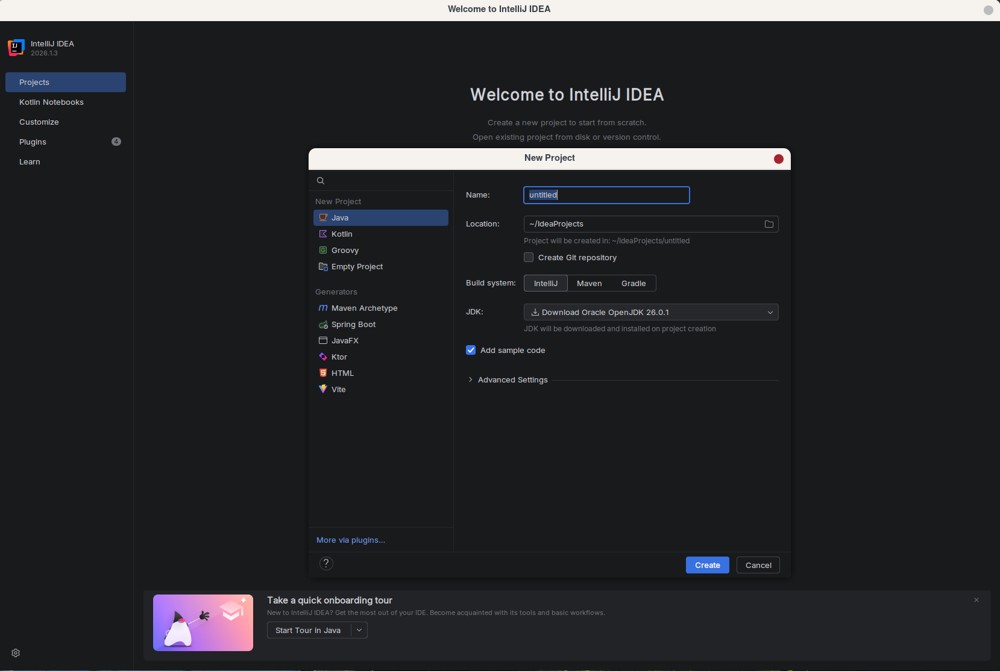
IntelliJ IDEA continues to solidify its position as the premier IDE for Java and Kotlin development with the release of version 2026.1.3. This latest update introduces a unified installer that integrates Junie coding agents and offers optional local AI routing through platforms like LM Studio and Ollama, enhancing the user experience for developers.
Why IntelliJ IDEA Stands Out
IntelliJ IDEA has garnered a reputation as the go-to IDE for developers focused on delivering quality code without the hassle of cumbersome tools. This guide aims to provide clarity on what features are truly beneficial, the cost implications, and how to optimize performance to prevent excessive RAM usage.
Choosing the Right Edition
JetBrains, the company behind IntelliJ IDEA, announced a significant change in July 2025: the discontinuation of separate downloads for the Community and Ultimate editions. From version 2025.3 onwards, users will access a single installer. The free Community version is sufficient for Java, Kotlin, Groovy, and Scala development, providing essential features like smart autocomplete, real-time error detection, and built-in Git integration without requiring a payment.
However, for developers needing advanced features such as Spring Boot wizards, comprehensive database tools, or Jakarta EE support, the paid Ultimate edition becomes necessary, which can quickly lead to frustration if developers attempt to piece together free plugins.
Performance Optimization Tips
The official requirements state a minimum of 2 GB RAM and 3.5 GB disk space, but these figures can be misleading. For a smoother experience, it is advisable to run IntelliJ IDEA on an SSD with at least 8 GB of RAM. Proper memory management settings can significantly enhance performance; users should adjust the maximum heap size based on their hardware capabilities. Monitoring memory usage with tools like Process Explorer can help identify resource-intensive processes, as the built-in monitor may not provide accurate data.
Navigating the Plugin Ecosystem
IntelliJ IDEA boasts a vast plugin marketplace with over 7,600 extensions, but many are outdated or unnecessary. It is recommended to disable any plugins that are not explicitly needed to maintain optimal performance, as excessive plugins can lead to a resource-heavy IDE.
Understanding Pricing and Licensing
The Ultimate edition is priced around $199 per year for individuals. It is essential to evaluate whether the full suite of features justifies the cost. Additionally, students, teachers, and open-source maintainers can obtain free licenses through JetBrains' verification program, which is particularly beneficial for those in educational settings.
AI Integration and Future Developments
The introduction of AI integration in September 2025, featuring Junie, GPT, and Claude support, marks a significant advancement in IDE functionality. Junie acts as a coding agent to streamline workflows while AI models manage complex language tasks. Developers also have the option to leverage local AI engines to maintain data privacy and enhance performance.
Pros and Cons of IntelliJ IDEA
Pros:
- The free version is robust enough for many basic Java and Kotlin projects without immediate subscription requirements.
- Reliable refactoring tools that minimize the risk of breaking code across modules.
- A unified installer simplifies the setup process for new users.
Cons:
- High RAM consumption, especially on systems with less than 16 GB of memory.
- Pricing for the Ultimate tier can seem arbitrary due to locked features.
- Plugin bloat can degrade performance if users install too many extensions.
Conclusion
IntelliJ IDEA remains a powerful tool for professional JVM development, providing deep insights into code that few other tools can match. While the Ultimate edition is essential for more complex projects requiring enterprise frameworks or database tools, casual developers can effectively utilize the free version. To get the most out of IntelliJ IDEA, users should download the unified installer, manage their memory settings, and be judicious about plugin installations. As the IDE continues to evolve with AI capabilities, it promises to enhance the coding experience even further
Why IntelliJ IDEA Stands Out
IntelliJ IDEA has garnered a reputation as the go-to IDE for developers focused on delivering quality code without the hassle of cumbersome tools. This guide aims to provide clarity on what features are truly beneficial, the cost implications, and how to optimize performance to prevent excessive RAM usage.
Choosing the Right Edition
JetBrains, the company behind IntelliJ IDEA, announced a significant change in July 2025: the discontinuation of separate downloads for the Community and Ultimate editions. From version 2025.3 onwards, users will access a single installer. The free Community version is sufficient for Java, Kotlin, Groovy, and Scala development, providing essential features like smart autocomplete, real-time error detection, and built-in Git integration without requiring a payment.
However, for developers needing advanced features such as Spring Boot wizards, comprehensive database tools, or Jakarta EE support, the paid Ultimate edition becomes necessary, which can quickly lead to frustration if developers attempt to piece together free plugins.
Performance Optimization Tips
The official requirements state a minimum of 2 GB RAM and 3.5 GB disk space, but these figures can be misleading. For a smoother experience, it is advisable to run IntelliJ IDEA on an SSD with at least 8 GB of RAM. Proper memory management settings can significantly enhance performance; users should adjust the maximum heap size based on their hardware capabilities. Monitoring memory usage with tools like Process Explorer can help identify resource-intensive processes, as the built-in monitor may not provide accurate data.
Navigating the Plugin Ecosystem
IntelliJ IDEA boasts a vast plugin marketplace with over 7,600 extensions, but many are outdated or unnecessary. It is recommended to disable any plugins that are not explicitly needed to maintain optimal performance, as excessive plugins can lead to a resource-heavy IDE.
Understanding Pricing and Licensing
The Ultimate edition is priced around $199 per year for individuals. It is essential to evaluate whether the full suite of features justifies the cost. Additionally, students, teachers, and open-source maintainers can obtain free licenses through JetBrains' verification program, which is particularly beneficial for those in educational settings.
AI Integration and Future Developments
The introduction of AI integration in September 2025, featuring Junie, GPT, and Claude support, marks a significant advancement in IDE functionality. Junie acts as a coding agent to streamline workflows while AI models manage complex language tasks. Developers also have the option to leverage local AI engines to maintain data privacy and enhance performance.
Pros and Cons of IntelliJ IDEA
Pros:
- The free version is robust enough for many basic Java and Kotlin projects without immediate subscription requirements.
- Reliable refactoring tools that minimize the risk of breaking code across modules.
- A unified installer simplifies the setup process for new users.
Cons:
- High RAM consumption, especially on systems with less than 16 GB of memory.
- Pricing for the Ultimate tier can seem arbitrary due to locked features.
- Plugin bloat can degrade performance if users install too many extensions.
Conclusion
IntelliJ IDEA remains a powerful tool for professional JVM development, providing deep insights into code that few other tools can match. While the Ultimate edition is essential for more complex projects requiring enterprise frameworks or database tools, casual developers can effectively utilize the free version. To get the most out of IntelliJ IDEA, users should download the unified installer, manage their memory settings, and be judicious about plugin installations. As the IDE continues to evolve with AI capabilities, it promises to enhance the coding experience even further
IntelliJ IDEA 2026.1.3 released
IntelliJ IDEA is the undisputed standard for Java and Kotlin development, now shipping a unified installer with integrated Junie coding agents and optional local AI routing through LM Studio or Ollama.