InstallerClean is an innovative utility specifically crafted to clean the often-overlooked C:\Windows\Installer folder, which can unexpectedly balloon in size, consuming valuable storage space on your system. For many users, this folder can grow to several tens of gigabytes, and in extreme cases—particularly for those with Adobe Acrobat installed—it may surpass 100 GB. InstallerClean emerges as a modern replacement for the outdated PatchCleaner, which hasn't seen updates since 2016.
Addressing Residual Files
When new applications are installed or Windows updates are applied, the operating system generates numerous additional files that accumulate over time in designated folders. Often, users remain unaware of this growing data clutter, which can take up significant storage space. InstallerClean is designed to tackle this issue efficiently, targeting and removing leftover files that linger after software installations or updates.
User-Friendly Design
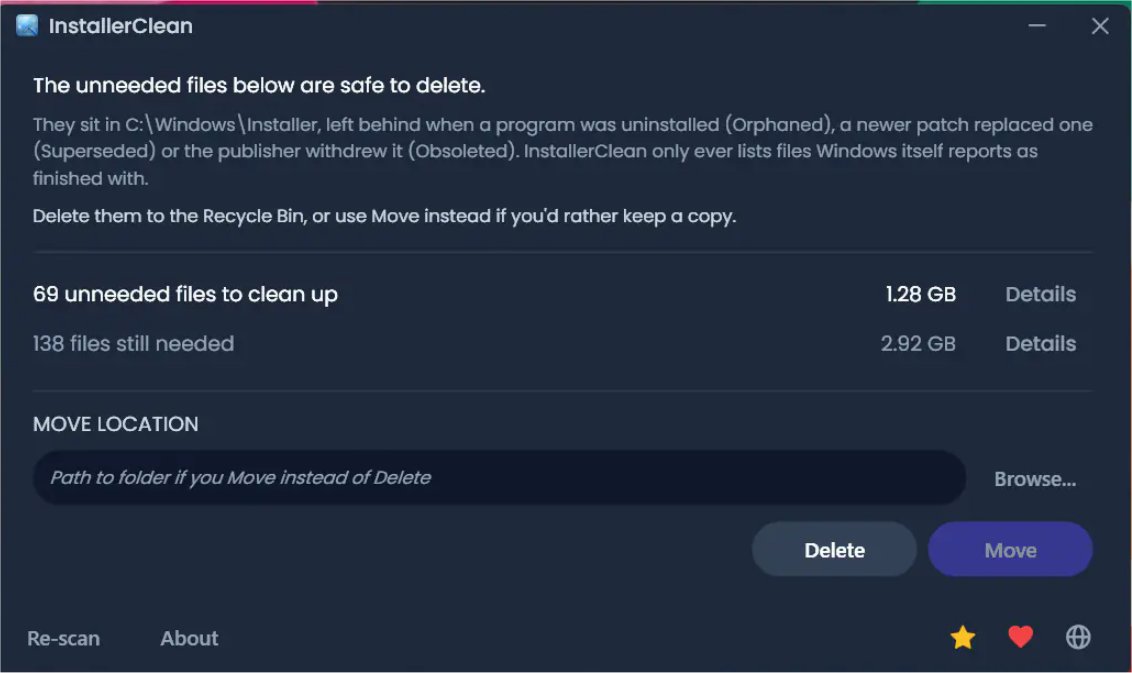
InstallerClean boasts an intuitive user interface that simplifies the cleanup process. Users are welcomed with a clean layout upon launching the program, which displays a list of detected installer files along with their sizes. This transparency allows users to easily identify files that can be safely deleted. After the cleanup, the tool provides a summary of the total space reclaimed and a clear prompt to finalize the operation.
Prioritizing user convenience, InstallerClean automatically scans for leftover installer files during system startup. However, it requires explicit user confirmation for both file deletion and movement, ensuring users maintain control over the cleanup process. Before making any changes, the tool presents the number of flagged files and their total size, enabling informed decision-making.
File Verification for Safety
A standout feature of InstallerClean is its ability to verify files before deletion. After scanning the Windows installer files folder, the tool cross-references identified files with the operating system to confirm which items are safe to remove. This verification process is highly reliable, as InstallerClean communicates directly with Windows through its built-in installer, eliminating the risk of arbitrary deletions.
Backup Precautions
It is always prudent to have a current restore point ready before commencing any cleanup operation, just in case unexpected issues arise.
Identifying Orphaned Files and Superseded Patches
InstallerClean excels at identifying two specific types of unnecessary files: orphaned files—remnants from previous installations that are no longer linked to active programs—and superseded patches, which are older update files replaced by more recent versions. These outdated files can linger on the system, unnecessarily occupying space.
Download Options
InstallerClean offers three convenient EXE download options:
- InstallerClean: A standard Windows installer for most users.
- InstallerClean Portable: A self-contained executable that doesn't require installation.
- InstallerClean Slim: For users who already have the .NET 10 Desktop Runtime; they should install it first if not already present.
The Geek Verdict
InstallerClean is especially beneficial for users who wish to periodically tidy up their systems or reinstall multiple applications. While these extraneous files may not accumulate as frequently as one might think, using InstallerClean occasionally can be a practical solution. After the cleanup process, the tool provides a detailed completion screen that outlines the files found and removed, allowing users to review the outcomes of their cleanup efforts.
Conclusion
With its robust features and user-centric design, InstallerClean 2.1.0 presents a compelling option for anyone looking to manage their system's storage effectively. By targeting unwanted residual files, it helps users maintain a leaner, more efficient operating environment. As technology evolves and applications grow increasingly complex, tools like InstallerClean will be essential in keeping systems optimized and clutter-free
Addressing Residual Files
When new applications are installed or Windows updates are applied, the operating system generates numerous additional files that accumulate over time in designated folders. Often, users remain unaware of this growing data clutter, which can take up significant storage space. InstallerClean is designed to tackle this issue efficiently, targeting and removing leftover files that linger after software installations or updates.
User-Friendly Design
InstallerClean boasts an intuitive user interface that simplifies the cleanup process. Users are welcomed with a clean layout upon launching the program, which displays a list of detected installer files along with their sizes. This transparency allows users to easily identify files that can be safely deleted. After the cleanup, the tool provides a summary of the total space reclaimed and a clear prompt to finalize the operation.
Prioritizing user convenience, InstallerClean automatically scans for leftover installer files during system startup. However, it requires explicit user confirmation for both file deletion and movement, ensuring users maintain control over the cleanup process. Before making any changes, the tool presents the number of flagged files and their total size, enabling informed decision-making.
File Verification for Safety
A standout feature of InstallerClean is its ability to verify files before deletion. After scanning the Windows installer files folder, the tool cross-references identified files with the operating system to confirm which items are safe to remove. This verification process is highly reliable, as InstallerClean communicates directly with Windows through its built-in installer, eliminating the risk of arbitrary deletions.
Backup Precautions
It is always prudent to have a current restore point ready before commencing any cleanup operation, just in case unexpected issues arise.
Identifying Orphaned Files and Superseded Patches
InstallerClean excels at identifying two specific types of unnecessary files: orphaned files—remnants from previous installations that are no longer linked to active programs—and superseded patches, which are older update files replaced by more recent versions. These outdated files can linger on the system, unnecessarily occupying space.
Download Options
InstallerClean offers three convenient EXE download options:
- InstallerClean: A standard Windows installer for most users.
- InstallerClean Portable: A self-contained executable that doesn't require installation.
- InstallerClean Slim: For users who already have the .NET 10 Desktop Runtime; they should install it first if not already present.
The Geek Verdict
InstallerClean is especially beneficial for users who wish to periodically tidy up their systems or reinstall multiple applications. While these extraneous files may not accumulate as frequently as one might think, using InstallerClean occasionally can be a practical solution. After the cleanup process, the tool provides a detailed completion screen that outlines the files found and removed, allowing users to review the outcomes of their cleanup efforts.
Conclusion
With its robust features and user-centric design, InstallerClean 2.1.0 presents a compelling option for anyone looking to manage their system's storage effectively. By targeting unwanted residual files, it helps users maintain a leaner, more efficient operating environment. As technology evolves and applications grow increasingly complex, tools like InstallerClean will be essential in keeping systems optimized and clutter-free
InstallerClean 2.1.0 released
InstallerClean is a tool designed to effectively clean the hidden C:\Windows\Installer folder, which can potentially accumulate significant data over time. On many systems, this folder can grow to tens of gigabytes, and in cases where Adobe Acrobat is installed, it may exceed 100 GB.