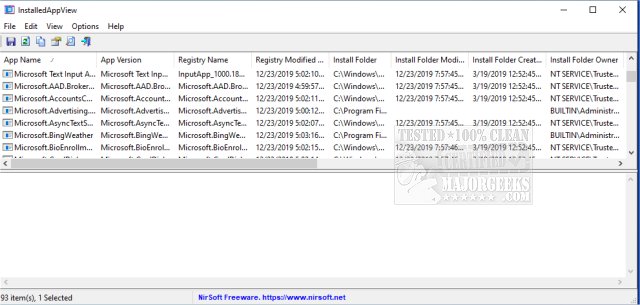
InstalledAppView version 1.10 has been released, offering a robust tool for displaying details about Windows 10 applications installed on your system. This application provides key information for each installed app, including the App Name, App Version, Registry Name, Registry Modified Time, Install Folder, Owner of the Install Folder, and the Uninstall Command, among other details.
The functionality of InstalledAppView extends beyond just local applications; it can also scan for apps on remote computers within your network and external drives connected to your machine. Users can access XML files related to the apps, such as AppxManifest.xml and AppxBlockMap.xml, which provide further insight into the applications' structure and metadata. Additionally, the tool allows for app uninstallation, including a silent uninstall option, and facilitates quick access to the application's install folder.
As with many of NirSoft's offerings, InstalledAppView starts collecting and sorting data immediately upon launch, enabling users to quickly obtain a comprehensive overview of their installed applications.
This release not only enhances the user's ability to manage and analyze their installed applications but also complements other resources, such as guides on uninstalling programs not listed in the Control Panel, stopping Windows updates from downloading drivers, and using PowerShell to remove built-in Windows apps. Overall, InstalledAppView 1.10 is a valuable addition for anyone looking to streamline their application management on Windows 10.
Future extensions of this application could include features such as improved network scanning capabilities, integration with cloud-based app management systems, and enhanced reporting tools for better analysis of application usage and performance across multiple devices
The functionality of InstalledAppView extends beyond just local applications; it can also scan for apps on remote computers within your network and external drives connected to your machine. Users can access XML files related to the apps, such as AppxManifest.xml and AppxBlockMap.xml, which provide further insight into the applications' structure and metadata. Additionally, the tool allows for app uninstallation, including a silent uninstall option, and facilitates quick access to the application's install folder.
As with many of NirSoft's offerings, InstalledAppView starts collecting and sorting data immediately upon launch, enabling users to quickly obtain a comprehensive overview of their installed applications.
This release not only enhances the user's ability to manage and analyze their installed applications but also complements other resources, such as guides on uninstalling programs not listed in the Control Panel, stopping Windows updates from downloading drivers, and using PowerShell to remove built-in Windows apps. Overall, InstalledAppView 1.10 is a valuable addition for anyone looking to streamline their application management on Windows 10.
Future extensions of this application could include features such as improved network scanning capabilities, integration with cloud-based app management systems, and enhanced reporting tools for better analysis of application usage and performance across multiple devices
InstalledAppView 1.10 released
InstalledAppView is designed to display the details of Windows 10 apps installed on your machine.