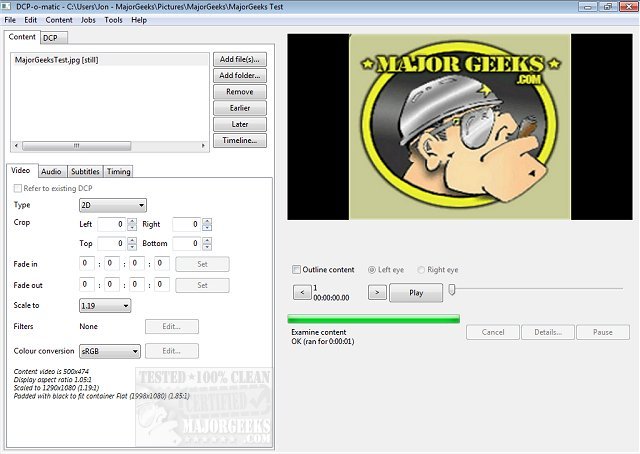
DCP-o-matic has recently released version 2.18.45 of its 64-bit application, which is designed for the creation of Digital Cinema Packages (DCPs) from various multimedia files, including images, videos, audio, and subtitles. This open-source software is also available in a 32-bit version, catering to a wider range of users.
The primary aim of DCP-o-matic is to facilitate the preparation of content for playback on DCI-compliant cinema projectors. It supports an extensive array of file formats, such as MP4, Apple ProRes, MOV, AVI, M2TS (from Blu-ray), VOB (from DVD), WMV, MKV, JPEG, PNG, and TIFF, among others. The application features a user-friendly interface that is accessible to users of all skill levels, accompanied by a comprehensive help manual to assist those who may encounter difficulties.
The interface is organized into two main tabs: the first tab allows users to load, create, and modify DCP content, while the second tab is dedicated to configuring DCP settings. This tabbed layout enables efficient management of video, audio, subtitle, and timing settings all in one place.
In summary, DCP-o-matic is an invaluable tool for filmmakers and content creators looking to prepare their work for digital cinema distribution, providing a versatile and easy-to-use platform for DCP creation.
To extend this information, users can explore additional features such as batch processing for handling multiple files simultaneously, support for various audio channels, and the ability to preview DCP outputs before finalizing the package. Furthermore, community forums and user groups can offer support and tips for optimizing the DCP creation process
The primary aim of DCP-o-matic is to facilitate the preparation of content for playback on DCI-compliant cinema projectors. It supports an extensive array of file formats, such as MP4, Apple ProRes, MOV, AVI, M2TS (from Blu-ray), VOB (from DVD), WMV, MKV, JPEG, PNG, and TIFF, among others. The application features a user-friendly interface that is accessible to users of all skill levels, accompanied by a comprehensive help manual to assist those who may encounter difficulties.
The interface is organized into two main tabs: the first tab allows users to load, create, and modify DCP content, while the second tab is dedicated to configuring DCP settings. This tabbed layout enables efficient management of video, audio, subtitle, and timing settings all in one place.
In summary, DCP-o-matic is an invaluable tool for filmmakers and content creators looking to prepare their work for digital cinema distribution, providing a versatile and easy-to-use platform for DCP creation.
To extend this information, users can explore additional features such as batch processing for handling multiple files simultaneously, support for various audio channels, and the ability to preview DCP outputs before finalizing the package. Furthermore, community forums and user groups can offer support and tips for optimizing the DCP creation process
DCP-o-matic 64 Bit 2.18.45 released
DCP-o-matic is an Open Source app for creating Digital Cinema Packages (DCPs) from images, videos, sound, and subtitle files. Also available for 32-Bit.