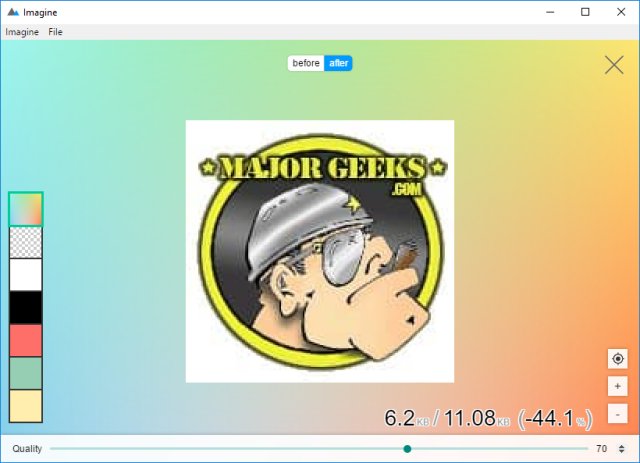
Imagine is a newly released open-source application compatible with Windows and Linux, designed for batch compressing JPEG and PNG files. It boasts a user-friendly interface that allows users to drag and drop images or select them through an "add" option. Upon double-clicking an image, users can adjust background colors and manipulate a quality slider, observing the original and modified file sizes along with the percentage change in size.
For batch processing, Imagine retains most of its features, excluding the before-and-after comparison view. Users have the option to clear all selections and choose from three different saving methods in batch mode: overwrite the existing file, save with a new automatic name, or export the files to a specified location.
Imagine is ideal for various applications, such as email attachments, web design, or simply conserving disk space. With its straightforward functionalities, it serves as an effective and free tool for image compression.
Extension: Additional Features and Use Cases
In addition to its core functionality, Imagine could incorporate features like customizable presets for different types of compression, allowing users to quickly apply their preferred settings without having to adjust sliders each time. Future updates may also include support for other image formats and enhanced preview options, enabling users to see changes more dynamically.
Furthermore, the app could benefit from integration with cloud storage services, allowing users to save their compressed images directly to platforms like Google Drive or Dropbox. This would enhance the app's usability for those who frequently share images online or work collaboratively.
Imagine's potential applications extend beyond individual users; it could be a valuable tool for small businesses looking to optimize their website's performance by reducing image sizes without sacrificing quality. Additionally, graphic designers might find it useful for preparing images for client presentations or online portfolios, ensuring their visuals maintain high quality while being lightweight.
Overall, Imagine positions itself as a versatile, efficient solution for anyone needing to compress images, with opportunities for continued growth and feature expansion in future versions
For batch processing, Imagine retains most of its features, excluding the before-and-after comparison view. Users have the option to clear all selections and choose from three different saving methods in batch mode: overwrite the existing file, save with a new automatic name, or export the files to a specified location.
Imagine is ideal for various applications, such as email attachments, web design, or simply conserving disk space. With its straightforward functionalities, it serves as an effective and free tool for image compression.
Extension: Additional Features and Use Cases
In addition to its core functionality, Imagine could incorporate features like customizable presets for different types of compression, allowing users to quickly apply their preferred settings without having to adjust sliders each time. Future updates may also include support for other image formats and enhanced preview options, enabling users to see changes more dynamically.
Furthermore, the app could benefit from integration with cloud storage services, allowing users to save their compressed images directly to platforms like Google Drive or Dropbox. This would enhance the app's usability for those who frequently share images online or work collaboratively.
Imagine's potential applications extend beyond individual users; it could be a valuable tool for small businesses looking to optimize their website's performance by reducing image sizes without sacrificing quality. Additionally, graphic designers might find it useful for preparing images for client presentations or online portfolios, ensuring their visuals maintain high quality while being lightweight.
Overall, Imagine positions itself as a versatile, efficient solution for anyone needing to compress images, with opportunities for continued growth and feature expansion in future versions
Imagine 1-1 released
Imagine is an Open Source app for Windows and Linux that can compress JPEG and PNG files in batch with options for colors and quality.