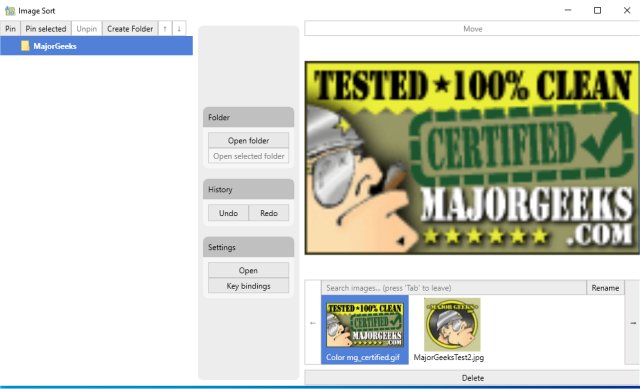
Image Sort is a free and open-source application designed to help users organize their photos more efficiently. In an era where digital photography has led to an overwhelming number of images, Image Sort provides a streamlined solution for managing and sorting these photos. The utility focuses on speed and user customization, allowing users to set personalized keyboard shortcuts for various functions to enhance their sorting experience.
Upon launching the app for the first time, users are guided through a tutorial that introduces the interface and features. Users can create unlimited folders within their Camera Roll and Pictures album for better organization. The program supports several actions including skipping, moving, deleting, renaming, and undoing actions on images, making it easy to manage large collections.
For optimal use, users are encouraged to remap the default "delete" key, which is set to the down arrow, to avoid accidental deletions. Image Sort also offers a choice between light and dark themes for user preference.
Keyboard shortcuts significantly enhance the user experience, offering quick access to essential functions:
- F2: Select folder
- F3: Create a new folder
- F5: Open the selected image in the explorer
- Enter: Enter the selected folder
- Escape: Leave the current folder
- Arrow keys: Navigate between folders
- Right arrow: Move the image to the selected folder or one level up
- Left arrow: Skip the current image
- Ctrl + left arrow: Undo the last action
- Ctrl + S: Toggle the search bar for quick folder searches
In conclusion, Image Sort 2.14.7 is a powerful tool for anyone looking to manage their photo library efficiently. Its user-friendly design, extensive features, and customizable options make it an excellent choice for both casual users and photography enthusiasts. As the application continues to evolve, users can expect even more functionalities that cater to their photo organization needs
Upon launching the app for the first time, users are guided through a tutorial that introduces the interface and features. Users can create unlimited folders within their Camera Roll and Pictures album for better organization. The program supports several actions including skipping, moving, deleting, renaming, and undoing actions on images, making it easy to manage large collections.
For optimal use, users are encouraged to remap the default "delete" key, which is set to the down arrow, to avoid accidental deletions. Image Sort also offers a choice between light and dark themes for user preference.
Keyboard shortcuts significantly enhance the user experience, offering quick access to essential functions:
- F2: Select folder
- F3: Create a new folder
- F5: Open the selected image in the explorer
- Enter: Enter the selected folder
- Escape: Leave the current folder
- Arrow keys: Navigate between folders
- Right arrow: Move the image to the selected folder or one level up
- Left arrow: Skip the current image
- Ctrl + left arrow: Undo the last action
- Ctrl + S: Toggle the search bar for quick folder searches
In conclusion, Image Sort 2.14.7 is a powerful tool for anyone looking to manage their photo library efficiently. Its user-friendly design, extensive features, and customizable options make it an excellent choice for both casual users and photography enthusiasts. As the application continues to evolve, users can expect even more functionalities that cater to their photo organization needs
Image Sort 2.14.7 released
Image Sort is a free and Open Source app to organize your photos.