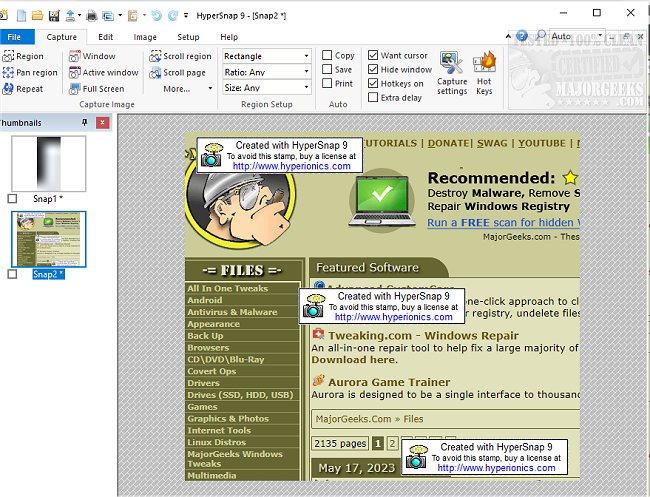
HyperSnap has released version 10.4.2, enhancing its capabilities as a robust screen capture and image editing tool. This software enables users to efficiently capture images from their main displays and full-screen games, while also offering a unique feature called TextSnap, which allows for the extraction of editable text even when traditional copying methods fail.
HyperSnap stands out by combining advanced image editing features with a powerful screen capture functionality, making it a versatile solution for various needs. Users can capture images from any part of their screen, including setups with multiple monitors, and utilize a suite of editing tools to annotate and manipulate their captures. The software supports a native file format that facilitates further editing of captured objects, or users can choose to permanently imprint these objects onto standard image files.
Key features of HyperSnap include:
- Unlimited undo/redo capabilities.
- The TextSnap feature, which captures editable text and allows for easy pasting into applications like MS Excel.
- Ability to capture challenging screens from DirectX and Glide games.
- Tools for image stamping, framing, drop shadows, and free-hand capture.
- Automatic color substitution and non-rectangular window capture options.
- A Button Capture mode tailored for technical writers needing to document various buttons.
- Auto-scrolling to capture long web pages and documents that extend beyond the visible screen.
- Seamless integration with the Windows clipboard for automating repetitive tasks.
- Automatic saving of captures to graphic files.
- Functionality as an image viewer and converter supporting over 20 formats.
- A fully customizable user interface that allows users to rearrange menus, assign keyboard shortcuts, and even control the application via voice commands.
- An extended window capture feature available for Windows XP, enabling users to capture larger windows without the need for auto-scrolling.
In summary, HyperSnap 10.4.2 is not just a tool for screen captures; it is a comprehensive solution for image editing and text extraction, ideal for professionals and casual users alike. Its continued updates reflect a commitment to enhancing usability and functionality, making it a valuable addition to any digital toolkit
HyperSnap stands out by combining advanced image editing features with a powerful screen capture functionality, making it a versatile solution for various needs. Users can capture images from any part of their screen, including setups with multiple monitors, and utilize a suite of editing tools to annotate and manipulate their captures. The software supports a native file format that facilitates further editing of captured objects, or users can choose to permanently imprint these objects onto standard image files.
Key features of HyperSnap include:
- Unlimited undo/redo capabilities.
- The TextSnap feature, which captures editable text and allows for easy pasting into applications like MS Excel.
- Ability to capture challenging screens from DirectX and Glide games.
- Tools for image stamping, framing, drop shadows, and free-hand capture.
- Automatic color substitution and non-rectangular window capture options.
- A Button Capture mode tailored for technical writers needing to document various buttons.
- Auto-scrolling to capture long web pages and documents that extend beyond the visible screen.
- Seamless integration with the Windows clipboard for automating repetitive tasks.
- Automatic saving of captures to graphic files.
- Functionality as an image viewer and converter supporting over 20 formats.
- A fully customizable user interface that allows users to rearrange menus, assign keyboard shortcuts, and even control the application via voice commands.
- An extended window capture feature available for Windows XP, enabling users to capture larger windows without the need for auto-scrolling.
In summary, HyperSnap 10.4.2 is not just a tool for screen captures; it is a comprehensive solution for image editing and text extraction, ideal for professionals and casual users alike. Its continued updates reflect a commitment to enhancing usability and functionality, making it a valuable addition to any digital toolkit
HyperSnap 10.4.2 released
HyperSnap allows you to take quick and easy screen captures from your main screen and full-screen games and text capture (TextSnap) where normal text copy is not possible.