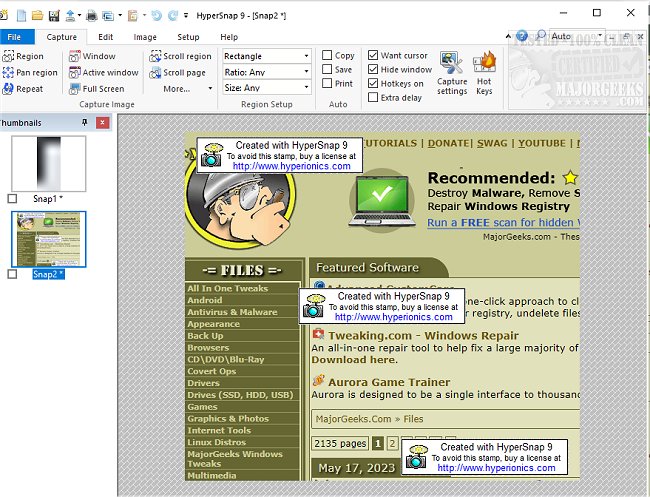
HyperSnap has announced the release of version 10.3.1, an advanced screen capture and image editing tool that simplifies the process of capturing screens from any source, including full-screen games. This software offers a unique TextSnap feature that enables users to capture editable text even from areas where standard copying isn't possible, making it particularly useful for extracting information from various applications and games.
HyperSnap combines powerful screen capturing capabilities with robust image editing functions, all within a user-friendly interface. Users can capture images from multiple monitors, employ a variety of editing and annotation tools, and save their work in a proprietary file format that allows for further edits. Key features include:
- Unlimited undo/redo capabilities.
- The ability to capture tab-delimited data for easy integration into applications like Microsoft Excel.
- Support for capturing images from complex graphics environments such as DirectX and Glide games.
- A range of editing options, including image stamps, frames, drop shadows, and free-hand capture.
- Automatic color substitution and non-rectangular window capture.
- A Button Capture function tailored for technical writers to document buttons efficiently.
- Auto-scrolling capabilities that allow users to capture lengthy web pages or documents in one go.
- Seamless integration with the Windows clipboard for streamlined workflows, including automatic pasting of captures.
- The option to automatically save captures to various graphic file formats, with support for over 20 different image formats.
- A fully customizable user interface, allowing users to rearrange menus, assign keyboard shortcuts, and even use voice commands to control the software.
- An extended window capture feature for Windows XP users that enables capturing large windows without the need for auto-scrolling.
This latest version enhances the software's functionality, making it an indispensable tool for anyone needing efficient screen capture and image editing capabilities. HyperSnap continues to evolve to meet the needs of users, ensuring they have access to powerful tools for documentation, content creation, and more
HyperSnap combines powerful screen capturing capabilities with robust image editing functions, all within a user-friendly interface. Users can capture images from multiple monitors, employ a variety of editing and annotation tools, and save their work in a proprietary file format that allows for further edits. Key features include:
- Unlimited undo/redo capabilities.
- The ability to capture tab-delimited data for easy integration into applications like Microsoft Excel.
- Support for capturing images from complex graphics environments such as DirectX and Glide games.
- A range of editing options, including image stamps, frames, drop shadows, and free-hand capture.
- Automatic color substitution and non-rectangular window capture.
- A Button Capture function tailored for technical writers to document buttons efficiently.
- Auto-scrolling capabilities that allow users to capture lengthy web pages or documents in one go.
- Seamless integration with the Windows clipboard for streamlined workflows, including automatic pasting of captures.
- The option to automatically save captures to various graphic file formats, with support for over 20 different image formats.
- A fully customizable user interface, allowing users to rearrange menus, assign keyboard shortcuts, and even use voice commands to control the software.
- An extended window capture feature for Windows XP users that enables capturing large windows without the need for auto-scrolling.
This latest version enhances the software's functionality, making it an indispensable tool for anyone needing efficient screen capture and image editing capabilities. HyperSnap continues to evolve to meet the needs of users, ensuring they have access to powerful tools for documentation, content creation, and more
HyperSnap 10.3.1 released
HyperSnap allows you to take quick and easy screen captures from your main screen and full-screen games and text capture (TextSnap) where normal text copy is not possible.