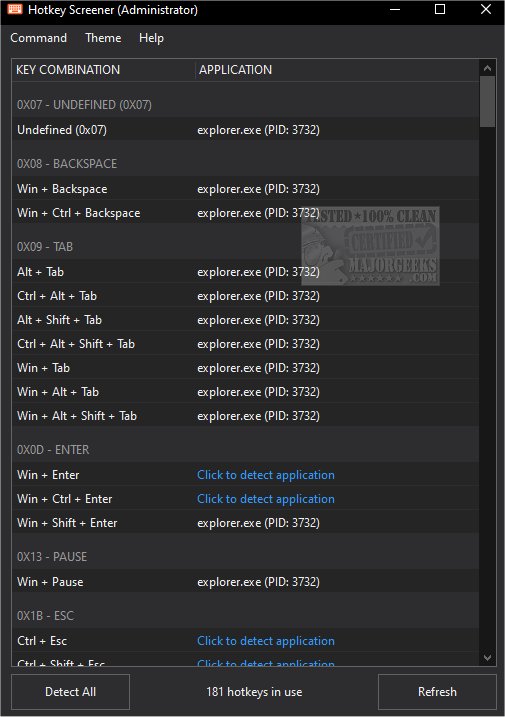
Hotkey Screener 1.2 has been released, offering users the ability to identify and enumerate system-wide hotkeys that are registered using the RegisterHotKey API. This versatile and portable application requires administrative privileges to operate effectively, so users are advised to run it with admin rights. Additionally, it's crucial to save any ongoing work and sensitive information before launching the tool, as it interacts with system processes.
The interface of Hotkey Screener is user-friendly; users can either detect hotkeys for individual applications or opt for a comprehensive detection of all hotkeys in use. The application is compatible with both 64-bit and 32-bit processes, accommodating those running with standard or administrative rights. It provides clear information by displaying the process name alongside its corresponding PID (Process ID) number.
Hotkey Screener is particularly useful for resolving hotkey conflicts, making it an essential tool for users who rely heavily on keyboard shortcuts. Despite its simplicity, users should still take precautions by backing up their data and creating a system restore point prior to use.
In addition to Hotkey Screener, users can enhance their productivity by familiarizing themselves with common keyboard shortcuts, such as those for copy, paste, and file management in Windows. Understanding how to run applications as an administrator and access various administrative tools can further streamline tasks and improve efficiency in Windows environments.
Overall, Hotkey Screener serves as a practical solution for managing hotkeys, and combined with a solid understanding of keyboard shortcuts, it can significantly boost productivity for power users
The interface of Hotkey Screener is user-friendly; users can either detect hotkeys for individual applications or opt for a comprehensive detection of all hotkeys in use. The application is compatible with both 64-bit and 32-bit processes, accommodating those running with standard or administrative rights. It provides clear information by displaying the process name alongside its corresponding PID (Process ID) number.
Hotkey Screener is particularly useful for resolving hotkey conflicts, making it an essential tool for users who rely heavily on keyboard shortcuts. Despite its simplicity, users should still take precautions by backing up their data and creating a system restore point prior to use.
In addition to Hotkey Screener, users can enhance their productivity by familiarizing themselves with common keyboard shortcuts, such as those for copy, paste, and file management in Windows. Understanding how to run applications as an administrator and access various administrative tools can further streamline tasks and improve efficiency in Windows environments.
Overall, Hotkey Screener serves as a practical solution for managing hotkeys, and combined with a solid understanding of keyboard shortcuts, it can significantly boost productivity for power users
Hotkey Screener 1.2 released
Hotkey Screener will enumerate your system-wide hotkeys installed with the RegisterHotKey API.